Huntt Aliexpress - Aliexpress price tracking
Huntt Ali - price tracking at Aliexpress
Τι είναι το Huntt Aliexpress - Aliexpress price tracking;
Το Huntt Aliexpress - Aliexpress price tracking είναι ένα πρόσθετο Chrome που αναπτύχθηκε από τον Huntt, και η κύρια λειτουργία του είναι "Huntt Ali - price tracking at Aliexpress".
Στιγμιότυπα Επέκτασης
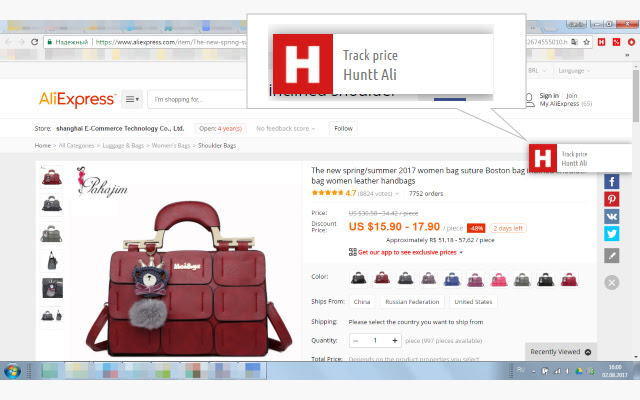


Λήψη αρχείου CRX της επέκτασης Huntt Aliexpress - Aliexpress price tracking
Λήψη αρχείων επέκτασης Huntt Aliexpress - Aliexpress price tracking σε μορφή crx, εγκατάσταση των επεκτάσεων Chrome μη αυτόματα στον περιηγητή ή κοινοποίηση των αρχείων crx με φίλους για εύκολη εγκατάσταση των επεκτάσεων Chrome.
Οδηγίες Χρήσης της Επέκτασης
                        Huntt-Ali - extension for tracking prices at AliExpress. Just click "Track price" and Huntt AliExpress will automatically start checking the price of the item. At price changes, Huntt AliExpress will fire you a notification. Price monitoring occurs in the background. Dynamics of prices displayed in the list of goods. In the current version, the price history consists of the initial, last changed and last checked prices of the product at Aliexpress.
     Version 1.2 - user manual.
     Version 1.3 - last changed price.
     Version 1.7 - local currency price tracking.
     Version 1.9 - bug fix.
Βασικές Πληροφορίες Επέκτασης
| Όνομα |  Huntt Aliexpress - Aliexpress price tracking Huntt Aliexpress - Aliexpress price tracking |
| ID | pgemmkmmhpocndegmkgkghlcgmkebpfc |
| Επίσημο URL | https://chrome.google.com/webstore/detail/huntt-aliexpress-%D0%BE%D1%82%D1%81%D0%BB%D0%B5%D0%B6%D0%B8%D0%B2/pgemmkmmhpocndegmkgkghlcgmkebpfc |
| Περιγραφή | Huntt Ali - price tracking at Aliexpress |
| Μέγεθος Αρχείου | 194 KB |
| Αριθμός Εγκαταστάσεων | 667 |
| Τρέχουσα Έκδοση | 1.9 |
| Τελευταία Ενημέρωση | 2017-11-02 |
| Ημερομηνία Δημοσίευσης | 2017-11-02 |
| Αξιολόγηση | 3.67/5 Συνολικά 3 Αξιολογήσεις |
| Προγραμματιστής | Huntt |
| Τύπος Πληρωμής | free |
| Υποστηριζόμενες Γλώσσες | en,ru |
| manifest.json | |
{
    "update_url": "https:\/\/clients2.google.com\/service\/update2\/crx",
    "manifest_version": 2,
    "name": "__MSG_default_name__",
    "short_name": "Huntt",
    "description": "__MSG_default_description__",
    "version": "1.9",
    "default_locale": "ru",
    "icons": {
        "16": "img\/la16.png",
        "32": "img\/la32.png",
        "64": "img\/la64.png",
        "128": "img\/la128.png"
    },
    "browser_action": {
        "default_icon": "img\/la64.png",
        "default_popup": "popup\/pricetable.html",
        "default_title": "__MSG_default_title__"
    },
    "background": {
        "scripts": [
            "lib\/jquery-3.1.1.min.js",
            "currencyUtil.js",
            "settings.js",
            "util.js",
            "contentSpecific\/ali\/ali.js",
            "contentSpecific\/contentSpecific.js",
            "storageUtil.js",
            "eventPage.js"
        ],
        "persistent": false
    },
    "content_scripts": [
        {
            "matches": [
                "http:\/\/*\/*",
                "https:\/\/*\/*",
                "file:\/\/*"
            ],
            "js": [
                "lib\/jquery-3.1.1.min.js",
                "currencyUtil.js",
                "settings.js",
                "util.js",
                "contentSpecific\/ali\/ali.js",
                "contentSpecific\/ali\/ali_inject.js",
                "contentSpecific\/contentSpecific.js",
                "content\/onpage.js"
            ]
        }
    ],
    "web_accessible_resources": [
        "contentSpecific\/ali\/ali_inject.js",
        "content\/trackButton.html",
        "content\/notification.html",
        "lib\/bootstrap.min.css",
        "img\/logo80.png",
        "img\/close.png"
    ],
    "content_security_policy": "script-src 'self' https:\/\/www.google-analytics.com\/analytics.js; object-src 'self';",
    "permissions": [
        "cookies",
        "alarms",
        "storage",
        "notifications",
        "http:\/\/*\/*",
        "https:\/\/*\/*"
    ]
} | |