My Checklist
Be more efficient. Remember whats on your list - and get the satisfying feeling, when marking a task as done!
¿Qué es My Checklist?
My Checklist es una extensión de Chrome desarrollada por devjonas, y su función principal es "Be more efficient. Remember whats on your list - and get the satisfying feeling, when marking a task as done!".
Capturas de Pantalla de la Extensión
Descargar Archivo CRX de la Extensión My Checklist
Descarga archivos de extensión My Checklist en formato crx, instala manualmente las extensiones de Chrome en el navegador o comparte los archivos crx con amigos para instalar fácilmente las extensiones de Chrome.
Instrucciones de Uso de la Extensión
                        The vision with My Checklist, is to increase your efficiency the easiest way possible.
No need for pen and paper. No need to switch tab to task management page.
And most importantly - you will keep this satisfying feeling, marking a task as done! 🥳

The use of My Checklist is very simple.
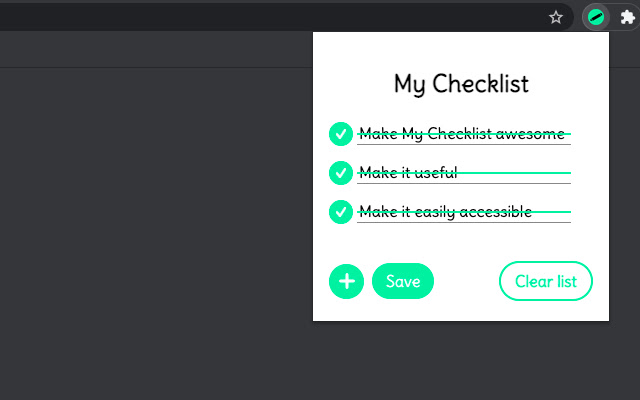
First you will make a list of the tasks and press save. The red dot of each line, indicate that the task is saved or not.

Later on, when the task is done, you will press on the checkmark, and the task will now be highlighting it is done - just the way we like it with pen and paper ✅

The task is automatically saved, when marked as done.

Whenever you want to remove the tasks, simply press the Clear list button.

That's it!
Información Básica de la Extensión
| Nombre |  My Checklist My Checklist |
| ID | abijmmmajjhcadmfibojkljenlidhpbf |
| URL Oficial | https://chrome.google.com/webstore/detail/my-checklist/abijmmmajjhcadmfibojkljenlidhpbf |
| Descripción | Be more efficient. Remember whats on your list - and get the satisfying feeling, when marking a task as done! |
| Tamaño del Archivo | 29.09 KB |
| Cantidad de Instalaciones | 118 |
| Versión Actual | 1.0.0 |
| Última Actualización | 2021-04-05 |
| Fecha de Publicación | 2021-04-05 |
| Desarrollador | devjonas |
| Correo electrónico | [email protected] |
| Tipo de Pago | free |
| Idiomas Soportados | en |
| manifest.json | |
{
    "update_url": "https:\/\/clients2.google.com\/service\/update2\/crx",
    "manifest_version": 2,
    "name": "My Checklist",
    "version": "1.0.0",
    "description": "Be more efficient. Remember whats on your list - and get the satisfying feeling, when marking a task as done!",
    "author": "Jonas K",
    "icons": {
        "16": "icons\/16.png",
        "48": "icons\/48.png",
        "128": "icons\/128.png"
    },
    "browser_action": {
        "default_popup": "popup.html",
        "default_icon": "icons\/16.png"
    },
    "permissions": [
        "activeTab",
        "storage"
    ]
} | |