LinkedIn Hashtag Analytics
Uncover total followers, likes and comments of any LinkedIn hashtag fast. Discover a trending hashtag early and get more visibility.
¿Qué es LinkedIn Hashtag Analytics?
LinkedIn Hashtag Analytics es una extensión de Chrome desarrollada por LinkedIn Growth Tools, y su función principal es "Uncover total followers, likes and comments of any LinkedIn hashtag fast. Discover a trending hashtag early and get more visibility.".
Capturas de Pantalla de la Extensión


Descargar Archivo CRX de la Extensión LinkedIn Hashtag Analytics
Descarga archivos de extensión LinkedIn Hashtag Analytics en formato crx, instala manualmente las extensiones de Chrome en el navegador o comparte los archivos crx con amigos para instalar fácilmente las extensiones de Chrome.
Instrucciones de Uso de la Extensión
                        LinkedIn Hashtag Analytics provides essential LinkedIn hashtags data for top professionals on LinkedIn to grow their presence or client’s presence on LinkedIn.

Business owners, social media managers and digital marketers are using this quick and easy tool to discover the most relevant hashtags that give them the best organic reach.

Do hashtags work on LinkedIn?

Yes, but less is more on LinkedIn. Use 1-3 hashtags to supercharge your copy and get discovered by more of your target audience.

Are hashtags important on LinkedIn?

Hashtags help others beyond your LinkedIn network to find your content, so yes. Choose a suitable hashtag for your mint copy.

How do I choose a good hashtag for LinkedIn?

A hashtag with millions of followers isn’t necessarily a good hashtag for LinkedIn.

Imagine thousands of other content creators using the same hashtag as you on their LinkedIn posts; that means followers of these hashtags skim through thousands of posts daily.

So what are the chances of your target audience reading your post?

This is where LinkedIn Hashtag Analytics comes in.

Why use LinkedIn Hashtags Analytics?

LinkedIn doesn’t make it easy for users to discover the right hashtags for their copy.

The process is manual, and it involves using the Search bar to look up a hashtag one by one for its follower count.

And while follower counts are fantastic, they don’t give you a complete picture of a hashtag’s efficacy.

LinkedIn Hashtag Analytics is the best free hashtag analytics tool that gives you:

#️⃣ Fast follower count checks
#️⃣ Instant checks on the maximum number of likes based on Top 20 recent posts
#️⃣ Instant checks on the maximum number of comments based on Top 20 recent posts

No uncertainties. No mundane labour. No wasted LinkedIn content that could have reached thousands of qualified customers and increased your profile visibility.

And it’s super easy to use:

#️⃣ Love scrolling through your feed to spot trending hashtags?
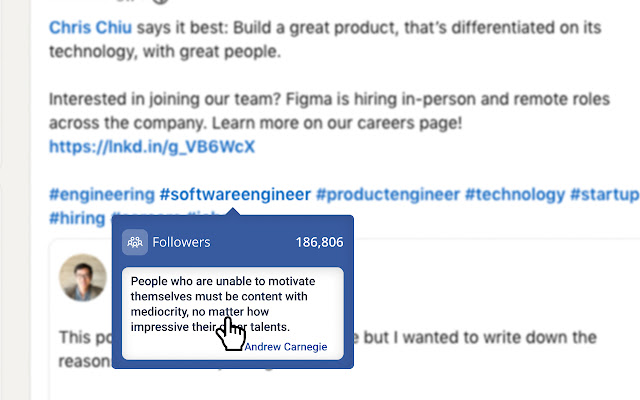
👉 Hover over any hashtag on LinkedIn and uncover their growing follower base instantly. Remember to refresh your page first!
👉 Be inspired by a quote from a successful business owner.

#️⃣ Need to look up a couple of hashtags on LinkedIn?
👉 Click on our extension icon and use our search bar, so you don’t have to leave your current page on LinkedIn.

#️⃣ Not sure what keyword combination makes the best hashtag?
👉 Start a fresh LinkedIn post and prompt the extension to list related hashtags in the drop-down menu by typing a keyword.

#️⃣ Want to know your total reach if you use more than one hashtag?
👉 No need to whip out a calculator; we have you covered. Simply click the “SUM” button on your LinkedIn draft post.

Start using this free Google Chrome extension today and watch your network and profile visibility grow exponentially.
Información Básica de la Extensión
| Nombre |  LinkedIn Hashtag Analytics LinkedIn Hashtag Analytics |
| ID | bfobmedbecfphmaenodckamjgjpemalm |
| URL Oficial | https://chrome.google.com/webstore/detail/linkedin-hashtag-analytic/bfobmedbecfphmaenodckamjgjpemalm |
| Descripción | Uncover total followers, likes and comments of any LinkedIn hashtag fast. Discover a trending hashtag early and get more visibility. |
| Tamaño del Archivo | 204 KB |
| Cantidad de Instalaciones | 5,000 |
| Versión Actual | 2.4 |
| Última Actualización | 2022-03-17 |
| Fecha de Publicación | 2021-06-08 |
| Calificación | 4.38/5 Total de 42 Calificaciones |
| Desarrollador | LinkedIn Growth Tools |
| Correo electrónico | [email protected] |
| Tipo de Pago | free |
| URL de la Página de Ayuda | https://docs.google.com/forms/d/e/1FAIpQLSfJaLzhczqVsuIFkYqueB5vDpCOvRJJkVnvjWYh1omsVtWRLQ/viewform?usp=sf_link |
| URL de la Página de Política de Privacidad | https://filtpod.com/privacy-policy-linkedin-hashtag-analytics-cookie-for-hootsuite |
| Idiomas Soportados | ms,de,en,nl,it,zh-CN |
| manifest.json | |
{
    "update_url": "https:\/\/clients2.google.com\/service\/update2\/crx",
    "name": "__MSG_appName__",
    "description": "__MSG_appDesc__",
    "default_locale": "en",
    "version": "2.4",
    "manifest_version": 3,
    "background": {
        "service_worker": "background.js"
    },
    "externally_connectable": {
        "matches": [
            "*:\/\/*.linkedin.com\/feed\/*",
            "*:\/\/*.mixpanel.com\/*"
        ]
    },
    "permissions": [
        "scripting",
        "storage"
    ],
    "host_permissions": [
        "*:\/\/*.linkedin.com\/feed\/*"
    ],
    "action": {
        "default_popup": "announcement.html",
        "default_icon": {
            "16": "\/images\/filticon_brand_colour.png",
            "32": "\/images\/filticon_brand_colour.png",
            "48": "\/images\/filticon_brand_colour.png",
            "128": "\/images\/filticon_brand_colour.png"
        }
    },
    "icons": {
        "16": "\/images\/filticon_brand_colour.png",
        "32": "\/images\/filticon_brand_colour.png",
        "48": "\/images\/filticon_brand_colour.png",
        "128": "\/images\/filticon_brand_colour.png"
    },
    "web_accessible_resources": [
        {
            "resources": [
                "images\/la_users_white.png",
                "images\/la_info-circle_black.png",
                "images\/la_users.png",
                "images\/slack-hash.png"
            ],
            "matches": [
                "*:\/\/*.linkedin.com\/*"
            ]
        }
    ]
} | |