Token signing
Use your eID smart card on the web
¿Qué es Token signing?
Token signing es una extensión de Chrome desarrollada por riaee, y su función principal es "Use your eID smart card on the web".
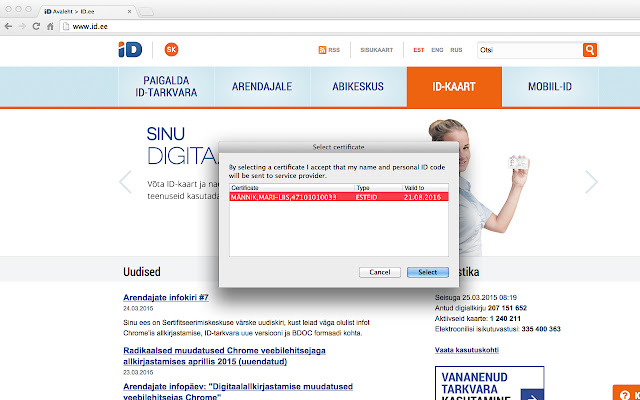
Capturas de Pantalla de la Extensión
Descargar Archivo CRX de la Extensión Token signing
Descarga archivos de extensión Token signing en formato crx, instala manualmente las extensiones de Chrome en el navegador o comparte los archivos crx con amigos para instalar fácilmente las extensiones de Chrome.
Instrucciones de Uso de la Extensión
                        Active development and management of the Token Signing component have ended due to the transition to the new web authentication and signing solution (Web eID): https://www.id.ee/en/article/the-latest-version-of-the-id-software-includes-an-innovative-web-eid-interface/
Token Signing extension will be removed from the extensions stores on 1st September 2023.
Web eID components are included in the ID-software installation package which can be downloaded from the website www.id.ee.
NB! Please remove Token Signing extension in order for Web eID to work.

For Uninstallation, please follow these instructions https://github.com/open-eid/chrome-token-signing/wiki/Extension-removal.
Información Básica de la Extensión
| Nombre |  Token signing Token signing |
| ID | ckjefchnfjhjfedoccjbhjpbncimppeg |
| URL Oficial | https://chrome.google.com/webstore/detail/ckjefchnfjhjfedoccjbhjpbncimppeg |
| Descripción | Use your eID smart card on the web |
| Tamaño del Archivo | 60.28 KB |
| Cantidad de Instalaciones | 515,219 |
| Versión Actual | 0.0.33 |
| Última Actualización | 2023-08-15 |
| Fecha de Publicación | 2019-07-22 |
| Calificación | 1.83/5 Total de 824 Calificaciones |
| Desarrollador | riaee |
| Correo electrónico | [email protected] |
| Tipo de Pago | free |
| Sitio Web de la Extensión | https://www.id.ee/en/ |
| Idiomas Soportados | en,et,ru |
| manifest.json | |
{
    "update_url": "https:\/\/clients2.google.com\/service\/update2\/crx",
    "name": "Token signing",
    "version": "0.0.33",
    "minimum_chrome_version": "40.0",
    "manifest_version": 2,
    "description": "Use your eID smart card on the web",
    "icons": {
        "48": "icon48.png",
        "128": "icon128.png"
    },
    "default_locale": "en",
    "content_scripts": [
        {
            "matches": [
                "*:\/\/*\/*",
                "file:\/\/\/*"
            ],
            "exclude_matches": [
                "*:\/\/*.overdrive.com\/*",
                "*:\/\/*\/*.svg",
                "https:\/\/ebs.instructure.com\/*"
            ],
            "js": [
                "content.js"
            ],
            "run_at": "document_end",
            "all_frames": true
        }
    ],
    "background": {
        "scripts": [
            "background.js"
        ]
    },
    "permissions": [
        "nativeMessaging"
    ],
    "applications": {
        "gecko": {
            "id": "{443830f0-1fff-4f9a-aa1e-444bafbc7319}"
        }
    }
} | |