WherTo - Geo Generator
A Google/OSM extension to make cool 3d models of places 🌍, woot!
¿Qué es WherTo - Geo Generator?
WherTo - Geo Generator es una extensión de Chrome desarrollada por Bitan Nath, y su función principal es "A Google/OSM extension to make cool 3d models of places 🌍, woot!".
Capturas de Pantalla de la Extensión
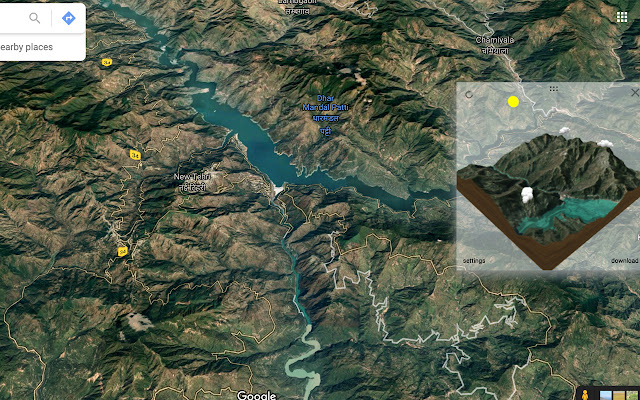


Descargar Archivo CRX de la Extensión WherTo - Geo Generator
Descarga archivos de extensión WherTo - Geo Generator en formato crx, instala manualmente las extensiones de Chrome en el navegador o comparte los archivos crx con amigos para instalar fácilmente las extensiones de Chrome.
Instrucciones de Uso de la Extensión
                        A simple Chrome Extension that plugs into Google Maps/Google Earth and generates 3d models of any places you see there. Download models as GLTF files (easily convertible to OBJ etc), and use to 3D print, or in other projects!

It works with Google Maps, Google Earth and Open Street Maps! Check it out now!

==== How to Use ====
Simply, install the extension, then open Google Maps or Google Earth or OpenStreetMaps in your browser.

You should see a panel on top of the map browser that shows an icon. Navigate to  the point you want to 3d model on the map, and click refresh. The Tool downloads a model to your browser in GLTF format. You can reuse/convert this to any format you want (for eg, OBJ or DAE). You can also use the excellent https://gltf-viewer.donmccurdy.com/ to visualize the model.

==== Privacy Policy ====

This extension does not collect any PII data and also does not collect any data for tracking or commercial purposes. That being said, please also note that the Software Is Provided "As Is", Without Warranty of Any Kind, Express Or Implied, Including But Not Limited To The Warranties Of Merchantability, Fitness For A Particular Purpose And Non-infringement. In No Event Shall The Authors Or Copyright Holders Be Liable For Any Claim, Damages Or Other Liability, Whether In An Action Of Contract, Tort Or Otherwise, Arising From, Out Of Or In Connection With The Software Or The Use Or Other Dealings In The Software.

You can find the detailed privacy policy here: https://www.bhaasha.app/geogen-privacy-policy.html
Información Básica de la Extensión
| Nombre |  WherTo - Geo Generator WherTo - Geo Generator |
| ID | dagocoabelccgpfighhckpchfjgcihnb |
| URL Oficial | https://chrome.google.com/webstore/detail/wherto-geo-generator/dagocoabelccgpfighhckpchfjgcihnb |
| Descripción | A Google/OSM extension to make cool 3d models of places 🌍, woot! |
| Tamaño del Archivo | 839 KB |
| Cantidad de Instalaciones | 84 |
| Versión Actual | 0.8 |
| Última Actualización | 2021-05-19 |
| Fecha de Publicación | 2021-05-19 |
| Calificación | 5.00/5 Total de 1 Calificaciones |
| Desarrollador | Bitan Nath |
| Correo electrónico | [email protected] |
| Tipo de Pago | in_app |
| URL de la Página de Política de Privacidad | https://www.bhaasha.app/geogen-privacy-policy.html |
| Idiomas Soportados | en |
| manifest.json | |
{
    "update_url": "https:\/\/clients2.google.com\/service\/update2\/crx",
    "manifest_version": 3,
    "name": "WherTo - Geo Generator",
    "version": "0.8",
    "description": "A Google\/OSM extension to make cool 3d models of places \ud83c\udf0d, woot!",
    "permissions": [
        "storage"
    ],
    "content_scripts": [
        {
            "matches": [
                "https:\/\/www.google.com\/maps\/*",
                "https:\/\/www.google.co.in\/maps\/*",
                "https:\/\/earth.google.com\/*",
                "https:\/\/www.openstreetmap.org\/*"
            ],
            "run_at": "document_idle",
            "js": [
                "lib\/babylon.js",
                "lib\/loaders.js",
                "lib\/materials.js",
                "lib\/serializers.js",
                "lib\/sphericalmercator.js",
                "script.js",
                "content.js"
            ],
            "css": [
                "style.css"
            ]
        }
    ],
    "background": {
        "service_worker": "background.js"
    },
    "options_page": "options.html",
    "icons": {
        "32": "\/icons\/icon_32.png",
        "16": "\/icons\/icon_16.png",
        "48": "\/icons\/icon_48.png",
        "128": "\/icons\/icon_128.png"
    }
} | |