Webreads
Webreads allows user to audio mark web page content and stream to smart phones
¿Qué es Webreads?
Webreads es una extensión de Chrome desarrollada por http://www.reader.solutions, y su función principal es "Webreads allows user to audio mark web page content and stream to smart phones".
Capturas de Pantalla de la Extensión
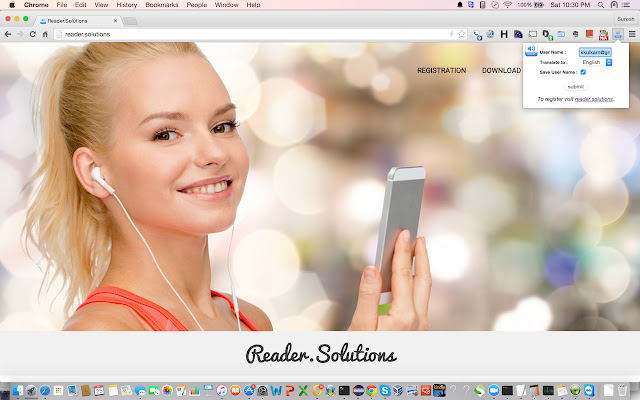
Descargar Archivo CRX de la Extensión Webreads
Descarga archivos de extensión Webreads en formato crx, instala manualmente las extensiones de Chrome en el navegador o comparte los archivos crx con amigos para instalar fácilmente las extensiones de Chrome.
Instrucciones de Uso de la Extensión
                        Long: You are in middle of reading an interesting article on your desktop/laptop,
when your boss asks you to respond to an urgent matter. The article you were reading is lost
or you bookmark it for later usage. In a lot of cases, you simply do not read the article.

Imagine if you could audiomark it (you heard it right audiomark and not bookmark) and play the content as an audio file,
from the convenience of your smart phone.

Look no further, Webreads is the way to go. Now you can actually audiomark articles that you want to be read out to you.

Implement this in 4 simple steps.

1. Install the Reader.solutions browser plugin from Chrome web store
2. Register with your details at www.reader.solutions
3. Download the WebReads app from Chrome web store
4. Simply click the “Audio” icon in your browser extension for all the pages you want to audio mark. The extension will ask for your user name that you used during registration,

Open up the mobile app and lo ! it will display all the content you had audiomarked, with a simple navigation to move back and forth
between the recordings. You can play, pause, rewind the audio - anything and everything that you would normally associate with an mp3/wav file.

The recordings are saved for _____ days.

Note: This application is still very much considered "beta". Please send us suggestions, feedback, bugs to [email protected].

Would also really appreciate if you can provide words of encouragement.
Información Básica de la Extensión
| Nombre |  Webreads Webreads |
| ID | ecgddeodcdflfnmnblpobcmoifdhbbli |
| URL Oficial | https://chrome.google.com/webstore/detail/webreads/ecgddeodcdflfnmnblpobcmoifdhbbli |
| Descripción | Webreads allows user to audio mark web page content and stream to smart phones |
| Tamaño del Archivo | 142 KB |
| Cantidad de Instalaciones | 15 |
| Versión Actual | 1.2 |
| Última Actualización | 2015-07-25 |
| Fecha de Publicación | 2015-07-25 |
| Calificación | 3.33/5 Total de 3 Calificaciones |
| Desarrollador | http://www.reader.solutions |
| Tipo de Pago | free |
| Sitio Web de la Extensión | http://reader.solutions |
| Idiomas Soportados | en-US |
| manifest.json | |
{
    "update_url": "https:\/\/clients2.google.com\/service\/update2\/crx",
    "name": "Webreads",
    "description": "Webreads allows user to audio mark web page content and stream to smart phones",
    "version": "1.2",
    "author": "Suresh Krishnan ([email protected])",
    "manifest_version": 2,
    "permissions": [
        "activeTab",
        "storage",
        "tabs",
        "notifications",
        "http:\/\/*\/*",
        "https:\/\/*\/*"
    ],
    "background": {
        "persistent": false,
        "scripts": [
            "data\/background.js"
        ]
    },
    "browser_action": {
        "default_title": "WebReads",
        "default_icon": "data\/webreads.png",
        "default_popup": "data\/popup.html"
    }
} | |