Line Tab
A new tab page built for the quickest browsing experience
¿Qué es Line Tab?
Line Tab es una extensión de Chrome desarrollada por Shahryar Parvez, y su función principal es "A new tab page built for the quickest browsing experience".
Capturas de Pantalla de la Extensión

Descargar Archivo CRX de la Extensión Line Tab
Descarga archivos de extensión Line Tab en formato crx, instala manualmente las extensiones de Chrome en el navegador o comparte los archivos crx con amigos para instalar fácilmente las extensiones de Chrome.
Instrucciones de Uso de la Extensión
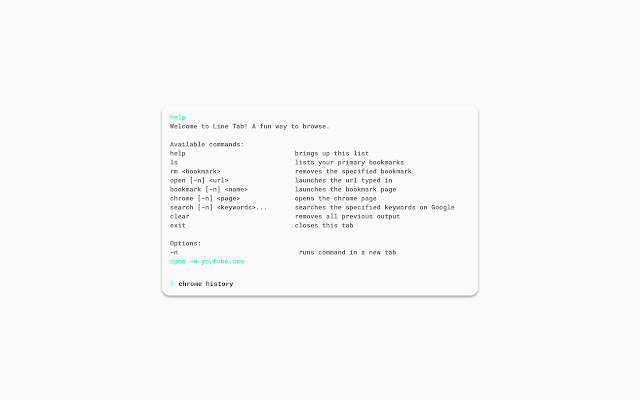
                        Speed up your browsing experience with Line Tab - the command-based new tab page.

For the regular CLI users out there, Line Tab will make you feel right at home in the browser. For others, it will make you feel like a true hacker.

Why use line tab?
- Launch your main bookmarks
- Search on Google
- Jump to any url
- A dark mode option

If there is a command or general feature you'd like to see, feel free to drop a message.
Información Básica de la Extensión
| Nombre |  Line Tab Line Tab |
| ID | flfjdodphlkeahmbnchjjjkoooahhkio |
| URL Oficial | https://chrome.google.com/webstore/detail/line-tab/flfjdodphlkeahmbnchjjjkoooahhkio |
| Descripción | A new tab page built for the quickest browsing experience |
| Tamaño del Archivo | 167 KB |
| Cantidad de Instalaciones | 28 |
| Versión Actual | 1.0.0.0 |
| Última Actualización | 2019-01-13 |
| Fecha de Publicación | 2019-01-13 |
| Calificación | 2.00/5 Total de 1 Calificaciones |
| Desarrollador | Shahryar Parvez |
| Correo electrónico | [email protected] |
| Tipo de Pago | free |
| Sitio Web de la Extensión | https://ssparvez.github.io/line-tab |
| URL de la Página de Política de Privacidad | https://ssparvez.github.io/line-tab/privacy |
| Idiomas Soportados | en-US |
| manifest.json | |
{
    "update_url": "https:\/\/clients2.google.com\/service\/update2\/crx",
    "name": "Line Tab",
    "description": "A new tab page built for the quickest browsing experience",
    "icons": {
        "16": "assets\/icon16.png",
        "48": "assets\/icon48.png",
        "128": "assets\/icon128.png"
    },
    "version": "1.0.0.0",
    "manifest_version": 2,
    "chrome_url_overrides": {
        "newtab": "index.html"
    },
    "permissions": [
        "bookmarks",
        "tabs",
        "storage"
    ]
} | |