pic2pixlr
Instantly send ANY image to the Pixlr O-Matic, Pixlr Express, or the Pixlr Editor image processing service at pixlr.com
¿Qué es pic2pixlr?
pic2pixlr es una extensión de Chrome desarrollada por Steve Reich, y su función principal es "Instantly send ANY image to the Pixlr O-Matic, Pixlr Express, or the Pixlr Editor image processing service at pixlr.com".
Capturas de Pantalla de la Extensión
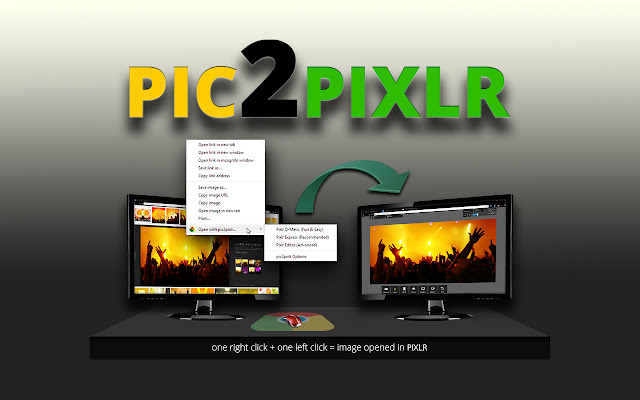

Descargar Archivo CRX de la Extensión pic2pixlr
Descarga archivos de extensión pic2pixlr en formato crx, instala manualmente las extensiones de Chrome en el navegador o comparte los archivos crx con amigos para instalar fácilmente las extensiones de Chrome.
Instrucciones de Uso de la Extensión
                        A Google Chrome extension that INSTANTLY sends ANY online image to Pixlr O-Matic, Pixlr Express, or Pixlr Editor! If you aren't familiar with these online graphic and photo editing applications, then you owe it to yourself to check them out. They have free photo enhancing and editing software for beginners and seasoned pros a like!

3 KEY FEATURES

pic2pixlr adds a right-click menu item in Google Chrome. When you right-click on an image on a web page, this gives you a menu option to send it to any one of the three Pixlr applications to edit and/or save.

Adds a custom image search engine in the address bar (AKA onmibar) in Google Chrome. This is activated by typing 'pic' (without the quotes) and then hitting the SPACE bar. Then just type in the image you're looking for and it will automatically search Google Images. The image search engine you would like to use can be changed in the options.

pic2pixlr sets an icon in your address bar to instantly download 500px.com or Flickr images. pic2pixlr adds an icon in the address bar when viewing images on sites that don't allow you to immediately download the image. This icon will appear when it pic2pixlr service is available.
Información Básica de la Extensión
| Nombre |  pic2pixlr pic2pixlr |
| ID | geedlmpoiiblchcmafdmlpjiclhnpkif |
| URL Oficial | https://chrome.google.com/webstore/detail/pic2pixlr/geedlmpoiiblchcmafdmlpjiclhnpkif |
| Descripción | Instantly send ANY image to the Pixlr O-Matic, Pixlr Express, or the Pixlr Editor image processing service at pixlr.com |
| Tamaño del Archivo | 2.05 MB |
| Cantidad de Instalaciones | 3,824 |
| Versión Actual | 2.0 |
| Última Actualización | 2014-05-28 |
| Fecha de Publicación | 2014-05-28 |
| Calificación | 3.89/5 Total de 164 Calificaciones |
| Desarrollador | Steve Reich |
| Tipo de Pago | free |
| Idiomas Soportados | en-US |
| manifest.json | |
{
"update_url": "https:\/\/clients2.google.com\/service\/update2\/crx",
"name": "pic2pixlr",
"version": "2.0",
"manifest_version": 2,
"description": "Instantly send ANY image to the Pixlr O-Matic, Pixlr Express, or the Pixlr Editor image processing service at pixlr.com",
"homepage_url": "http:\/\/pic2pixlr.com",
"options_page": "\/options.html",
"icons": {
"16": "\/img\/pic2pixlr-16.png",
"19": "\/img\/pic2pixlr-19.png",
"48": "\/img\/pic2pixlr-48.png",
"128": "\/img\/pic2pixlr-128.png"
},
"background": {
"scripts": [
"\/js\/background.js"
],
"persistent": false
},
"page_action": {
"default_icon": {
"19": "\/img\/pic2pixlr-19.png"
},
"default_popup": "popup.html"
},
"permissions": [
"contextMenus",
"background",
"tabs",
" | |