Bard Voice Conversation
This extension for Google Bard allows you to have two way conversations using your voice. Ask using voice and listen to response.
¿Qué es Bard Voice Conversation?
Bard Voice Conversation es una extensión de Chrome desarrollada por bikeshdhunju, y su función principal es "This extension for Google Bard allows you to have two way conversations using your voice. Ask using voice and listen to response.".
Capturas de Pantalla de la Extensión

Descargar Archivo CRX de la Extensión Bard Voice Conversation
Descarga archivos de extensión Bard Voice Conversation en formato crx, instala manualmente las extensiones de Chrome en el navegador o comparte los archivos crx con amigos para instalar fácilmente las extensiones de Chrome.
Instrucciones de Uso de la Extensión
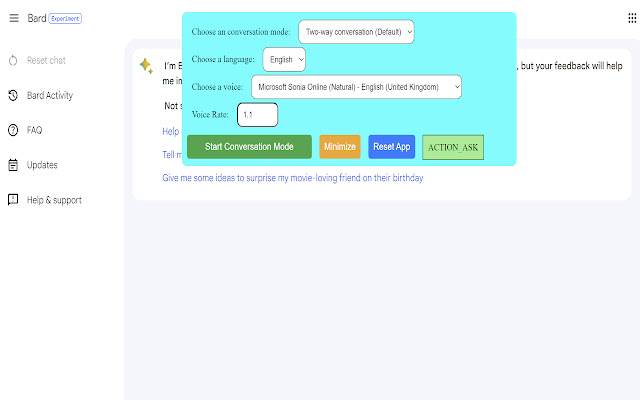
                        Discover the convenience of voice interactions with Google Bard.  This extension for Google Bard website allows you to have conversations using your voice. Ask questions using your voice and you can listen to Google Bard response, making it easy and convenient to get the information you need hands-free. Perfect for hands-free browsing or anyone who prefers to talk to Google Bard using their voice. Google Bard can be your voice assistant.

Get answers, discuss ideas, and explore topics with ease. Say goodbye to typing and instead talk to Google Bard.

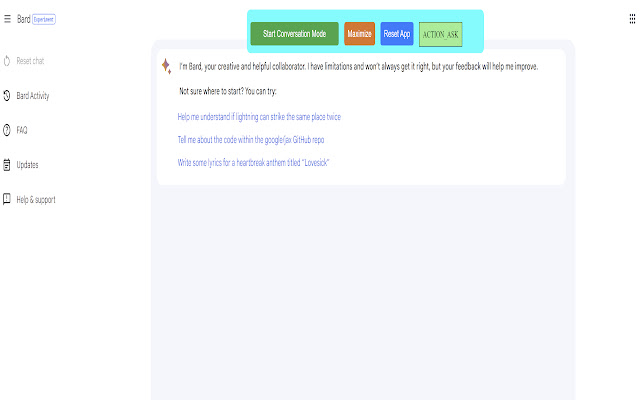
With the extension, you can effortlessly talk instead of type. Simply start the conversation mode, and start talking with Google Bard using your voice. The extension will automatically manage turns between asking question and listening to the response once you've started the conversation mode.

There are three conversation modes available:

1. Two-way conversation (Default) - You can ask question using voice and Google Bard will respond with voice.
2. You talk & Google Bard text response - You can ask question using voice and Google Bard will respond with text. Useful if you want to just read.
3. You type & Google Bard voice response - You can ask question using typing and Google Bard will respond with voice. Useful if you want to listen on headphone and cannot speak out loud in quite place.

The extension allows to ask questions in the following languages:

English, Chinese (Simplified), French, Germany, Japanese, Hindi (Indian), Indonesian, Italian, Korean, Spanish

The voice-to-text is based on the browser API that is built in the browser itself. The browser will automatically download additional voices (for text-to-speech) once you use the extension. This process is handled by the browser itself and may take varying amounts of time depending on your system and network conditions. The performance and accuracy of voice-to-text may depend on your machine and how much resources it has. For instance, you might notice that the conversion is not accurate when your machine is busy and lacks CPU resources.

Please contact us if you've any questions or feedback.
Información Básica de la Extensión
| Nombre |  Bard Voice Conversation Bard Voice Conversation |
| ID | hakgjmdjpppociihicfmipkdcnjlniia |
| URL Oficial | https://chrome.google.com/webstore/detail/bard-voice-conversation/hakgjmdjpppociihicfmipkdcnjlniia |
| Descripción | This extension for Google Bard allows you to have two way conversations using your voice. Ask using voice and listen to response. |
| Tamaño del Archivo | 47.69 KB |
| Cantidad de Instalaciones | 274 |
| Versión Actual | 1.3.1 |
| Última Actualización | 2023-07-26 |
| Fecha de Publicación | 2023-05-16 |
| Calificación | 5.00/5 Total de 4 Calificaciones |
| Desarrollador | bikeshdhunju |
| Correo electrónico | [email protected] |
| Tipo de Pago | free |
| Idiomas Soportados | en |
| manifest.json | |
{
    "update_url": "https:\/\/clients2.google.com\/service\/update2\/crx",
    "name": "Bard Voice Conversation",
    "version": "1.3.1",
    "manifest_version": 3,
    "description": "This extension for Google Bard allows you to have two way conversations using your voice. Ask using voice and listen to response.",
    "icons": {
        "16": "icons\/logo-16.png",
        "32": "icons\/logo-32.png",
        "48": "icons\/logo-48.png",
        "128": "icons\/logo-128.png"
    },
    "action": {
        "default_popup": "popup.html"
    },
    "permissions": [
        "activeTab",
        "storage"
    ],
    "content_scripts": [
        {
            "matches": [
                "https:\/\/bard.google.com\/",
                "https:\/\/bard.google.com\/*"
            ],
            "js": [
                "bard_voice_conversation.js"
            ]
        }
    ]
} | |