Music New Tab
Provides music-themed new tab page
¿Qué es Music New Tab?
Music New Tab es una extensión de Chrome desarrollada por http://musicnewtab.com, y su función principal es "Provides music-themed new tab page".
Capturas de Pantalla de la Extensión
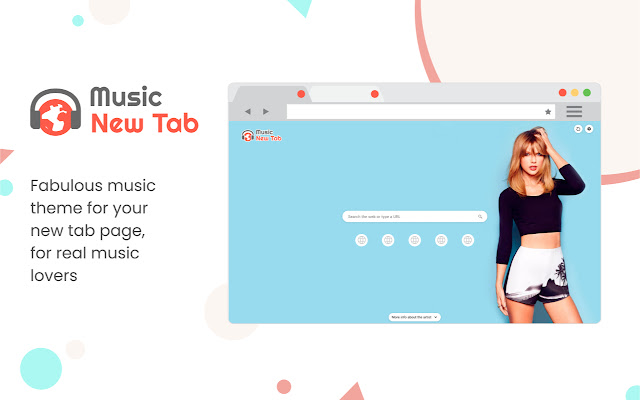


Descargar Archivo CRX de la Extensión Music New Tab
Descarga archivos de extensión Music New Tab en formato crx, instala manualmente las extensiones de Chrome en el navegador o comparte los archivos crx con amigos para instalar fácilmente las extensiones de Chrome.
Instrucciones de Uso de la Extensión
                        Enjoy the new tab experience with its background musician and singing artist posters, most visited sites for your easy access, and a search box.

Know more about the musician:
Did you recognize the singer from the background poster and want to know more about him/her? Simply click on the “More info about the artist” button at the bottom of the page and check it out! The information of the artists is provided by YouTube.

Most Visited Sites:
Enable this feature and get quick access to the icons of your most visited websites on the New Tab page.

Enable/disable background poster:
Want some focus and concentration on your work? You can always turn off the background. It’s in the Settings of the extension. Don’t forget to turn it back on when you are in the mood again!

Background Refreshing Interval:
Set your preferred background poster refreshing interval (by hours).

Search Box and Supported Search Engines Inside:
Supporting Yahoo (default), Google, Bing, and DuckDuckGo from the search box. You can make your selection in the Settings of the extension.

Permissions used and reasons:

Access to “topSites” (optional). We require this permission to enable the display of the most visited sites on your New Tab page. It’s optional, only needed if you want to enable it.

How to remove this extension?

If you want to remove our extension, go to “Settings” on Chrome, and find our extension in the “Extensions” tab. Click “remove”. Alternatively, you can right-click on the extension’s icon on your browser and select “Uninstall” from the drop-down menu.

Chrome™  and YouTube™ are trademarks of Google LLC. The use of them does not imply any affiliation to or endorsement by Google LLC.

By adding this extension to your Chrome browser, you accept and agree to our Privacy Policy and End-User License Agreement.

Privacy Policy: https://www.musicnewtab.com/privacy

EULA: https://www.musicnewtab.com/terms

FAQ: https://www.musicnewtab.com/#faq

Contact Us: https://www.musicnewtab.com/contact

Uninstall: https://www.musicnewtab.com/uninstall
Información Básica de la Extensión
| Nombre |  Music New Tab Music New Tab |
| ID | hfamgdphmadpbopjpnjeclijgabhmeml |
| URL Oficial | https://chrome.google.com/webstore/detail/music-new-tab/hfamgdphmadpbopjpnjeclijgabhmeml |
| Descripción | Provides music-themed new tab page |
| Tamaño del Archivo | 42.42 KB |
| Cantidad de Instalaciones | 358,581 |
| Versión Actual | 3.0.0 |
| Última Actualización | 2021-01-11 |
| Fecha de Publicación | 2020-08-19 |
| Calificación | 3.40/5 Total de 20 Calificaciones |
| Desarrollador | http://musicnewtab.com |
| Correo electrónico | [email protected] |
| Tipo de Pago | free |
| Sitio Web de la Extensión | https://www.musicnewtab.com |
| URL de la Página de Ayuda | https://www.musicnewtab.com/contact |
| URL de la Página de Política de Privacidad | https://www.musicnewtab.com/privacy |
| Idiomas Soportados | en |
| manifest.json | |
null | |