DueTax GST Login Info Manager
A system to save GST username and password in Tally and Auto Login to GST Portal without typing Username and GST Password
¿Qué es DueTax GST Login Info Manager?
DueTax GST Login Info Manager es una extensión de Chrome desarrollada por https://duetaxofficial.blogspot.com, y su función principal es "A system to save GST username and password in Tally and Auto Login to GST Portal without typing Username and GST Password".
Capturas de Pantalla de la Extensión




Descargar Archivo CRX de la Extensión DueTax GST Login Info Manager
Descarga archivos de extensión DueTax GST Login Info Manager en formato crx, instala manualmente las extensiones de Chrome en el navegador o comparte los archivos crx con amigos para instalar fácilmente las extensiones de Chrome.
Instrucciones de Uso de la Extensión
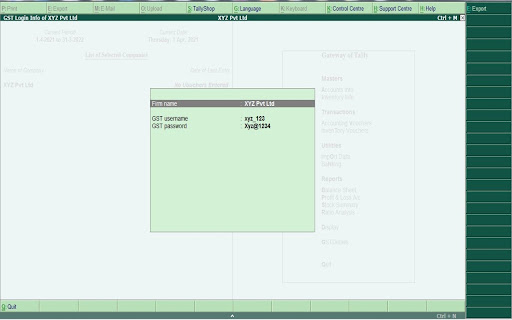
                        This GST Credential Manager called as DueTax GST Login Info Manager help you to maintain your client's GST Username and GST Password inside Tally database. From within Tally you can Login to GST Portal and this extension will get Login details from tally of the company which is active at that time and will auto fill the login details on the GST Portal. The system also works on Optotax website.

Features of this system:
1. Maintain GST Username and Password in tally company database
2. Import GST username and password of your client in tally from xml
3. Export GST username and password from tally of all of your companies
     in any format like pdf, excel, xml etc.
4. See GST Login Info in tally
6. Auto Login to GST Portal without need to manually fill GST username
    and password.
7. Auto fill password on Optotax website also.

Benefits of using this system:
1. No need to maintain GST Login details of your clients on files.
2. No need to manually enter username and password on GST Portal.
3. No fear of loosing your excel file containing GST Login details of all of
     your clients.
4. Our extension DO NOT save any username or password anywhere. It
     merely takes the login info from tally and fill it on the GST portal.
5. This system will work in both TALLY ERP 9 and TALLY PRIME.

System created by: CA. Prince Varshney
Información Básica de la Extensión
| Nombre |  DueTax GST Login Info Manager DueTax GST Login Info Manager |
| ID | hjbbgdocnhfkcoadhkogohjmhocfmcph |
| URL Oficial | https://chromewebstore.google.com/detail/duetax-gst-login-info-man/hjbbgdocnhfkcoadhkogohjmhocfmcph |
| Descripción | A system to save GST username and password in Tally and Auto Login to GST Portal without typing Username and GST Password |
| Tamaño del Archivo | 3.11 MB |
| Cantidad de Instalaciones | 142 |
| Versión Actual | 1.3 |
| Última Actualización | 2022-04-06 |
| Fecha de Publicación | 2021-08-04 |
| Calificación | 5.00/5 Total de 2 Calificaciones |
| Desarrollador | https://duetaxofficial.blogspot.com |
| Correo electrónico | [email protected] |
| Tipo de Pago | free |
| Sitio Web de la Extensión | https://duetaxofficial.blogspot.com/2021/07/duetax-gst-login-info-manager.html |
| URL de la Página de Política de Privacidad | https://duetaxofficial.blogspot.com/p/privacy-policy.html |
| Idiomas Soportados | en |
| manifest.json | |
{
    "browser_action": {
        "default_popup": "popup.html"
    },
    "content_scripts": [
        {
            "js": [
                "content.js"
            ],
            "matches": [
                "https:\/\/services.gst.gov.in\/services\/login",
                "https:\/\/gst.optotax.com\/*"
            ]
        }
    ],
    "description": "A system to save GST username and password in Tally and Auto Login to GST Portal without typing Username and GST Password",
    "differential_fingerprint": "1.ec35fac2a9d41a6b8ce1674b272e193894adf74bb57e2e47ee39969d79d65f55",
    "icons": {
        "128": "icon2.png"
    },
    "key": "MIIBIjANBgkqhkiG9w0BAQEFAAOCAQ8AMIIBCgKCAQEAlkpxv1qDOHVH9IznxYxHGpD2e9EStupNwlueO3mo9kVZoyENWr5Zj3afAOTxR5lKeGv0XJF5A0q1iN4YzWJEJd8qeadu9kD0cszHs4nGqMiwDXafh+vWFctnGW6x8obflx9s5HHxCKSU1AvN6WaZm9vp2m2g+fzSa6OLiyDOmCOppfx2GAH\/mVxmJ583rg6iKLkhTtNhRAcMvxPvgtajzoZ877plfR8Trd89+BUvwmQlYhNdwE18Kc3V+h5qTl6a8AfPpQN61TY7HzEfV+1DxFpG2\/O4YWwBfalnhLNKso3+qnZMbEfhHO7FvJpw1Zm+PW+xjNQAEFBQqC3MVUHJ\/wIDAQAB",
    "manifest_version": 2,
    "minimum_chrome_version": "45",
    "name": "DueTax GST Login Info Manager",
    "options_page": "options.html",
    "update_url": "https:\/\/clients2.google.com\/service\/update2\/crx",
    "version": "1.3"
} | |