Tulip - prevent spam, detect abusive sites
Tulip: Detect and avoid abusive sites as you browse. Prevent spam and protect your personal info.
¿Qué es Tulip - prevent spam, detect abusive sites?
Tulip - prevent spam, detect abusive sites es una extensión de Chrome desarrollada por http://addtulip.com, y su función principal es "Tulip: Detect and avoid abusive sites as you browse. Prevent spam and protect your personal info.".
Capturas de Pantalla de la Extensión


Descargar Archivo CRX de la Extensión Tulip - prevent spam, detect abusive sites
Descarga archivos de extensión Tulip - prevent spam, detect abusive sites en formato crx, instala manualmente las extensiones de Chrome en el navegador o comparte los archivos crx con amigos para instalar fácilmente las extensiones de Chrome.
Instrucciones de Uso de la Extensión
                        Tulip is a free privacy extension that tells you which websites to trust in order to keep your personal information safe and secure.

★★★★★ "This is the extension/add-on I've been seeking for YEARS..." Sean, IT Help Desk
★★★★★ “I feel safer when I use the internet with Tulip.” - Lisa, Stay-at-home Mom
★★★★★ “I never realized what was being hidden from users.” - Jack, Personal Assistant
★★★★   “Tulip sheds light on the aftermath of email sign-ups…” - Darnell, Vice President

►  Stop spam, avoid breaches, and keep your inbox clean

Protect yourself from spam, scams, and malicious emails with one quick glance at Tulip’s browser icon.

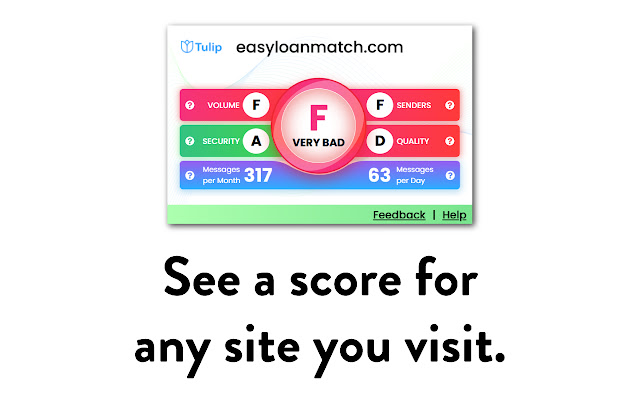
When you arrive at any website, Tulip quickly checks how a site uses your email, how they keep your information secure, and the risk of your data being leaked and presents this to you as a simple A – F grade.

We make browsing safe and trouble-free.

►  Claim Back Your Email Privacy

Your privacy is important. There’s nothing worse than not knowing where a data breach happened or not knowing how your email address is being distributed.

Tulip breaks down a website’s email message quality and whether the site will share your information with third-parties.

Find out:
	● Whether a website will resell your data
	● Whether a website complies with consumer protection standards
	● And more . . .

► Protect Your Inbox

Sign-up to your favorite websites with peace of mind. Tulip uncovers exactly how many emails you’ll receive per day and month with one simple click.

► Clean and simple interface

Your user interface is easy on the eye, won’t slow down your browsing, and has simple grading without cluttered options.

The uncomplicated color coded grade shows who you can trust with your information on websites and search engines.

► Accurate security data

Keeping up with the evolution of web browsing and privacy exploitation is tough!

Unfortunately, data leaks happen all the time . . .

Therefore, Tulip collects accurate security data on new websites every single day . . .
and warns you when you’re at risk. The list keeps growing to ensure you’re protected.


CHANGES
--------------------
v2.0.0

-Brand new user interface
-Several bug fixes

--------------------


NOTE: The install notice about accessing website data is automatically generated because Tulip runs on every tab. But it does not actually monitor your browsing history or require your personal information to work properly.

By using this browser extension/add-on, you agree to the terms of service as described here: https://www.addtulip.com/terms . You also agree that you have read and understand our privacy policy located here: https://www.addtulip.com/privacy

This extension uses Google Analytics to collect extension usage statistics to help improve user experience. If you want to opt-out of Google Analytics tracking, please visit http://tools.google.com/dlpage/gaoptout to install Google's opt-out add-on or utilize a privacy/blocking extension.
Información Básica de la Extensión
| Nombre |  Tulip - prevent spam, detect abusive sites Tulip - prevent spam, detect abusive sites |
| ID | hpdhblkfagpldebpgpepbcaekloogblg |
| URL Oficial | https://chrome.google.com/webstore/detail/tulip-prevent-spam-detect/hpdhblkfagpldebpgpepbcaekloogblg |
| Descripción | Tulip: Detect and avoid abusive sites as you browse. Prevent spam and protect your personal info. |
| Tamaño del Archivo | 2.84 MB |
| Cantidad de Instalaciones | 372 |
| Versión Actual | 2.0.0 |
| Última Actualización | 2021-06-02 |
| Fecha de Publicación | 2020-05-19 |
| Calificación | 5.00/5 Total de 1 Calificaciones |
| Desarrollador | http://addtulip.com |
| Correo electrónico | [email protected] |
| Sitio Web de la Extensión | http://www.addtulip.com |
| URL de la Página de Ayuda | http://www.addtulip.com/contact |
| URL de la Página de Política de Privacidad | https://www.addtulip.com/privacy |
| Idiomas Soportados | en-US |
| manifest.json | |
{
    "update_url": "https:\/\/clients2.google.com\/service\/update2\/crx",
    "author": "lightblueventures.com",
    "background": {
        "page": "background\/background.html",
        "persistent": true
    },
    "browser_action": {
        "default_icon": {
            "16": "icons\/logo_16.png",
            "20": "icons\/logo_20.png",
            "25": "icons\/logo_25.png",
            "30": "icons\/logo_30.png",
            "32": "icons\/logo_32.png",
            "40": "icons\/logo_40.png",
            "48": "icons\/logo_48.png",
            "64": "icons\/logo_64.png",
            "128": "icons\/logo_128.png"
        },
        "default_title": "Tulip: Prevent spam, detect abusive sites.",
        "default_popup": "popup\/popup.html"
    },
    "content_scripts": [
        {
            "matches": [
                "http:\/\/*\/*",
                "https:\/\/*\/*"
            ],
            "exclude_matches": [
                "https:\/\/*.addtulip.com\/*"
            ],
            "js": [
                "content\/content.2.0.0.js"
            ],
            "css": [
                "content\/assets\/css\/font.css",
                "content\/assets\/css\/global.css"
            ]
        }
    ],
    "web_accessible_resources": [
        "content\/assets\/img\/*.*",
        "content\/assets\/webfonts\/*.*"
    ],
    "description": "Tulip: Detect and avoid abusive sites as you browse. Prevent spam and protect your personal info.",
    "icons": {
        "16": "icons\/logo_16.png",
        "20": "icons\/logo_20.png",
        "25": "icons\/logo_25.png",
        "30": "icons\/logo_30.png",
        "32": "icons\/logo_32.png",
        "40": "icons\/logo_40.png",
        "48": "icons\/logo_48.png",
        "64": "icons\/logo_64.png",
        "128": "icons\/logo_128.png"
    },
    "manifest_version": 2,
    "name": "Tulip - prevent spam, detect abusive sites",
    "short_name": "Tulip",
    "permissions": [
        "storage",
        "tabs",
        "webNavigation",
        "http:\/\/*\/*",
        "https:\/\/*\/*",
        "*:\/\/*\/*"
    ],
    "version": "2.0.0"
} | |