Wordzzz – Learn language with video subs
Boost your language learning with Wordzzz
¿Qué es Wordzzz – Learn language with video subs?
Wordzzz – Learn language with video subs es una extensión de Chrome desarrollada por https://wordzzz.app, y su función principal es "Boost your language learning with Wordzzz".
Capturas de Pantalla de la Extensión




Descargar Archivo CRX de la Extensión Wordzzz – Learn language with video subs
Descarga archivos de extensión Wordzzz – Learn language with video subs en formato crx, instala manualmente las extensiones de Chrome en el navegador o comparte los archivos crx con amigos para instalar fácilmente las extensiones de Chrome.
Instrucciones de Uso de la Extensión
                        Wordzzz — Translate words & subtitles

Boost your language learning with Wordzzz for Chrome

Wordzzz extension analyzes subtitles in your YouTube & Netflix player (subtitles must be enabled) and when you hover over a word, the video stops and you can click on a word to see the translation card.

All translated words can be added to your vocabulary. We use internal storage of the browser so no sign-in is required. When you click on the Wordzzz icon, the main extension window with vocabulary and language settings will appear. Learn new words with the most effective card system. When you start practicing, hover over the card and see the translation of the new word - this effective method allows you to remember the new words and check the translation on-the-go.

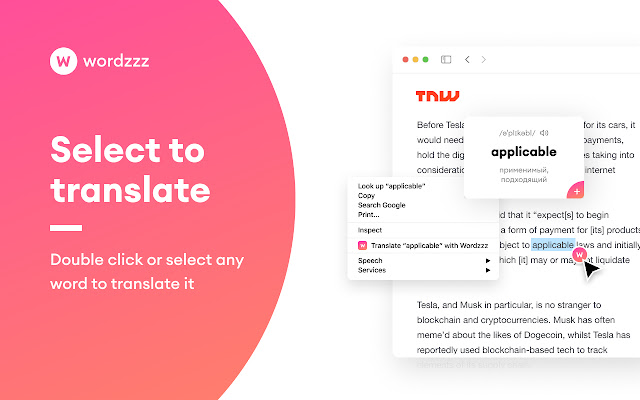
★ TRANSLATE TEXT WHILE BROWSING
Double click or select any word to translate it

★ SAVE NEW WORDS
Save words while watching your favorite videos on YouTube

★ PRACTICE YOUR VOCABULARY
Learn new words with the most effective card system

★ EASILY SWITCH LANGUAGES
Switch between the most popular language pairs

★ DARK MODE FOR  READABILITY
Reduce your eye strain with the automatic dark mode

★ HOW TO USE WORDZZZ
- Download Wordzzz extension from Chrome store
- Whenever you see a new word or phrase, click on it to get its meaning
- Add it to your vocabulary to practice later
- Go to the main extension window and start practising

★ QUESTIONS, FEEDBACK: Having problems with this extension? If the suggestions above didn't work, please fill out a problem report: https://chrome.google.com/webstore/support/
Información Básica de la Extensión
| Nombre |  Wordzzz – Learn language with video subs Wordzzz – Learn language with video subs |
| ID | iekapmfhbnlnpgapdilmdlehfmelengm |
| URL Oficial | https://chrome.google.com/webstore/detail/wordzzz-%E2%80%93-learn-language/iekapmfhbnlnpgapdilmdlehfmelengm |
| Descripción | Boost your language learning with Wordzzz |
| Tamaño del Archivo | 2.01 MB |
| Cantidad de Instalaciones | 484 |
| Versión Actual | 2.0.0 |
| Última Actualización | 2021-03-11 |
| Fecha de Publicación | 2020-08-22 |
| Calificación | 4.83/5 Total de 6 Calificaciones |
| Desarrollador | https://wordzzz.app |
| Correo electrónico | [email protected] |
| Tipo de Pago | free |
| Sitio Web de la Extensión | https://wordzzz.app/ |
| Idiomas Soportados | de,en,fr,tr,es,it,pt-BR,ru |
| manifest.json | |
{
    "update_url": "https:\/\/clients2.google.com\/service\/update2\/crx",
    "name": "__MSG_name__",
    "short_name": "Wordzzz",
    "description": "__MSG_Description__",
    "version": "2.0.0",
    "default_locale": "en",
    "content_scripts": [
        {
            "run_at": "document_idle",
            "matches": [
                "*:\/\/*\/*"
            ],
            "all_frames": true,
            "js": [
                ".\/js\/vendor.js",
                ".\/js\/content.js"
            ],
            "css": [
                ".\/styles\/fonts.css",
                ".\/styles\/content.css"
            ]
        }
    ],
    "content_security_policy": "child-src 'self' blob:; worker-src 'self' blob:; script-src 'self' https:\/\/cdn.logrocket.io https:\/\/cdn.lr-ingest.io https:\/\/www.google-analytics.com https:\/\/*.amplitude.com; object-src 'self';",
    "web_accessible_resources": [
        "*.ttf",
        "*.eot",
        "*.woff",
        "*.woff2",
        "images\/*.svg"
    ],
    "permissions": [
        "activeTab",
        "tabs",
        "storage",
        "notifications",
        "contextMenus"
    ],
    "optional_permissions": [
        "*:\/\/*\/*"
    ],
    "browser_action": {
        "default_title": "__MSG_name__",
        "default_popup": ".\/pages\/popup.html",
        "default_icon": ".\/images\/icon_logo.png"
    },
    "icons": {
        "16": ".\/images\/icon_logo.png",
        "128": ".\/images\/icon_logo128.png"
    },
    "background": {
        "scripts": [
            ".\/js\/vendor.js",
            ".\/js\/background.js"
        ],
        "persistent": false
    },
    "options_ui": {
        "page": ".\/pages\/options.html",
        "open_in_tab": true
    },
    "manifest_version": 2
} | |