Trello Flow
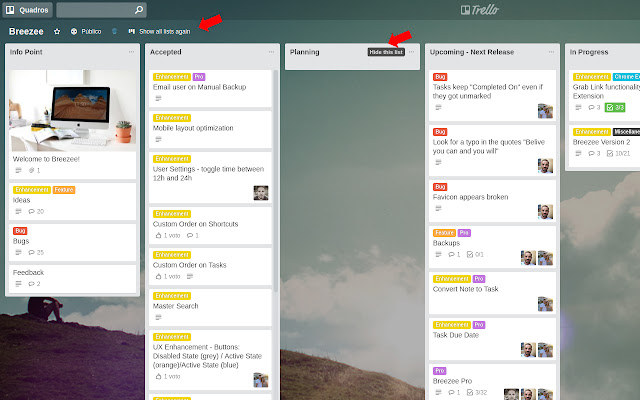
Hide columns in trello board that are not important for you!
¿Qué es Trello Flow?
Trello Flow es una extensión de Chrome desarrollada por Renan Borges, y su función principal es "Hide columns in trello board that are not important for you!".
Capturas de Pantalla de la Extensión
Descargar Archivo CRX de la Extensión Trello Flow
Descarga archivos de extensión Trello Flow en formato crx, instala manualmente las extensiones de Chrome en el navegador o comparte los archivos crx con amigos para instalar fácilmente las extensiones de Chrome.
Instrucciones de Uso de la Extensión
                        Hide and show columns in Trello, just it!

No changes in your tasks, no changes in any card, your flow will keep working the only thing what will happen is: YOU select what YOU want to see or not!

One click to hide, one click to show again.
Información Básica de la Extensión
| Nombre |  Trello Flow Trello Flow |
| ID | iiflidlllljlnghlfigmebcnjiloohbn |
| URL Oficial | https://chrome.google.com/webstore/detail/trello-flow/iiflidlllljlnghlfigmebcnjiloohbn |
| Descripción | Hide columns in trello board that are not important for you! |
| Tamaño del Archivo | 294 KB |
| Cantidad de Instalaciones | 57 |
| Versión Actual | 1.0.2 |
| Última Actualización | 2022-11-03 |
| Fecha de Publicación | 2019-10-10 |
| Calificación | 3.67/5 Total de 3 Calificaciones |
| Desarrollador | Renan Borges |
| Correo electrónico | [email protected] |
| Tipo de Pago | free |
| Sitio Web de la Extensión | https://github.com/renanborgez |
| Idiomas Soportados | en |
| manifest.json | |
{
    "update_url": "https:\/\/clients2.google.com\/service\/update2\/crx",
    "name": "Trello Flow",
    "version": "1.0.2",
    "manifest_version": 2,
    "description": "Hide columns in trello board that are not important for you!",
    "homepage_url": "https:\/\/github.com\/renanborgez\/TrelloFlow",
    "icons": {
        "16": "icons\/icon16.png",
        "48": "icons\/icon48.png",
        "128": "icons\/icon128.png"
    },
    "page_action": {
        "default_icon": "icons\/icon48.png",
        "default_title": "Trello Flow"
    },
    "permissions": [
        "https:\/\/trello.com\/"
    ],
    "content_scripts": [
        {
            "matches": [
                "https:\/\/trello.com\/*"
            ],
            "css": [
                "src\/inject\/inject.css"
            ]
        },
        {
            "matches": [
                "https:\/\/trello.com\/*"
            ],
            "js": [
                "src\/inject\/inject.js"
            ]
        }
    ]
} | |














![[DEPRECATED] List Layouts for Trello](https://lh3.googleusercontent.com/dMEliMsS2lms4RZnApgfyShZkCag2o-BBMlgj5Y3W8ciG6XjIVm8DIAgykGQyAOZJq6vrZeOl_IQLlxLmSM5ggTP6w)


