HTML Style Quick Viewer
HTML DOM element style quick viewer
¿Qué es HTML Style Quick Viewer?
HTML Style Quick Viewer es una extensión de Chrome desarrollada por _(:з」∠)_, y su función principal es "HTML DOM element style quick viewer".
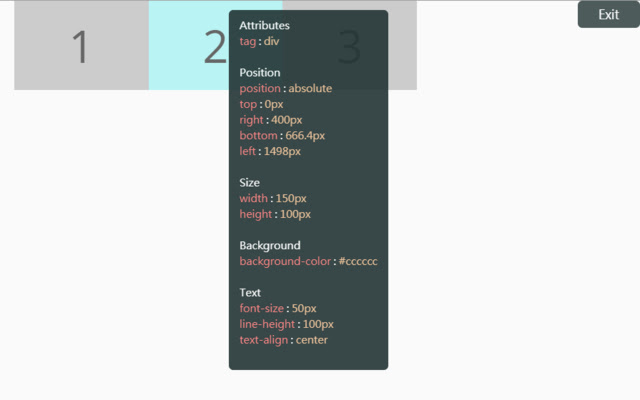
Capturas de Pantalla de la Extensión
Descargar Archivo CRX de la Extensión HTML Style Quick Viewer
Descarga archivos de extensión HTML Style Quick Viewer en formato crx, instala manualmente las extensiones de Chrome en el navegador o comparte los archivos crx con amigos para instalar fácilmente las extensiones de Chrome.
Instrucciones de Uso de la Extensión
                        How about viewing the HTML DOM styles in a different way?
Just move your mouse and it shows the target's styles.

After installation, you may have to reload tabs to for the extension to take effect.

Instructions:
1. Click HTML Style Quick Viewer in the toolbar, then click 'run' button to start.
2. Move mouse to see the element's styles.
3. Mouse left click to close the popup panel.
4. Mouse middle click to pin the popup panel.
5. Click the 'Exit' button at the top-right or click 'Stop' button through the toolbar to stop.
Información Básica de la Extensión
| Nombre |  HTML Style Quick Viewer HTML Style Quick Viewer |
| ID | inafmkpmbkldliccdbeieeafnbkcmmap |
| URL Oficial | https://chrome.google.com/webstore/detail/html-style-quick-viewer/inafmkpmbkldliccdbeieeafnbkcmmap |
| Descripción | HTML DOM element style quick viewer |
| Tamaño del Archivo | 15.88 KB |
| Cantidad de Instalaciones | 271 |
| Versión Actual | 1.0.2 |
| Última Actualización | 2018-08-26 |
| Fecha de Publicación | 2018-08-26 |
| Calificación | 5.00/5 Total de 3 Calificaciones |
| Desarrollador | _(:з」∠)_ |
| Correo electrónico | [email protected] |
| Tipo de Pago | free |
| Idiomas Soportados | en |
| manifest.json | |
{
    "update_url": "https:\/\/clients2.google.com\/service\/update2\/crx",
    "name": "HTML Style Quick Viewer",
    "description": "HTML DOM element style quick viewer",
    "version": "1.0.2",
    "permissions": [
        "activeTab"
    ],
    "content_scripts": [
        {
            "matches": [
                "http:\/\/*\/*",
                "https:\/\/*\/*"
            ],
            "js": [
                "content\/content.js"
            ],
            "css": [
                "content\/content.css"
            ],
            "run_at": "document_start"
        }
    ],
    "browser_action": {
        "default_title": "HTML Style Quick Viewer\nRight click (Close)\nMiddle click (Pin)",
        "default_icon": {
            "16": "icons\/icon_16.png",
            "32": "icons\/icon_32.png",
            "48": "icons\/icon_48.png",
            "128": "icons\/icon_128.png"
        },
        "default_popup": "popup\/popup.html"
    },
    "manifest_version": 2
} | |