UCLA Automated Login
Tired of entering your UCLA logon ID and username every single time? Install the UCLA Automated Login! By clicking the icon after…
¿Qué es UCLA Automated Login?
UCLA Automated Login es una extensión de Chrome desarrollada por Stanley Hsu, y su función principal es "Tired of entering your UCLA logon ID and username every single time? Install the UCLA Automated Login! By clicking the icon after…".
Capturas de Pantalla de la Extensión
Descargar Archivo CRX de la Extensión UCLA Automated Login
Descarga archivos de extensión UCLA Automated Login en formato crx, instala manualmente las extensiones de Chrome en el navegador o comparte los archivos crx con amigos para instalar fácilmente las extensiones de Chrome.
Instrucciones de Uso de la Extensión
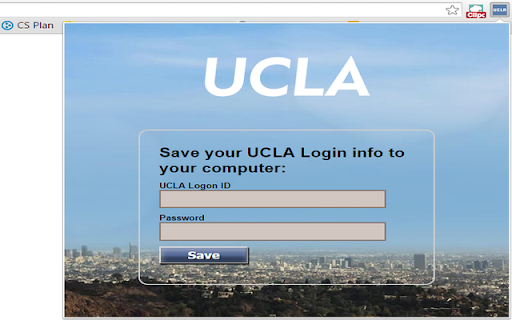
                        Tired of entering your UCLA logon ID and username every single time?
Install the UCLA Automated Login!

By clicking the icon after installing and entering the logon info, you will never have to manually enter them again.

This extension allows you to automatically log in to all the newly updated UCLA authentication pages.
Información Básica de la Extensión
| Nombre |  UCLA Automated Login UCLA Automated Login |
| ID | inelalkinoinjgbfjfmkfiagmfefpeic |
| URL Oficial | https://chromewebstore.google.com/detail/ucla-automated-login/inelalkinoinjgbfjfmkfiagmfefpeic |
| Descripción | Tired of entering your UCLA logon ID and username every single time? Install the UCLA Automated Login! By clicking the icon after… |
| Tamaño del Archivo | 150 KB |
| Cantidad de Instalaciones | 13 |
| Versión Actual | 2.0.1 |
| Última Actualización | 2015-11-10 |
| Fecha de Publicación | 2015-11-10 |
| Calificación | 5.00/5 Total de 3 Calificaciones |
| Desarrollador | Stanley Hsu |
| Tipo de Pago | free |
| Idiomas Soportados | en |
| manifest.json | |
{
    "update_url": "http:\/\/clients2.google.com\/service\/update2\/crx",
    "name": "UCLA Automated Login",
    "version": "2.0.1",
    "manifest_version": 2,
    "icons": {
        "16": "images\/icon16.png",
        "48": "images\/icon48.png",
        "128": "images\/ucla128.png"
    },
    "background": {
        "page": "background.html"
    },
    "permissions": [
        "tabs",
        "https:\/\/*\/*"
    ],
    "options_page": "optionPage.html",
    "browser_action": {
        "default_icon": "images\/icon16.png",
        "default_title": "UCLA Automated Login",
        "default_popup": "options.html"
    }
} | |