ReplaceR
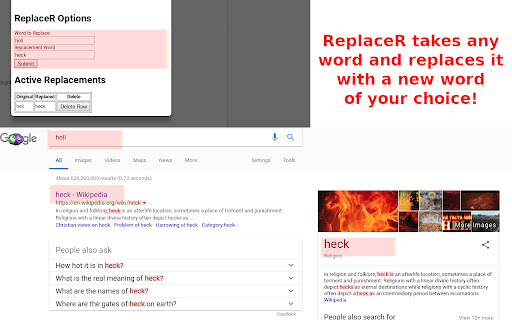
ReplaceR replaces existing words on web pages with new words. Make 'Hell' become 'Heck' or 'Game of Thrones' become 'SPOILER ALERT'.
¿Qué es ReplaceR?
ReplaceR es una extensión de Chrome desarrollada por https://iamtravisw.com, y su función principal es "ReplaceR replaces existing words on web pages with new words. Make 'Hell' become 'Heck' or 'Game of Thrones' become 'SPOILER ALERT'.".
Capturas de Pantalla de la Extensión
Descargar Archivo CRX de la Extensión ReplaceR
Descarga archivos de extensión ReplaceR en formato crx, instala manualmente las extensiones de Chrome en el navegador o comparte los archivos crx con amigos para instalar fácilmente las extensiones de Chrome.
Instrucciones de Uso de la Extensión
                        ReplaceR is a Google Chrome extension that lets you take specific words that show up in your Google Chrome browser and replace them with new words. For example, you can take the word "Hell" and make it look like "Heck".


Why would you want to do that?

1. Get warnings about SPOILERS!
   Let's say you watch George R.R. Martin's smash hit Game of Thrones on HBO. You can Enter 'GoT' and 'Game of Thrones' into ReplaceR and have it read back "SPOILERS!" so that you have a fighting chance to avoid reading what happens to Khaleesi next.


2. Don't like curse words? Maybe certain words trigger you?
   Maybe you don't like curse words. You can replace those filthy words with ***** or different words. Or perhaps certain words just make you cringe... Same idea! You can swap those words out for something more acceptable to you.


3. Correct Capitalization
   You can use ReplaceR to change the capitalization of words. For example, you can change eSports to always show as Esports.

How to use ReplaceR:

Add a Word:
1. Right click on the ReplaceR icon and select options.
2. Add a word to replace and a word to replace the word with.
3. Click Submit.
Note: You will need to refresh your pages for ReplaceR to start doing it's job.

Delete a Replacement:
1. Right click on the ReplaceR icon and select options.
2. Find the word you want to remove in the table.
3. Click the Delete button.
Note: You will need to refresh your pages for ReplaceR to update.
Información Básica de la Extensión
| Nombre |  ReplaceR ReplaceR |
| ID | jokhdedhpjlobfbnokhfjipjdhboiing |
| URL Oficial | https://chromewebstore.google.com/detail/replacer/jokhdedhpjlobfbnokhfjipjdhboiing |
| Descripción | ReplaceR replaces existing words on web pages with new words. Make 'Hell' become 'Heck' or 'Game of Thrones' become 'SPOILER ALERT'. |
| Tamaño del Archivo | 43.49 KB |
| Cantidad de Instalaciones | 2,405 |
| Versión Actual | 1.0.3 |
| Última Actualización | 2023-04-18 |
| Fecha de Publicación | 2018-11-01 |
| Calificación | 2.85/5 Total de 20 Calificaciones |
| Desarrollador | https://iamtravisw.com |
| Correo electrónico | [email protected] |
| Tipo de Pago | free |
| Idiomas Soportados | en-US |
| manifest.json | |
{
"update_url": "https:\/\/clients2.google.com\/service\/update2\/crx",
"manifest_version": 2,
"name": "ReplaceR",
"description": "ReplaceR replaces existing words on web pages with new words. Make 'Hell' become 'Heck' or 'Game of Thrones' become 'SPOILER ALERT'.",
"version": "1.0.3",
"author": "Travis Woodward",
"browser_action": {
"default_icon": "replacer.png",
"default_title": "ReplaceR"
},
"content_scripts": [
{
"matches": [
" | |