JotterWolf - Job Tracker AI
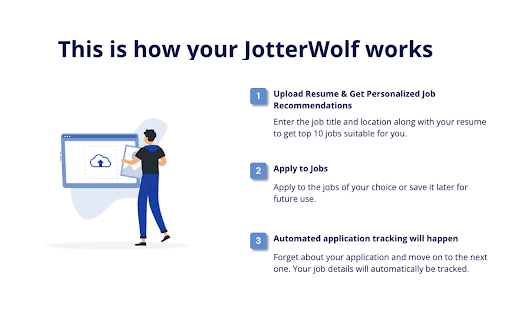
JotterWolf is a simple and effective job tracking tool that allows you to keep all your job role details organized.
¿Qué es JotterWolf - Job Tracker AI?
JotterWolf - Job Tracker AI es una extensión de Chrome desarrollada por https://jotterwolf.com, y su función principal es "JotterWolf is a simple and effective job tracking tool that allows you to keep all your job role details organized.".
Capturas de Pantalla de la Extensión


Descargar Archivo CRX de la Extensión JotterWolf - Job Tracker AI
Descarga archivos de extensión JotterWolf - Job Tracker AI en formato crx, instala manualmente las extensiones de Chrome en el navegador o comparte los archivos crx con amigos para instalar fácilmente las extensiones de Chrome.
Instrucciones de Uso de la Extensión
JotterWolf is a simple and effective job tracking tool that allows you to keep all your job role details organized and accessible for that crucial interview call. Información Básica de la Extensión
| Nombre |  JotterWolf - Job Tracker AI JotterWolf - Job Tracker AI |
| ID | lhobdlgnfijnbnjcgdhelkcnhcdkfogk |
| URL Oficial | https://chromewebstore.google.com/detail/jotterwolf-job-tracker-ai/lhobdlgnfijnbnjcgdhelkcnhcdkfogk |
| Descripción | JotterWolf is a simple and effective job tracking tool that allows you to keep all your job role details organized. |
| Tamaño del Archivo | 40.58 KB |
| Cantidad de Instalaciones | 341 |
| Versión Actual | 1.2 |
| Última Actualización | 2023-08-09 |
| Fecha de Publicación | 2023-07-17 |
| Desarrollador | https://jotterwolf.com |
| Correo electrónico | [email protected] |
| Tipo de Pago | free |
| Idiomas Soportados | en-US |
| manifest.json | |
{
    "update_url": "https:\/\/clients2.google.com\/service\/update2\/crx",
    "manifest_version": 3,
    "name": "JotterWolf - Job Tracker AI",
    "description": "JotterWolf is a simple and effective job tracking tool that allows you to keep all your job role details organized.",
    "version": "1.2",
    "background": {
        "service_worker": "background.js"
    },
    "action": {
        "default_popup": "popup.html",
        "default_icon": {
            "16": "images\/16x16.png",
            "32": "images\/32x32.png",
            "48": "images\/48x48.png",
            "128": "images\/128x128.png"
        }
    },
    "icons": {
        "16": "images\/16x16.png",
        "32": "images\/32x32.png",
        "48": "images\/48x48.png",
        "128": "images\/128x128.png"
    },
    "permissions": [
        "activeTab",
        "scripting",
        "tabs"
    ]
} | |