Sports Search for Chrome™
Provides quick access in autocomplete to search for sports results.
¿Qué es Sports Search for Chrome™?
Sports Search for Chrome™ es una extensión de Chrome desarrollada por https://sports-search.today, y su función principal es "Provides quick access in autocomplete to search for sports results.".
Capturas de Pantalla de la Extensión


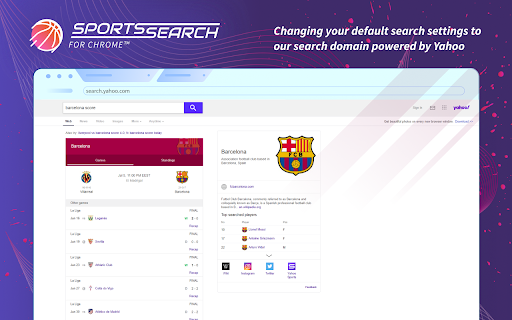
Descargar Archivo CRX de la Extensión Sports Search for Chrome™
Descarga archivos de extensión Sports Search for Chrome™ en formato crx, instala manualmente las extensiones de Chrome en el navegador o comparte los archivos crx con amigos para instalar fácilmente las extensiones de Chrome.
Instrucciones de Uso de la Extensión
                        This extension is a sports results search tool that makes it easier for you to stay up-to-date with the latest scores online. Instead of typing the names of basketball teams or football leagues you are looking for, going to a certain website, and browsing through all the sections for the live scores, our extension provides you quick access in the autocomplete suggestions of your Chrome’s address bar to send you directly to the results feed page where you will find a designated section for live scores.

Permissions used and reasons:

1. Change default search settings to our domain my-sports-search.com, powered by Yahoo. We require this permission to provide you the feature of a special component in the autocomplete powered by Yahoo. In this extension, we also support Google and Bing. If you would like to choose a different option, you can go to Settings and make the change.
2. Access to “contextMenus”. We require this permission to add the uninstall item on your context menu, which you can open by right-clicking the extension’s action icon.

The selection of different search engines will not affect the functionality of the extension component, which is powered by Yahoo. If you select Google, the live sports scores will still be provided by Yahoo.

Chrome™ is a trademark of Google LLC. The use of it does not imply any affiliation to or endorsement by Google LLC.

How to remove this extension from your Chrome?

You can open your Chrome browser’s Settings and find our extension in the Extensions page. Click on the “Remove” button and it will be completely removed. Alternatively, you can right-click on the extension’s icon on your browser, select “Remove from Chrome” from the drop-down menu.

If you have more questions about our extension, take a look at the answers below:

Terms and Conditions: https://www.sports-search.today/terms

Privacy Policy: https://www.sports-search.today/privacy

Contact Us: https://www.sports-search.today/contact

Uninstall: https://www.sports-search.today/uninstall
Información Básica de la Extensión
| Nombre |  Sports Search for Chrome™ Sports Search for Chrome™ |
| ID | lliehpfkblogcdojndaddkfbiijlgphc |
| URL Oficial | https://chromewebstore.google.com/detail/sports-search-for-chrome/lliehpfkblogcdojndaddkfbiijlgphc |
| Descripción | Provides quick access in autocomplete to search for sports results. |
| Tamaño del Archivo | 469 KB |
| Cantidad de Instalaciones | 178,418 |
| Versión Actual | 3.0.3 |
| Última Actualización | 2022-04-14 |
| Fecha de Publicación | 2020-08-12 |
| Calificación | 2.00/5 Total de 8 Calificaciones |
| Desarrollador | https://sports-search.today |
| Correo electrónico | [email protected] |
| Tipo de Pago | free |
| Sitio Web de la Extensión | https://www.sports-search.today |
| URL de la Página de Ayuda | https://www.sports-search.today/contact |
| URL de la Página de Política de Privacidad | https://www.sports-search.today/privacy |
| Idiomas Soportados | en |
| manifest.json | |
{
"update_url": "https:\/\/clients2.google.com\/service\/update2\/crx",
"name": "Sports Search for Chrome\u2122",
"description": "Provides quick access in autocomplete to search for sports results.",
"version": "3.0.3",
"background": {
"service_worker": "bg\/background.js",
"type": "module"
},
"chrome_settings_overrides": {
"search_provider": {
"encoding": "UTF-8",
"favicon_url": "https:\/\/www.my-sports-search.com\/favicon.ico",
"is_default": true,
"name": "Sports Search for Chrome\u2122",
"keyword": "Sports Search for Chrome\u2122",
"search_url": "https:\/\/www.my-sports-search.com\/search\/?category=web&s=m3ds&vert=sport&q={searchTerms}",
"suggest_url": "https:\/\/sug.my-sports-search.com\/v1\/sug\/?yid=m3ds&vert=sport&q={searchTerms}"
}
},
"homepage_url": "https:\/\/www.my-sports-search.com\/wim\/gotohub?s=m3ds",
"action": {
"default_title": "Sports Search for Chrome\u2122",
"default_icon": "img\/icon16.png",
"default_popup": "extension-page.html"
},
"manifest_version": 3,
"content_security_policy": {
"extension_pages": "script-src 'self'; object-src 'self'"
},
"content_scripts": [
{
"matches": [
"*:\/\/*.my-sports-search.com\/*"
],
"js": [
"content_script\/contentScript.js"
],
"all_frames": true
}
],
"icons": {
"16": "img\/icon16.png",
"48": "img\/icon48.png",
"128": "img\/icon128.png"
},
"permissions": [
"contextMenus"
],
"web_accessible_resources": [
{
"resources": [
"img\/icon16.png"
],
"matches": [
" | |