Total AV Password Vault Assistant
Access saved passwords from Total AV's Password Vault, including the ability to generate and save a new password.
¿Qué es Total AV Password Vault Assistant?
Total AV Password Vault Assistant es una extensión de Chrome desarrollada por https://www.totalav.com, y su función principal es "Access saved passwords from Total AV's Password Vault, including the ability to generate and save a new password.".
Capturas de Pantalla de la Extensión


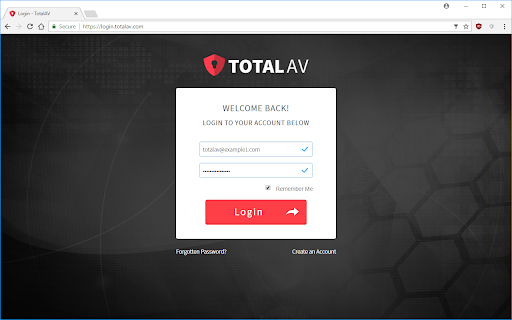
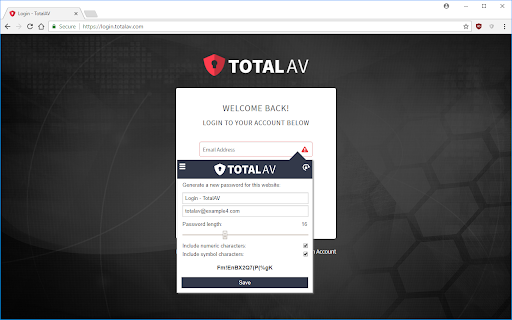

Descargar Archivo CRX de la Extensión Total AV Password Vault Assistant
Descarga archivos de extensión Total AV Password Vault Assistant en formato crx, instala manualmente las extensiones de Chrome en el navegador o comparte los archivos crx con amigos para instalar fácilmente las extensiones de Chrome.
Instrucciones de Uso de la Extensión
                        This extension works with the Password Vault provided by the Total AV application. Instead of manually searching for a password within Total AV, you can now search the vault directly from any web page.

Simply click one of the icons added by the extension to get a list of possible passwords for the current website. Selecting the entry will then add your login information. If you don't currently have any passwords saved for the website, you can generate a new one to add to the vault.

The extension will detect logins to a website not stored in the vault, or if any existing entries have a different password. You'll be prompted whether you would like to save this new data.

Please note: this extension requires Total AV v1.37+ to be installed on your PC / Mac.
Información Básica de la Extensión
| Nombre |  Total AV Password Vault Assistant Total AV Password Vault Assistant |
| ID | nhmijhgkfdhekaofhdkgdpmgidbijbnh |
| URL Oficial | https://chromewebstore.google.com/detail/total-av-password-vault-a/nhmijhgkfdhekaofhdkgdpmgidbijbnh |
| Descripción | Access saved passwords from Total AV's Password Vault, including the ability to generate and save a new password. |
| Tamaño del Archivo | 70.88 KB |
| Cantidad de Instalaciones | 28,146 |
| Versión Actual | 1.4.66 |
| Última Actualización | 2023-05-03 |
| Fecha de Publicación | 2017-12-21 |
| Calificación | 3.87/5 Total de 99 Calificaciones |
| Desarrollador | https://www.totalav.com |
| Correo electrónico | [email protected] |
| Tipo de Pago | in_app |
| Sitio Web de la Extensión | https://www.totalav.com |
| URL de la Página de Ayuda | https://support.totalav.com |
| URL de la Página de Política de Privacidad | https://www.totalav.com/privacy |
| Idiomas Soportados | en |
| manifest.json | |
{
    "update_url": "https:\/\/clients2.google.com\/service\/update2\/crx",
    "author": "SS Protect",
    "name": "Total AV Password Vault Assistant",
    "version": "1.4.66",
    "manifest_version": 3,
    "description": "Access saved passwords from Total AV's Password Vault, including the ability to generate and save a new password.",
    "icons": {
        "128": "shared\/images\/icon.png"
    },
    "background": {
        "service_worker": "shared\/js\/service-worker.js"
    },
    "content_scripts": [
        {
            "all_frames": true,
            "js": [
                "shared\/js\/jquery-3.5.0.js",
                "shared\/js\/content-script.js"
            ],
            "css": [
                "shared\/css\/content-script.css"
            ],
            "matches": [
                "http:\/\/*\/*",
                "https:\/\/*\/*",
                "file:\/\/\/*"
            ],
            "run_at": "document_start"
        }
    ],
    "permissions": [
        "nativeMessaging",
        "tabs",
        "storage"
    ],
    "minimum_chrome_version": "92.0",
    "web_accessible_resources": [
        {
            "resources": [
                "shared\/html\/*.html",
                "shared\/images\/*.svg",
                "shared\/images\/*.png"
            ],
            "matches": [
                "http:\/\/*\/*",
                "https:\/\/*\/*",
                "file:\/\/\/*"
            ],
            "extension_ids": [
                "dlbdmahiaadnbkihdklfkbdeoekfiefp",
                "dhciheiahfalhaemakioldbcopodipfm",
                "dbmjhebcnagfljllolnmbpkghfmckjgl",
                "aejfkifmimhoafnfeffghcaijhfmofle",
                "nhmijhgkfdhekaofhdkgdpmgidbijbnh",
                "jmidhlioompgcfmgfdalpkocpilgcjdg"
            ],
            "use_dyanmic_url": false
        }
    ]
} | |