Sitecore keyboard shortcuts
Speed up your Sitecore experience by creating hot key combinations to execute common actions.
¿Qué es Sitecore keyboard shortcuts?
Sitecore keyboard shortcuts es una extensión de Chrome desarrollada por daveleigh, y su función principal es "Speed up your Sitecore experience by creating hot key combinations to execute common actions.".
Capturas de Pantalla de la Extensión
Descargar Archivo CRX de la Extensión Sitecore keyboard shortcuts
Descarga archivos de extensión Sitecore keyboard shortcuts en formato crx, instala manualmente las extensiones de Chrome en el navegador o comparte los archivos crx con amigos para instalar fácilmente las extensiones de Chrome.
Instrucciones de Uso de la Extensión
                        Sitecore keyboard shortcuts allows you to create hot keys to quickly complete common tasks in Sitecore.

New Features for November!

Paste to item

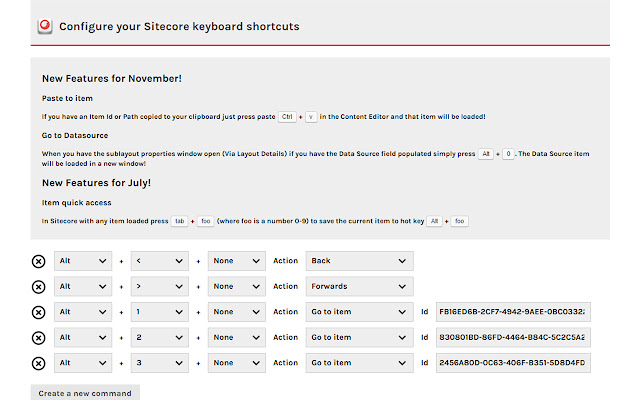
If you have an Item Id or Path copied to your clipboard just press paste Ctrl + v in the Content Editor and that item will be loaded!

Go to Datasource

When you have the sublayout properties window open (Via Layout Details) if you have the Data Source field populated simply press Alt + 0. The Data Source item will be loaded in a new window!


Save favourite items by pressing Ctrl + Alt + Foo (where Foo is a number 1 - 9) on an item to save that item to hot key Alt + Foo.

This is especially useful for demos or for quick access to frequently used items. No need to repeatedly expand the content tree any longer.

You can also assign shortcuts for:

Go to Item with specified Id
Go back to previous item
Go forwards to next item
Open the publish dialogue
Go to template of current item
Open the presentation details of the current item
Open the page editor

...and many more actions will be added soon.


Sitecore keyboard shortcuts is still in beta so please send me any feedback. Also if you would like a new feature added just let me know.
Información Básica de la Extensión
| Nombre |  Sitecore keyboard shortcuts Sitecore keyboard shortcuts |
| ID | oddpghjnkkgfncigahnhdlbngkooijhm |
| URL Oficial | https://chrome.google.com/webstore/detail/sitecore-keyboard-shortcu/oddpghjnkkgfncigahnhdlbngkooijhm |
| Descripción | Speed up your Sitecore experience by creating hot key combinations to execute common actions. |
| Tamaño del Archivo | 542 KB |
| Cantidad de Instalaciones | 83 |
| Versión Actual | 1.0.1.0 |
| Última Actualización | 2015-11-03 |
| Fecha de Publicación | 2015-11-03 |
| Calificación | 5.00/5 Total de 2 Calificaciones |
| Desarrollador | daveleigh |
| Tipo de Pago | free |
| Sitio Web de la Extensión | http://www.daveleigh.co.uk |
| Idiomas Soportados | en-GB |
| manifest.json | |
{
    "update_url": "https:\/\/clients2.google.com\/service\/update2\/crx",
    "manifest_version": 2,
    "name": "Sitecore keyboard shortcuts",
    "short_name": "Sitecore keyboard shortcuts",
    "description": "Speed up your Sitecore experience by creating hot key combinations to execute common actions.",
    "version": "1.0.1.0",
    "icons": {
        "16": "images\/icons\/icon-16.png",
        "48": "images\/icons\/icon-48.png",
        "128": "images\/icons\/icon-128.png"
    },
    "background": {
        "persistent": false,
        "page": "views\/background.html"
    },
    "content_scripts": [
        {
            "matches": [
                "*:\/\/*\/sitecore*"
            ],
            "js": [
                "scripts\/inject.js"
            ],
            "runat_at": "document_idle",
            "all_frames": true,
            "css": [
                "styles\/main.css"
            ]
        }
    ],
    "page_action": {
        "default_icon": {
            "19": "images\/icons\/icon-19.png"
        },
        "default_title": "Sitecore keyboard shortcuts"
    },
    "content_security_policy": "script-src 'self' 'unsafe-eval'; object-src 'self'",
    "options_page": "views\/options.html",
    "permissions": [
        "activeTab",
        "contextMenus",
        "storage",
        "tabs",
        "notifications"
    ]
} | |