New Tab Suspender
Make your computer run smoothly by suspending the tabs you aren't using
¿Qué es New Tab Suspender?
New Tab Suspender es una extensión de Chrome desarrollada por the new tab suspender, y su función principal es "Make your computer run smoothly by suspending the tabs you aren't using".
Capturas de Pantalla de la Extensión
Descargar Archivo CRX de la Extensión New Tab Suspender
Descarga archivos de extensión New Tab Suspender en formato crx, instala manualmente las extensiones de Chrome en el navegador o comparte los archivos crx con amigos para instalar fácilmente las extensiones de Chrome.
Instrucciones de Uso de la Extensión
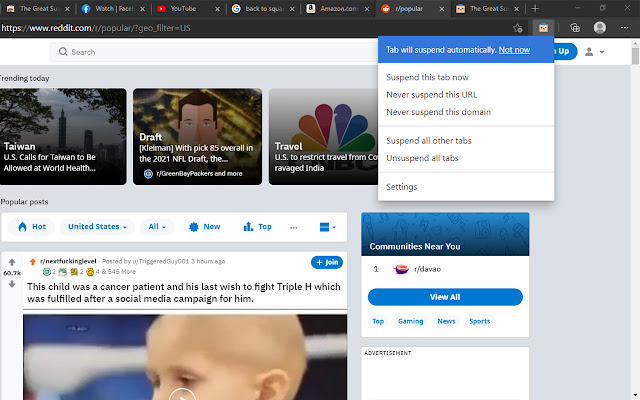
                        Make your computer run smoothly by suspending the tabs you aren't using.
The New Tab Suspender is a lightweight take on the popular and great suspender extensions in the Chrome Webstore.

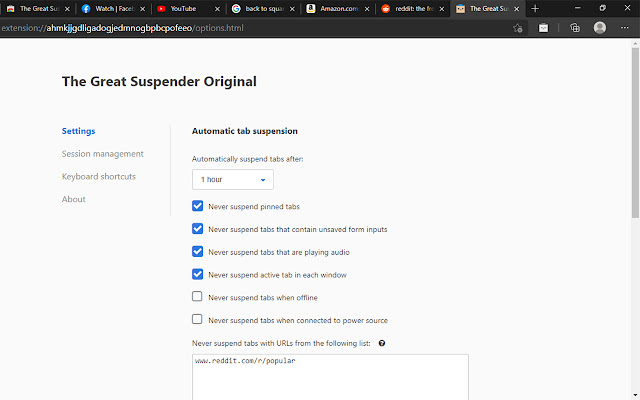
The New Tab Suspender pauses unused tabs to save memory usage. Flexible settings menu allows to set shortcuts, periodical of suspending and many other advantages.

Organize browser tabs and manage opened session easily.

Manage open tabs easier with a union list. Save your time and quickly find needed tab.

Features:

- suspend opened tabs by schedule or with a single click to save memory
- restore tab all at one or only one needed
- create group of tabs and save it for then using
- suspend and unsuspend selected tab or all at once
Información Básica de la Extensión
| Nombre |  New Tab Suspender New Tab Suspender |
| ID | oonaffdalieidjppjahogamepnmhgacm |
| URL Oficial | https://chrome.google.com/webstore/detail/new-tab-suspender/oonaffdalieidjppjahogamepnmhgacm |
| Descripción | Make your computer run smoothly by suspending the tabs you aren't using |
| Tamaño del Archivo | 1.1 MB |
| Cantidad de Instalaciones | 231 |
| Versión Actual | 1.0.0 |
| Última Actualización | 2021-05-26 |
| Fecha de Publicación | 2021-05-26 |
| Desarrollador | the new tab suspender |
| Correo electrónico | [email protected] |
| Tipo de Pago | free |
| URL de la Página de Política de Privacidad | https://sites.google.com/view/thenewtabsuspender---pp |
| Idiomas Soportados | de,en,tr,pt-BR,pt-PT,ru,zh-CN,zh-TW |
| manifest.json | |
{
    "update_url": "https:\/\/clients2.google.com\/service\/update2\/crx",
    "name": "__MSG_ext_extension_name__",
    "description": "__MSG_ext_extension_description__",
    "version": "1.0.0",
    "default_locale": "en",
    "permissions": [
        "tabs",
        "storage",
        "history",
        "unlimitedStorage",
        "webRequest",
        "webRequestBlocking",
        "http:\/\/*\/*",
        "https:\/\/*\/*",
        "file:\/\/*\/*",
        "chrome:\/\/favicon\/*",
        "contextMenus",
        "cookies"
    ],
    "storage": {
        "managed_schema": "managed-storage-schema.json"
    },
    "background": {
        "scripts": [
            "js\/gsUtils.js",
            "js\/gsChrome.js",
            "js\/gsAnalytics.js",
            "js\/gsStorage.js",
            "js\/db.js",
            "js\/gsIndexedDb.js",
            "js\/gsMessages.js",
            "js\/gsSession.js",
            "js\/gsTabQueue.js",
            "js\/gsTabCheckManager.js",
            "js\/gsFavicon.js",
            "js\/gsCleanScreencaps.js",
            "js\/gsTabSuspendManager.js",
            "js\/gsTabDiscardManager.js",
            "js\/gsSuspendedTab.js",
            "js\/background.js"
        ],
        "persistent": true
    },
    "content_scripts": [
        {
            "matches": [
                "http:\/\/*\/*",
                "https:\/\/*\/*",
                "file:\/\/*\/*"
            ],
            "js": [
                "js\/contentscript.js"
            ]
        }
    ],
    "browser_action": {
        "default_title": "__MSG_ext_default_title__",
        "default_icon": {
            "16": "img\/ic_suspendy_16x16.png",
            "32": "img\/ic_suspendy_32x32.png"
        },
        "default_popup": "popup.html"
    },
    "options_page": "options.html",
    "icons": {
        "16": "img\/ic_suspendy_16x16.png",
        "32": "img\/ic_suspendy_32x32.png",
        "48": "img\/ic_suspendy_48x48.png",
        "128": "img\/ic_suspendy_128x128.png"
    },
    "web_accessible_resources": [
        "suspended.html"
    ],
    "content_security_policy": "script-src 'self' https:\/\/www.google-analytics.com; object-src 'self' ; child-src *; connect-src 'self' https:\/\/raw.githubusercontent.com\/StevenBlack\/hosts\/master\/hosts https:\/\/www.google-analytics.com www.google-analytics.com https:\/\/stats.g.doubleclick.net *; img-src 'self' data: chrome: https:\/\/www.google-analytics.com www.google-analytics.com https:\/\/stats.g.doubleclick.net; style-src 'self'; default-src 'self'",
    "incognito": "split",
    "manifest_version": 2,
    "minimum_chrome_version": "55",
    "commands": {
        "1-suspend-tab": {
            "description": "__MSG_ext_cmd_toggle_tab_suspension_description__",
            "suggested_key": {
                "default": "Ctrl+Shift+S"
            }
        },
        "2-toggle-temp-whitelist-tab": {
            "description": "__MSG_ext_cmd_toggle_tab_pause_description__"
        },
        "2a-suspend-selected-tabs": {
            "description": "__MSG_ext_cmd_suspend_selected_tabs_description__"
        },
        "2b-unsuspend-selected-tabs": {
            "description": "__MSG_ext_cmd_unsuspend_selected_tabs_description__"
        },
        "3-suspend-active-window": {
            "description": "__MSG_ext_cmd_soft_suspend_active_window_description__"
        },
        "3b-force-suspend-active-window": {
            "description": "__MSG_ext_cmd_force_suspend_active_window_description__"
        },
        "4-unsuspend-active-window": {
            "description": "__MSG_ext_cmd_unsuspend_active_window_description__"
        },
        "4b-soft-suspend-all-windows": {
            "description": "__MSG_ext_cmd_soft_suspend_all_windows_description__"
        },
        "5-suspend-all-windows": {
            "description": "__MSG_ext_cmd_force_suspend_all_windows_description__"
        },
        "6-unsuspend-all-windows": {
            "description": "__MSG_ext_cmd_unsuspend_all_windows_description__"
        }
    }
} | |