Transparent
Changes the background of images on the dash to blue when moused over to make viewing transparent images easier.
¿Qué es Transparent?
Transparent es una extensión de Chrome desarrollada por becca.ooo, y su función principal es "Changes the background of images on the dash to blue when moused over to make viewing transparent images easier.".
Capturas de Pantalla de la Extensión
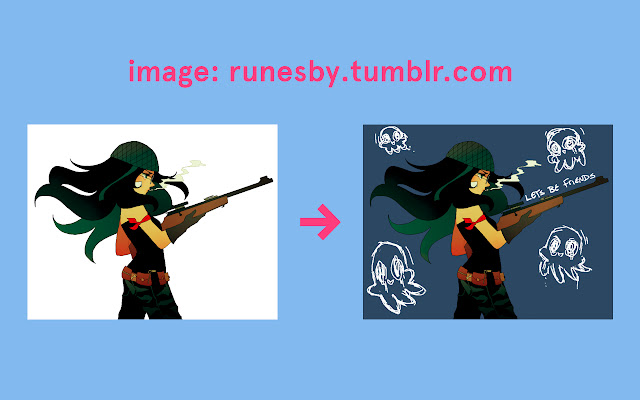


Descargar Archivo CRX de la Extensión Transparent
Descarga archivos de extensión Transparent en formato crx, instala manualmente las extensiones de Chrome en el navegador o comparte los archivos crx con amigos para instalar fácilmente las extensiones de Chrome.
Instrucciones de Uso de la Extensión
Easily view how an image would look on your blog or see hidden text written in white at full resolution! Información Básica de la Extensión
| Nombre |  Transparent Transparent |
| ID | phkhgilamababakkmpaegfafbefhgfoe |
| URL Oficial | https://chrome.google.com/webstore/detail/transparent/phkhgilamababakkmpaegfafbefhgfoe |
| Descripción | Changes the background of images on the dash to blue when moused over to make viewing transparent images easier. |
| Tamaño del Archivo | 4.69 KB |
| Cantidad de Instalaciones | 376 |
| Versión Actual | 1.1.2 |
| Última Actualización | 2014-11-08 |
| Fecha de Publicación | 2014-11-08 |
| Calificación | 2.50/5 Total de 10 Calificaciones |
| Desarrollador | becca.ooo |
| Tipo de Pago | free |
| Idiomas Soportados | en |
| manifest.json | |
{
    "update_url": "https:\/\/clients2.google.com\/service\/update2\/crx",
    "name": "Transparent",
    "version": "1.1.2",
    "manifest_version": 2,
    "description": "Changes the background of images on the dash to blue when moused over to make viewing transparent images easier.",
    "icons": {
        "16": "icon_16.png",
        "48": "icon_48.png",
        "128": "icon_128.png"
    },
    "content_scripts": [
        {
            "matches": [
                "http:\/\/www.tumblr.com\/*",
                "https:\/\/www.tumblr.com\/*"
            ],
            "css": [
                "main.css"
            ]
        }
    ]
} | |