Boomi Extension
Some new functionalities for the DELL Boomi AtomSphere
What is Boomi Extension?
Boomi Extension is a Chrome extension developed by Baptiste BIEBER, and its main feature is "Some new functionalities for the DELL Boomi AtomSphere".
Extension Screenshots
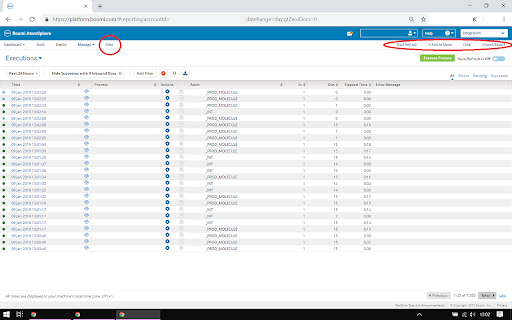
Download Boomi Extension Extension CRX File
Download Boomi Extension extension files in crx format, manually install Chrome extensions in the browser, or share the crx files with friends to easily install Chrome extensions.
Extension Usage Instructions
                        Some new functionalities for the DELL Boomi AtomSphere:
- Customize the Menu by added custom links
- Refresh every 5s in Process Reporting (dedicated button)
- Pulsated unlinked

2020-07-18 (v1.2.0):
- Fix for the new Boomi Inferface

2020-07-20 (v1.3.0):
- Add configuration menu
- You can choose the frequency refresh
- You can remove specific links

2023-12-05 (v1.3.1)
- Manifest version
Extension Basic Information
| Name |  Boomi Extension Boomi Extension |
| ID | aaggknbfbihendcojjngdkkgbppklage |
| Official URL | https://chromewebstore.google.com/detail/boomi-extension/aaggknbfbihendcojjngdkkgbppklage |
| Description | Some new functionalities for the DELL Boomi AtomSphere |
| File Size | 316 KB |
| Installation Count | 79 |
| Current Version | 1.3.1 |
| Last Updated | 2023-12-06 |
| Publish Date | 2019-10-29 |
| Developer | Baptiste BIEBER |
| [email protected] | |
| Payment Type | free |
| Extension Website | https://github.com/baptistebieber/boomi-extension |
| Supported Languages | en |
| manifest.json | |
{
    "update_url": "https:\/\/clients2.google.com\/service\/update2\/crx",
    "manifest_version": 3,
    "name": "Boomi Extension",
    "version": "1.3.1",
    "author": "Baptiste BIEBER",
    "description": "Some new functionalities for the DELL Boomi AtomSphere",
    "homepage_url": "https:\/\/github.com\/baptistebieber\/boomi-extension",
    "icons": {
        "16": "img\/icon-16.png",
        "32": "img\/icon-32.png",
        "48": "img\/icon-48.png",
        "128": "img\/icon-128.png"
    },
    "browser_action": {
        "default_icon": "img\/icon-16.png"
    },
    "content_scripts": [
        {
            "matches": [
                "https:\/\/platform.boomi.com\/*"
            ],
            "css": [
                "css\/style.css"
            ],
            "js": [
                "js\/jquery.min.js",
                "js\/script.js"
            ]
        }
    ],
    "host_permissions": []
} | |