Kindling for Campfire
Adds useful features to 37signals Campfire.
What is Kindling for Campfire?
Kindling for Campfire is a Chrome extension developed by http://yetilabs.org, and its main feature is "Adds useful features to 37signals Campfire.".
Extension Screenshots
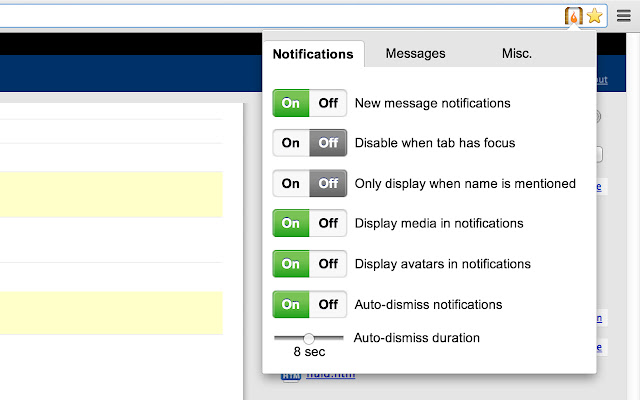


Download Kindling for Campfire Extension CRX File
Download Kindling for Campfire extension files in crx format, manually install Chrome extensions in the browser, or share the crx files with friends to easily install Chrome extensions.
Extension Usage Instructions
                        • Desktop notifications for new messages.
• Adds the ability to remove enter, leave, and timestamp messages.
• Adds emoji & sound auto-complete.
• Option to show user avatars.
• Option to highlight your name when it's mentioned.
• Many other convenient features that improve the campfire experience.

Submit your questions and suggestions at:
https://github.com/ejensen/Kindling/issues

Kindling is open source! Help improve it on GitHub:
https://github.com/ejensen/Kindling
Extension Basic Information
| Name |  Kindling for Campfire Kindling for Campfire |
| ID | abnakpmgckdkcpgbcejajjbllagggcif |
| Official URL | https://chrome.google.com/webstore/detail/kindling-for-campfire/abnakpmgckdkcpgbcejajjbllagggcif |
| Description | Adds useful features to 37signals Campfire. |
| File Size | 105 KB |
| Installation Count | 2,415 |
| Current Version | 4.4.4 |
| Last Updated | 2015-03-17 |
| Publish Date | 2015-03-17 |
| Rating | 4.17/5 Total 48 Ratings |
| Developer | http://yetilabs.org |
| Payment Type | free |
| Supported Languages | en-US |
| manifest.json | |
{
    "update_url": "https:\/\/clients2.google.com\/service\/update2\/crx",
    "manifest_version": 2,
    "name": "Kindling for Campfire",
    "short_name": "Kindling",
    "version": "4.4.4",
    "default_locale": "en_US",
    "description": "__MSG_description__",
    "background": {
        "scripts": [
            "scripts\/kindling.background.js"
        ],
        "persistent": false
    },
    "options_page": "options.html",
    "minimum_chrome_version": "28",
    "icons": {
        "16": "img\/icon16.png",
        "48": "img\/icon48.png",
        "128": "img\/icon128.png"
    },
    "permissions": [
        "notifications",
        "tabs",
        "*:\/\/*.campfirenow.com\/room\/*"
    ],
    "page_action": {
        "default_icon": {
            "19": "img\/icon19.png",
            "38": "img\/icon38.png"
        },
        "default_title": "__MSG_iconTooltip__",
        "default_popup": "options.html"
    },
    "web_accessible_resources": [
        "img\/campfire.png",
        "img\/avatar.png",
        "img\/empty_avatar.png",
        "img\/emoji.png",
        "img\/sound.png",
        "img\/symbols.png",
        "img\/nature.png",
        "img\/objects.png",
        "img\/places.png",
        "img\/eye.svg",
        "img\/close.svg",
        "scripts\/kindling.inject.js"
    ],
    "content_scripts": [
        {
            "matches": [
                "*:\/\/*.campfirenow.com\/room\/*"
            ],
            "css": [
                "css\/content.css",
                "lib\/coda-slider\/coda-slider.css",
                "lib\/at-who\/jquery.atwho.css"
            ],
            "js": [
                "lib\/jquery.min.js",
                "lib\/pubsub.min.js",
                "lib\/highlight.min.js",
                "lib\/coda-slider\/jquery.coda-slider.js",
                "lib\/at-who\/jquery.atwho.min.js",
                "scripts\/kindling.common.js",
                "scripts\/kindling.theme.js",
                "scripts\/kindling.emoji.js",
                "scripts\/kindling.sounds.js",
                "scripts\/kindling.highlight.js",
                "scripts\/kindling.messagefilter.js",
                "scripts\/kindling.avatars.js",
                "scripts\/kindling.notificationpublisher.js",
                "scripts\/kindling.contentscript.js",
                "scripts\/kindling.minimalinterface.js",
                "scripts\/kindling.expandabbreviations.js",
                "scripts\/kindling.history.js",
                "scripts\/kindling.images.js"
            ]
        }
    ]
} | |