ReadingBuddies
Tools for easier reading.
What is ReadingBuddies?
ReadingBuddies is a Chrome extension developed by readingbuddiesapp, and its main feature is "Tools for easier reading.".
Extension Screenshots


Download ReadingBuddies Extension CRX File
Download ReadingBuddies extension files in crx format, manually install Chrome extensions in the browser, or share the crx files with friends to easily install Chrome extensions.
Extension Usage Instructions
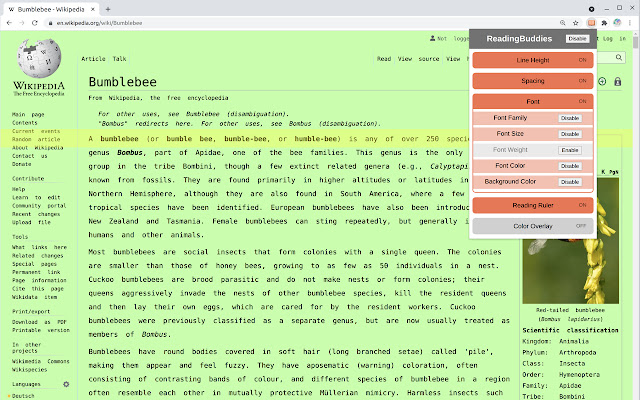
                        ReadingBuddies allows you to adjust visual elements on webpages for accessibility, style, and easy reading.

Features:
    -  Reading ruler, a horizontal highlight bar that follows the mouse
    -  Adjust line spacing between text
    -  Adjust spacing between words and characters
    -  Adjust fonts, font size, and font weight
    -  Adjust font and background colors
    -  Add color filters over webpages
    -  Colorful themes! Right click extension icon, choose options, and pick a color

ReadingBuddies does not contain ads and is free forever.  ReadingBuddies respects your privacy and does not track any web activity.
Extension Basic Information
| Name |  ReadingBuddies ReadingBuddies |
| ID | adfjlknhfdbnfajbdlhilnbepfnemigm |
| Official URL | https://chrome.google.com/webstore/detail/readingbuddies/adfjlknhfdbnfajbdlhilnbepfnemigm |
| Description | Tools for easier reading. |
| File Size | 33.41 KB |
| Installation Count | 307 |
| Current Version | 0.22 |
| Last Updated | 2022-07-21 |
| Publish Date | 2020-07-23 |
| Rating | 4.75/5 Total 4 Ratings |
| Developer | readingbuddiesapp |
| [email protected] | |
| Payment Type | free |
| Help Page URL | https://github.com/jordanpemberton/ReadingBuddies/ |
| Supported Languages | en-US |
| manifest.json | |
{
    "update_url": "https:\/\/clients2.google.com\/service\/update2\/crx",
    "name": "ReadingBuddies",
    "description": "Tools for easier reading.",
    "version": "0.22",
    "manifest_version": 2,
    "permissions": [
        "storage",
        "tabs",
        "http:\/\/*\/*",
        "https:\/\/*\/*"
    ],
    "background": {
        "scripts": [
            "background.js"
        ],
        "persistent": false
    },
    "browser_action": {
        "default_title": "ReadingBuddies",
        "default_popup": "popup.html",
        "default_icon": {
            "16": "icons\/icon16.png",
            "32": "icons\/icon32.png",
            "48": "icons\/icon48.png"
        }
    },
    "options_page": "user_settings.html",
    "icons": {
        "16": "icons\/icon16.png",
        "32": "icons\/icon32.png",
        "48": "icons\/icon48.png",
        "128": "icons\/icon128.png"
    }
} | |