copylify
copylify helps you to copy unsegmented data not only from single tab or pararaph but from multiple platform to one place.
What is copylify?
copylify is a Chrome extension developed by Barun Sarraf, and its main feature is "copylify helps you to copy unsegmented data not only from single tab or pararaph but from multiple platform to one place.".
Extension Screenshots
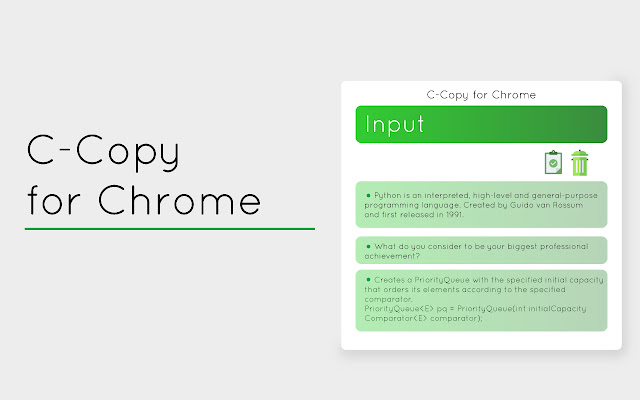


Download copylify Extension CRX File
Download copylify extension files in crx format, manually install Chrome extensions in the browser, or share the crx files with friends to easily install Chrome extensions.
Extension Usage Instructions
                        Are you someone who struggles to keep track of your daily tasks and often forgets important deadlines? Look no further because our Chrome extension is here to save the day!

Our Copylify extension is designed to make your life easier by helping you manage your tasks right from your browser. The best part? It saves your data in Chrome, so it remains with you all the time until you remove it.

Here are some of the features of our to-do list extension:

1. Task Management: You can create a list of all the tasks you need to complete and check them off as you go along. You can also add new tasks and delete old ones as needed.

2. UI Customisation: Our extension allows you to customize the user interface to suit your preferences. You can choose from color (the icon in the extension) to make the extension look just the way you want it.

3. Copy from Any Tab: With our extension, you can copy everything together from any tab in your browser. This means you can quickly and easily transfer important information from one website to your to-do list without having to switch back and forth between tabs.

Problems:
1. Do you ever come across important text that you need to save for later?
2. Have you ever wanted to store essential questions/links that won't disappear even if you close your browser?
3. Is it frustrating to copy data from different tabs and repeatedly save multiple copies in different places eg some text editor tool?

Solutions:
1. By helping you to focus on what interests you, this tool can increase your concentration and productivity while reading.
2. In case of an emergency, you can easily add your own essential text, including numbers and scores.
3. This feature allows the data to remain stored even if you shut down your PC until you choose to clear it.

HOW TO USE?
1. You can easily insert text directly into the extension using the input field.
2. With the "Copylify it!" feature, simply select the text you want to copy, right-click, and choose "Copylify it!" from the context menu.

Whether you're a student, a busy professional, or just someone who needs a little help staying organised, Copylify is the perfect solution. Download our extension today and start enjoying the benefits of a well-managed lists!
Extension Basic Information
| Name |  copylify copylify |
| ID | agnlipecgkknmpnlacfdlohopgmmcohg |
| Official URL | https://chrome.google.com/webstore/detail/copylify/agnlipecgkknmpnlacfdlohopgmmcohg |
| Description | copylify helps you to copy unsegmented data not only from single tab or pararaph but from multiple platform to one place. |
| File Size | 247 KB |
| Installation Count | 53 |
| Current Version | 1.3 |
| Last Updated | 2023-03-06 |
| Publish Date | 2020-10-03 |
| Rating | 5.00/5 Total 7 Ratings |
| Developer | Barun Sarraf |
| [email protected] | |
| Payment Type | free |
| Extension Website | https://www.instagram.com/copy.lify/?hl=en |
| Supported Languages | en-US |
| manifest.json | |
{
    "update_url": "https:\/\/clients2.google.com\/service\/update2\/crx",
    "manifest_version": 3,
    "name": "copylify",
    "description": "copylify helps you to copy unsegmented data not only from single tab or pararaph but from multiple platform to one place.",
    "version": "1.3",
    "icons": {
        "128": "icon128.png",
        "48": "icon48.png",
        "16": "icon16.png"
    },
    "action": {
        "default_icon": "icon16.png",
        "default_popup": "popup.html"
    },
    "background": {
        "service_worker": "eventpage.js"
    },
    "commands": {
        "Ctrl+M": {
            "suggested_key": {
                "default": "Ctrl+M",
                "mac": "Command+M"
            },
            "description": "press Ctrl+M in windows or command+M in mac by selecting text."
        }
    },
    "permissions": [
        "storage",
        "contextMenus",
        "notifications",
        "http:\/\/*\/",
        "https:\/\/*\/",
        "scripting"
    ]
} | |