The Great Suspender Recovery Tool
Recover your lost Great Suspender Tabs!
What is The Great Suspender Recovery Tool?
The Great Suspender Recovery Tool is a Chrome extension developed by Dave Stewart, and its main feature is "Recover your lost Great Suspender Tabs!".
Extension Screenshots


Download The Great Suspender Recovery Tool Extension CRX File
Download The Great Suspender Recovery Tool extension files in crx format, manually install Chrome extensions in the browser, or share the crx files with friends to easily install Chrome extensions.
Extension Usage Instructions
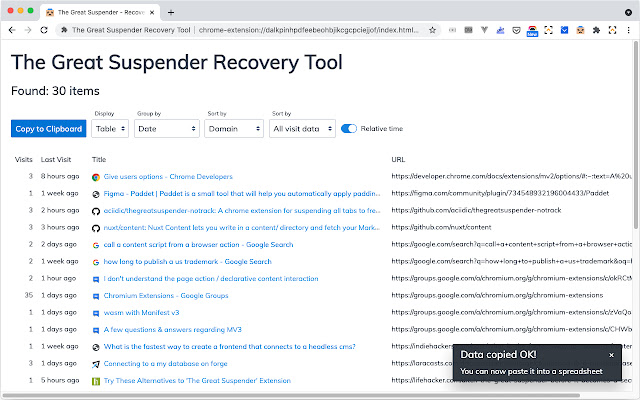
                        This extension attempts to recover your suspended Great Suspender tabs by searching your browser history and displaying any found suspended tabs.

You can then:

- adjust grouping, sorting and detail
- save as folders and bookmarks
- copy URLs to the clipboard
Extension Basic Information
| Name |  The Great Suspender Recovery Tool The Great Suspender Recovery Tool |
| ID | ainlmpkfinfbbgdpimmldfdgpenmclmk |
| Official URL | https://chrome.google.com/webstore/detail/the-great-suspender-recov/ainlmpkfinfbbgdpimmldfdgpenmclmk |
| Description | Recover your lost Great Suspender Tabs! |
| File Size | 164 KB |
| Installation Count | 2,611 |
| Current Version | 1.3.0 |
| Last Updated | 2021-02-14 |
| Publish Date | 2021-02-09 |
| Rating | 4.47/5 Total 15 Ratings |
| Developer | Dave Stewart |
| [email protected] | |
| Payment Type | free |
| Extension Website | https://github.com/davestewart/great-suspender-recovery-tool |
| Help Page URL | https://github.com/davestewart/great-suspender-recovery-tool/issues |
| Privacy Policy Page URL | https://github.com/davestewart/better-fastmail/blob/main/PRIVACY.md |
| Supported Languages | en-GB |
| manifest.json | |
{
    "update_url": "https:\/\/clients2.google.com\/service\/update2\/crx",
    "name": "The Great Suspender Recovery Tool",
    "description": "Recover your lost Great Suspender Tabs!",
    "version": "1.3.0",
    "manifest_version": 2,
    "icons": {
        "16": "assets\/icons\/icon-16.png",
        "32": "assets\/icons\/icon-32.png",
        "48": "assets\/icons\/icon-48.png",
        "128": "assets\/icons\/icon-128.png"
    },
    "permissions": [
        "windows",
        "history",
        "bookmarks",
        "clipboardWrite",
        "chrome:\/\/favicon\/*"
    ],
    "background": {
        "persistent": false,
        "scripts": [
            "scripts\/background.js"
        ]
    },
    "web_accessible_resources": [
        "index.html"
    ],
    "browser_action": {
        "default_icon": {
            "32": "assets\/icons\/icon-32.png"
        }
    },
    "content_security_policy": "script-src 'self' 'unsafe-eval'; object-src 'self'; img-src * 'self' data: https: http: chrome: chrome:\/\/favicon\/"
} | |