ChromeKeePass Bèta
Extension for automatically entering logins from KeePass
What is ChromeKeePass Bèta?
ChromeKeePass Bèta is a Chrome extension developed by RoelVB, and its main feature is "Extension for automatically entering logins from KeePass".
Extension Screenshots

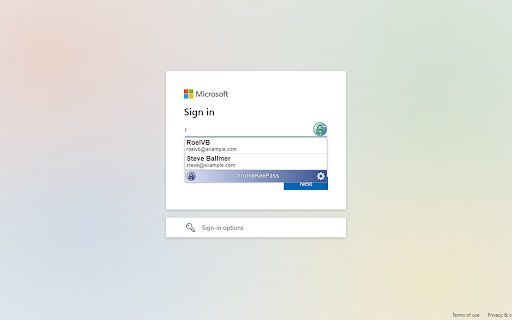


Download ChromeKeePass Bèta Extension CRX File
Download ChromeKeePass Bèta extension files in crx format, manually install Chrome extensions in the browser, or share the crx files with friends to easily install Chrome extensions.
Extension Usage Instructions
                        When you want to be the first to have the newest ChromeKeePass feature you need this extension.
If you're looking for the stable release, you can find it at https://chrome.google.com/webstore/detail/chromekeepass/dphoaaiomekdhacmfoblfblmncpnbahm

This is an open source extension that securely connects KeePass to your browser for automatically entering logins into websites.

The source code can be found at https://github.com/RoelVB/ChromeKeePass
And if you're experiencing any issues you can report them at https://github.com/RoelVB/ChromeKeePass/issues
Extension Basic Information
| Name |  ChromeKeePass Bèta ChromeKeePass Bèta |
| ID | ameocahhjkljlabpiajepcipkbcpjpep |
| Official URL | https://chromewebstore.google.com/detail/chromekeepass-b%C3%A8ta/ameocahhjkljlabpiajepcipkbcpjpep |
| Description | Extension for automatically entering logins from KeePass |
| File Size | 559 KB |
| Installation Count | 95 |
| Current Version | 2.1.0 |
| Last Updated | 2024-02-15 |
| Publish Date | 2023-07-11 |
| Developer | RoelVB |
| [email protected] | |
| Payment Type | free |
| Extension Website | https://github.com/RoelVB/ChromeKeePass |
| Help Page URL | https://github.com/RoelVB/ChromeKeePass/issues |
| Privacy Policy Page URL | https://github.com/RoelVB/ChromeKeePass/blob/master/Documents/Privacy.md |
| Supported Languages | en |
| manifest.json | |
{
"update_url": "https:\/\/clients2.google.com\/service\/update2\/crx",
"manifest_version": 3,
"name": "ChromeKeePass B\u00e8ta",
"description": "Extension for automatically entering logins from KeePass",
"version": "2.1.0",
"commands": {
"redetect_fields": {
"suggested_key": {
"default": "Ctrl+Shift+Z",
"mac": "Command+Shift+Z"
},
"description": "Redetect credential fields"
}
},
"content_scripts": [
{
"matches": [
" | |