8x8 Meet for Google Chrome
Easily schedule 8x8 meetings in any calendaring application in a Google Chrome Browser.
What is 8x8 Meet for Google Chrome?
8x8 Meet for Google Chrome is a Chrome extension developed by http://8x8.vc, and its main feature is "Easily schedule 8x8 meetings in any calendaring application in a Google Chrome Browser.".
Extension Screenshots
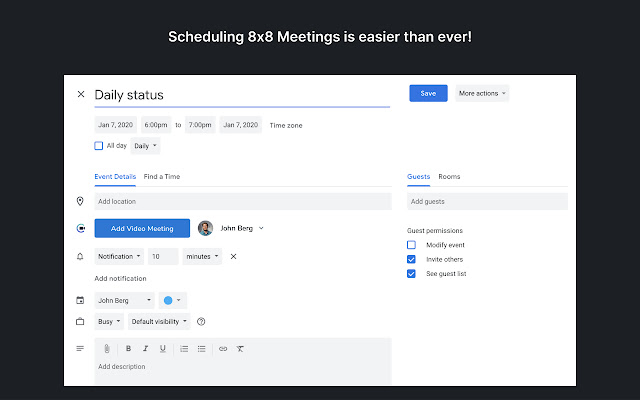


Download 8x8 Meet for Google Chrome Extension CRX File
Download 8x8 Meet for Google Chrome extension files in crx format, manually install Chrome extensions in the browser, or share the crx files with friends to easily install Chrome extensions.
Extension Usage Instructions
                        8x8 Meet is a scalable meetings solution perfect for companies of all sizes. It’s simple to use and offers limitless flexibility on how you collaborate with colleagues, vendors and customers.

The 8x8 Meet Chrome extension allows you to schedule and join meetings within your own calendar and provides the ability to:
Set your meeting link as the meeting location
Automatically include all call-in details and URLs (and meeting passwords)
Invite attendees from your contact list
Allow participants to join with just one click

It also provides:
* Full participation in meetings without the requirement of creating an account
* Ability to create passwords for your meeting space to control who has access
* Encryption (by default) for all your meetings
* High quality audio and video delivered with the clarity and richness of Opus and VP8
* A browser experience that enables all participants to join with a single click of the meeting URL
* Custom URLs that are easy to remember and support your company brand (requires registration)
Extension Basic Information
| Name |  8x8 Meet for Google Chrome 8x8 Meet for Google Chrome |
| ID | aodngmlagnikpifloamojhehjgeglfjh |
| Official URL | https://chrome.google.com/webstore/detail/8x8-meet-for-google-chrom/aodngmlagnikpifloamojhehjgeglfjh |
| Description | Easily schedule 8x8 meetings in any calendaring application in a Google Chrome Browser. |
| File Size | 894 KB |
| Installation Count | 182,305 |
| Current Version | 2.9.8 |
| Last Updated | 2022-12-13 |
| Publish Date | 2020-06-23 |
| Rating | 4.50/5 Total 20 Ratings |
| Developer | http://8x8.vc |
| [email protected] | |
| Payment Type | free |
| Privacy Policy Page URL | https://www.8x8.com/terms-and-conditions/privacy-policy |
| Supported Languages | en-US |
| manifest.json | |
{
    "update_url": "https:\/\/clients2.google.com\/service\/update2\/crx",
    "author": "8x8",
    "manifest_version": 2,
    "key": "MIIBIjANBgkqhkiG9w0BAQEFAAOCAQ8AMIIBCgKCAQEAmUPhUvNaX31XqdxcC\/qJRHGLqnZrFSaMkYYwLz0x1chqE50JfK5eEoSYOHar\/LStd4mJorqE7WW2LqbJeNOArGoIxC1N+PtSbLOIIMjRKWoce1rfe3Elxt\/ujEmaknRn7YIyyO5+p3dn8KeAt+w0oWOg76m7uNoPIAPVAZd4w6WuZOr3hIjS9yEXpOB4+3CJCkaHigQ0vbkpZDNgDQK\/0BrRVOsalYWtfJro+5a01GpDFdosvXryoYA5ajinGw2rVV6A6dRo+IWKf5I\/azrJ3EhOugpDFuQYWkxFL9IZKGRStu8pilFtnqtAA0MlJDeZcuSX5mXDW9V+AYEfMha1QQIDAQAB",
    "name": "8x8 Meet for Google Chrome",
    "version": "2.9.8",
    "description": "Easily schedule 8x8 meetings in any calendaring application in a Google Chrome Browser.",
    "icons": {
        "128": "assets\/images\/auth0\/logo128.png"
    },
    "background": {
        "scripts": [
            "scripts\/analytics.js",
            "scripts\/auth0.js",
            "scripts\/background.js"
        ]
    },
    "browser_action": {
        "default_icon": {
            "128": "assets\/images\/auth0\/logo128.png"
        },
        "default_title": "8x8 Video Meetings",
        "default_popup": "templates\/popup.html"
    },
    "content_scripts": [
        {
            "matches": [
                "*:\/\/calendar.google.com\/calendar\/*",
                "*:\/\/outlook.office.com\/*",
                "*:\/\/outlook.office365.com\/*",
                "*:\/\/calendly.com\/*"
            ],
            "js": [
                "scripts\/main.js"
            ],
            "css": [
                "assets\/css\/meeting.css"
            ]
        }
    ],
    "web_accessible_resources": [
        "assets\/images\/icon48.png",
        "assets\/css\/meeting.css"
    ],
    "content_security_policy": "script-src 'self' https:\/\/www.google-analytics.com; object-src 'self'",
    "permissions": [
        "https:\/\/www.google-analytics.com\/*",
        "https:\/\/api-vo.jitsi.net\/*",
        "https:\/\/cloud8.8x8.com\/*",
        "https:\/\/calendar.google.com\/*",
        "https:\/\/outlook.office365.com\/*",
        "https:\/\/outlook.live.com\/*",
        "https:\/\/outlook.office.com\/*",
        "https:\/\/eight.auth0.com\/*",
        "https:\/\/calendly.com\/*",
        "tabs",
        "storage"
    ]
} | |