Deloitte Credentials Wallet
Deloitte Credentials Wallet. The wallet for your credentials.
What is Deloitte Credentials Wallet?
Deloitte Credentials Wallet is a Chrome extension developed by https://kyc-credentials.com, and its main feature is "Deloitte Credentials Wallet. The wallet for your credentials.".
Extension Screenshots

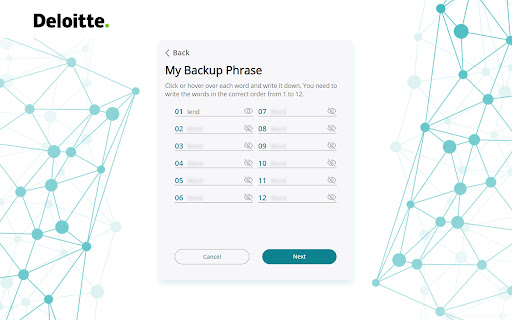

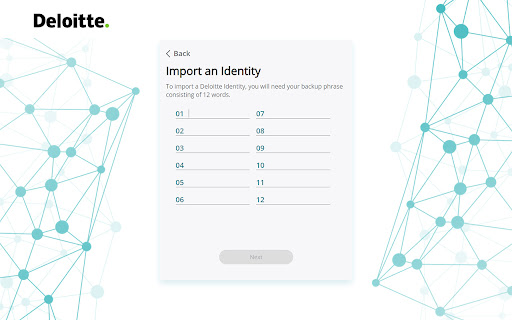
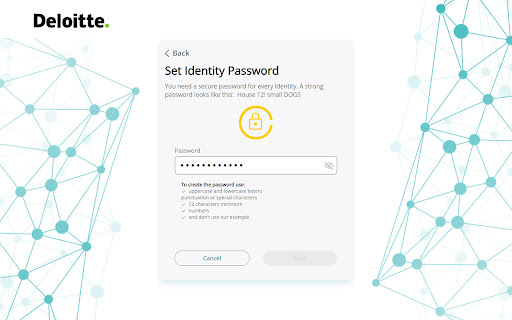
Download Deloitte Credentials Wallet Extension CRX File
Download Deloitte Credentials Wallet extension files in crx format, manually install Chrome extensions in the browser, or share the crx files with friends to easily install Chrome extensions.
Extension Usage Instructions
                        The Wallet for your Deloitte KYC credentials.

The Deloitte Wallet is a browser extension in which to store and share your Deloitte KYC credentials with third party verifiers. They can then trust these credentials and use them to identify and verify counterparties.

With the Deloitte KYC credential service, users can create digital identities using blockchain. The Deloitte Wallet (built on the Sporran Wallet) acts like a physical wallet, storing personal digital credentials and providing users with both anonymity and control over their own data when they present their information to online services.

For download and usage of the Deloitte Wallet the Terms and Conditions as outlined under https://kyc-credentials.com/terms-of-use are applicable.
Extension Basic Information
| Name |  Deloitte Credentials Wallet Deloitte Credentials Wallet |
| ID | bflldjbbpcjgooclhpmhdhioebmnnkcm |
| Official URL | https://chromewebstore.google.com/detail/deloitte-credentials-wall/bflldjbbpcjgooclhpmhdhioebmnnkcm |
| Description | Deloitte Credentials Wallet. The wallet for your credentials. |
| File Size | 1.48 MB |
| Installation Count | 969 |
| Current Version | 2023.11.7 |
| Last Updated | 2023-11-09 |
| Publish Date | 2023-10-31 |
| Rating | 5.00/5 Total 47 Ratings |
| Developer | https://kyc-credentials.com |
| [email protected] | |
| Payment Type | free |
| Extension Website | https://kyc-credentials.com |
| Help Page URL | https://kyc-credentials.com/home(modals:contact) |
| Privacy Policy Page URL | https://www2.deloitte.com/ch/en/legal/privacy.html |
| Supported Languages | en |
| manifest.json | |
{
    "update_url": "https:\/\/clients2.google.com\/service\/update2\/crx",
    "manifest_version": 3,
    "name": "__MSG_manifest_name__",
    "short_name": "__MSG_manifest_short_name__",
    "description": "__MSG_manifest_description__",
    "version": "2023.11.7",
    "default_locale": "en",
    "action": {
        "default_icon": {
            "16": "icon\/dark\/favicon-16x16.png",
            "32": "icon\/dark\/favicon-32x32.png",
            "192": "icon\/dark\/android-chrome-192x192.png",
            "128": "icon\/dark\/android-chrome-512x512.png"
        },
        "default_popup": "popup.html"
    },
    "background": {
        "service_worker": "js\/backgroundScript.js"
    },
    "content_scripts": [
        {
            "matches": [
                "*:\/\/*\/*"
            ],
            "js": [
                "js\/contentScript.js"
            ]
        }
    ],
    "icons": {
        "16": "icon\/dark\/favicon-16x16.png",
        "32": "icon\/dark\/favicon-32x32.png",
        "192": "icon\/dark\/android-chrome-192x192.png",
        "128": "icon\/dark\/android-chrome-512x512.png"
    },
    "permissions": [
        "storage"
    ],
    "content_security_policy": {
        "extension_pages": "script-src 'self' 'wasm-unsafe-eval'; object-src 'self';"
    },
    "web_accessible_resources": [
        {
            "resources": [
                "js\/injectedScript.js"
            ],
            "matches": [
                "*:\/\/*\/*"
            ]
        }
    ]
} | |