Timely
See how much time you're spending on Facebook in real-time
What is Timely?
Timely is a Chrome extension developed by http://timely-chrome-extension.blogspot.com, and its main feature is "See how much time you're spending on Facebook in real-time".
Extension Screenshots


Download Timely Extension CRX File
Download Timely extension files in crx format, manually install Chrome extensions in the browser, or share the crx files with friends to easily install Chrome extensions.
Extension Usage Instructions
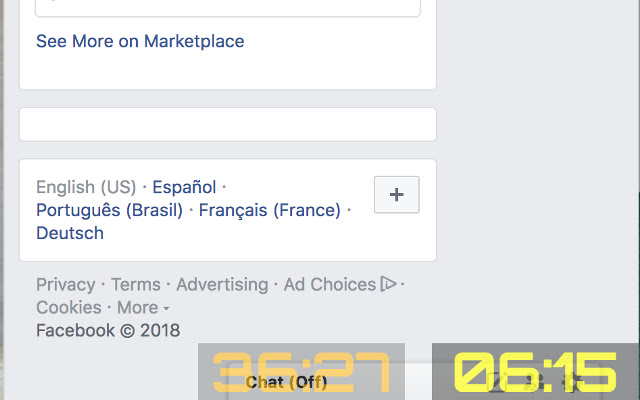
                        This extension will display two stopwatches every time you open Facebook on the browser; one stopwatch will display how much time you have been spending since you opened Facebook in a tab (session time) and the other one will display the total spent time per day.

Both stopwatches will change color according to the time spent. The left stopwatch will turn red when the total time is more than 60 minutes and the right stopwatch when the session time is more than 15 minutes.
Extension Basic Information
| Name |  Timely Timely |
| ID | bfmbkfjklpkaogjlmcengklnloplijal |
| Official URL | https://chrome.google.com/webstore/detail/timely/bfmbkfjklpkaogjlmcengklnloplijal |
| Description | See how much time you're spending on Facebook in real-time |
| File Size | 33.11 KB |
| Installation Count | 98 |
| Current Version | 1.0.2 |
| Last Updated | 2018-07-15 |
| Publish Date | 2018-07-15 |
| Rating | 5.00/5 Total 1 Ratings |
| Developer | http://timely-chrome-extension.blogspot.com |
| [email protected] | |
| Payment Type | free |
| Supported Languages | en |
| manifest.json | |
{
    "update_url": "https:\/\/clients2.google.com\/service\/update2\/crx",
    "name": "__MSG_appName__",
    "version": "1.0.2",
    "manifest_version": 2,
    "description": "__MSG_appDescription__",
    "icons": {
        "16": "images\/icon-16.png",
        "19": "images\/icon-19.png",
        "38": "images\/icon-38.png",
        "48": "images\/icon-48.png",
        "128": "images\/icon-128.png"
    },
    "author": "Marco Ch\u00e1vez",
    "default_locale": "en",
    "background": {
        "scripts": [
            "scripts\/background.js"
        ]
    },
    "permissions": [
        "identity",
        "storage"
    ],
    "content_scripts": [
        {
            "css": [
                "styles\/content.css"
            ],
            "js": [
                "scripts\/analytics.tracker.js",
                "scripts\/content.js"
            ],
            "matches": [
                "https:\/\/facebook.com\/*",
                "https:\/\/www.facebook.com\/*"
            ]
        }
    ],
    "content_security_policy": "script-src 'self' https:\/\/www.google-analytics.com; object-src 'self'",
    "web_accessible_resources": [
        "fonts\/orbitron-bold.otf"
    ]
} | |