VPNMatic Free VPN
Unblock websites and stay secure with FreeVPN SSL VPN proxy.
What is VPNMatic Free VPN?
VPNMatic Free VPN is a Chrome extension developed by http://vpnmatic.com, and its main feature is "Unblock websites and stay secure with FreeVPN SSL VPN proxy.".
Extension Screenshots
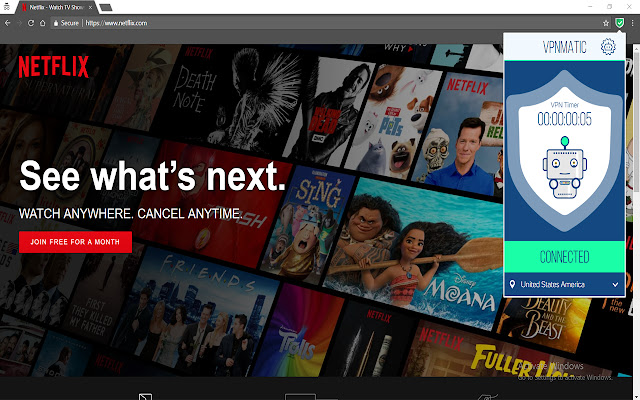


Download VPNMatic Free VPN Extension CRX File
Download VPNMatic Free VPN extension files in crx format, manually install Chrome extensions in the browser, or share the crx files with friends to easily install Chrome extensions.
Extension Usage Instructions
                        Download our Chrome extension and connect within seconds to our VPN servers and protect yourself. Our VPN client comes with many useful features to protect your online safety.
VPNMatic is the ultimate solution to bypass internet censorship. Just turn it on and get access to your favorite content like Facebook, YouTube, Google, and many others. Our service will secure your online privacy and provide safe access to the open internet on your Chrome browser anytime and anywhere.

Benefits:
Strong Security and Unlimited Online Access.
No Malware. No Tracking. No Ads.
Intuitive and User-Friendly Extension.
Extension Basic Information
| Name |  VPNMatic Free VPN VPNMatic Free VPN |
| ID | bkkgdjpomdnfemhhkalfkogckjdkcjkg |
| Official URL | https://chrome.google.com/webstore/detail/vpnmatic-free-vpn/bkkgdjpomdnfemhhkalfkogckjdkcjkg |
| Description | Unblock websites and stay secure with FreeVPN SSL VPN proxy. |
| File Size | 822 KB |
| Installation Count | 22 |
| Current Version | 1.7 |
| Last Updated | 2017-12-13 |
| Publish Date | 2017-12-13 |
| Rating | 4.33/5 Total 6 Ratings |
| Developer | http://vpnmatic.com |
| Payment Type | free |
| Supported Languages | en |
| manifest.json | |
{
    "update_url": "https:\/\/clients2.google.com\/service\/update2\/crx",
    "manifest_version": 2,
    "name": "VPNMatic Free VPN",
    "short_name": "VpnMatic",
    "description": "Unblock websites and stay secure with FreeVPN SSL VPN proxy.",
    "version": "1.7",
    "icons": {
        "16": "icon16.png",
        "48": "icon48.png",
        "128": "icon128.png"
    },
    "browser_action": {
        "default_icon": {
            "48": "images\/off.png",
            "64": "images\/off.png",
            "128": "images\/off.png"
        },
        "default_popup": "popup.html",
        "default_title": "VpnMatic"
    },
    "background": {
        "scripts": [
            "background.js"
        ]
    },
    "content_security_policy": "script-src 'self' https:\/\/vpnmatic.com\/; object-src 'self'",
    "content_scripts": [
        {
            "matches": [
                "http:\/\/*\/*",
                "https:\/\/*\/*"
            ],
            "js": [
                "popup.js"
            ]
        }
    ],
    "permissions": [
        "proxy",
        "storage",
        "alarms",
        "notifications"
    ]
} | |