IBM RPA Web Recorder
Create a RPA Automation script by recording browser actions
What is IBM RPA Web Recorder?
IBM RPA Web Recorder is a Chrome extension developed by IBM, and its main feature is "Create a RPA Automation script by recording browser actions".
Extension Screenshots

Download IBM RPA Web Recorder Extension CRX File
Download IBM RPA Web Recorder extension files in crx format, manually install Chrome extensions in the browser, or share the crx files with friends to easily install Chrome extensions.
Extension Usage Instructions
                        Overview

The web recorder is a tool in IBM RPA Studio that record your actions on a browser,
automatically adding the equivalent command in your script. You can use the web
recorder to map elements or record your actions in a website.
This extension enables IBM RPA Automation to aid on developing scripts targeting web
browser automation.

Using web recorder
1. Log in to IBM RPA Studio.
2. Create a new script or open an existing script.
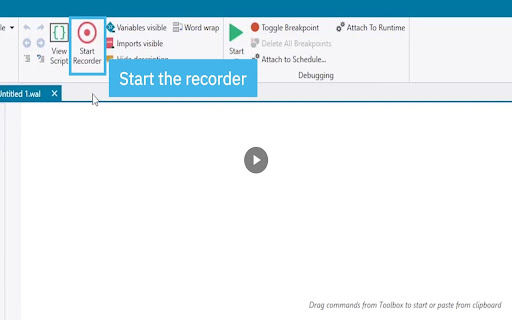
3. On the Home tab, click Start Recorder.
4. Click the Activate Web Recorder icon.
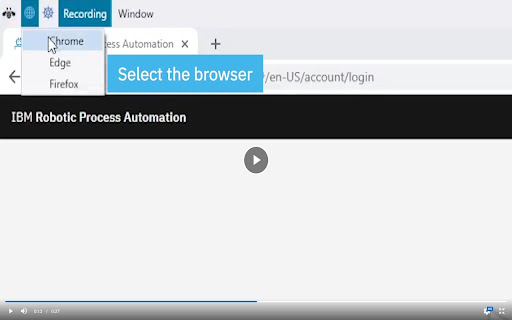
5. Select a browser option:
o Chrome
o Edge
o Firefox
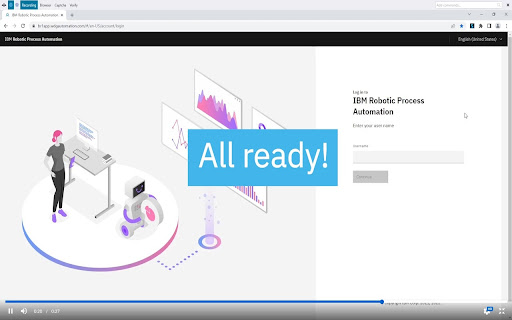
6. In your selected browser, click the Web Recorder extension to activate it:
o If the icon is gray, the plug-in is installed and working.
o If the icon is blue, the recorder is sending commands to IBM RPA Studio
when activated by the recorder for the selected browser.
o If the icon is red, the plug-in is installed, but failing to communicate with
the IBM RPA service.
Extension Basic Information
| Name |  IBM RPA Web Recorder IBM RPA Web Recorder |
| ID | blajkkcceijnkjgcoeipldglonnnpnlm |
| Official URL | https://chromewebstore.google.com/detail/ibm-rpa-web-recorder/blajkkcceijnkjgcoeipldglonnnpnlm |
| Description | Create a RPA Automation script by recording browser actions |
| File Size | 78.1 KB |
| Installation Count | 1,221 |
| Current Version | 1.2.3 |
| Last Updated | 2024-02-28 |
| Publish Date | 2019-10-29 |
| Rating | 3.00/5 Total 2 Ratings |
| Developer | IBM |
| [email protected] | |
| Payment Type | free |
| Extension Website | https://www.ibm.com/products/robotic-process-automation |
| Privacy Policy Page URL | https://www.ibm.com/software/reports/compatibility/clarity-reports/report/html/softwareReqsForProduct?deliverableId=7D6B3530A02A11EA88F5BE8EBF8F323B |
| Supported Languages | en-US |
| manifest.json | |
{
"update_url": "https:\/\/clients2.google.com\/service\/update2\/crx",
"manifest_version": 3,
"name": "IBM RPA Web Recorder",
"version": "1.2.3",
"description": "Create a RPA Automation script by recording browser actions",
"icons": {
"48": "icons\/ico48.png"
},
"action": {
"default_icon": "icons\/disconnected-icon.png",
"default_title": "IBM RPA Automation (disconnected)"
},
"background": {
"service_worker": "service-worker.js"
},
"content_scripts": [
{
"run_at": "document_end",
"matches": [
"http:\/\/*\/*",
"https:\/\/*\/*"
],
"css": [
"content\/highlighter.css"
],
"js": [
"jquery-3.7.1.min.js",
"jquery-extensions.js",
"common.js",
"content\/timeout.js",
"content\/highlighter.js",
"content\/recorder.js",
"content\/duplicates.js",
"content\/content.js"
],
"all_frames": true
}
],
"permissions": [
"alarms",
"tabs",
"scripting",
"activeTab"
],
"host_permissions": [
" | |