Fastest PDF Combine
Fast PDF Combine in your newtab anytime.
What is Fastest PDF Combine?
Fastest PDF Combine is a Chrome extension developed by Springfield Search Solutions, and its main feature is "Fast PDF Combine in your newtab anytime.".
Extension Screenshots

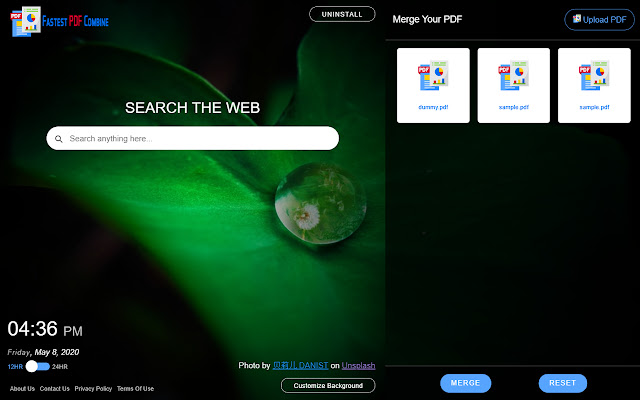

Download Fastest PDF Combine Extension CRX File
Download Fastest PDF Combine extension files in crx format, manually install Chrome extensions in the browser, or share the crx files with friends to easily install Chrome extensions.
Extension Usage Instructions
                        The Fastest PDF Combine Extension gives you an easy way for merging the PDFs and garnish your Chrome Browser New tab default looks to an attractive New tab.

This is a free add-on for Chrome Browser where the primary target is merging PDFs easily and quickly. Also, set a background from our selective Natural images gallery powered by unsplash in your Chrome Browser default new tab. We are actually changing your Chrome browser default new tab page.

Also as an added feature we are giving you easy way to search your desired information, image, video and others through Bing search.

There is also a Digital Clock in New tab where you can check your current location time in a 12 hours/ 24-hour format with date according to your preference.

By clicking "Add to chrome", I accept and agree to install the "Fastest PDF Combine" Chrome extension and setting Chrome™ New Tab to that provided by the service and the Privacy (https://www.springfieldsearchsolutions.com/privacy-policy) and Terms of Use (https://www.springfieldsearchsolutions.com/terms-and-conditions).
Extension Basic Information
| Name |  Fastest PDF Combine Fastest PDF Combine |
| ID | cdhbgoejgdccibmcnjlmhbgbmdineamm |
| Official URL | https://chrome.google.com/webstore/detail/fastest-pdf-combine/cdhbgoejgdccibmcnjlmhbgbmdineamm |
| Description | Fast PDF Combine in your newtab anytime. |
| File Size | 817 KB |
| Installation Count | 63 |
| Current Version | 3.2 |
| Last Updated | 2020-08-26 |
| Publish Date | 2020-05-08 |
| Developer | Springfield Search Solutions |
| [email protected] | |
| Payment Type | free |
| Privacy Policy Page URL | http://www.springfieldsearchsolutions.com/privacy-policy |
| Supported Languages | en-US |
| manifest.json | |
{
    "update_url": "https:\/\/clients2.google.com\/service\/update2\/crx",
    "manifest_version": 2,
    "name": "Fastest PDF Combine",
    "description": "Fast PDF Combine in your newtab anytime.",
    "homepage_url": "https:\/\/www.fastestpdfcombine.com\/",
    "background": {
        "scripts": [
            "js\/background.js"
        ],
        "persistent": false
    },
    "permissions": [
        "storage",
        "https:\/\/www.springfieldsearchsolutions.com\/fastestpdfcombine\/*"
    ],
    "version": "3.2",
    "browser_action": {
        "default_icon": {
            "16": "images\/bd-16.png",
            "32": "images\/bd-32.png",
            "48": "images\/bd-48.png",
            "128": "images\/bd-128.png"
        }
    },
    "icons": {
        "16": "images\/bd-16.png",
        "32": "images\/bd-32.png",
        "48": "images\/bd-48.png",
        "128": "images\/bd-128.png"
    },
    "chrome_url_overrides": {
        "newtab": "landing.html"
    },
    "web_accessible_resources": [
        "images\/*.*"
    ],
    "content_security_policy": "script-src 'self' https:\/\/www.springfieldsearchsolutions.com\/fastestpdfcombine\/custom.js https:\/\/www.springfieldsearchsolutions.com\/fastestpdfcombine\/background.js https:\/\/ssl.google-analytics.com; object-src 'self';style-src 'self' 'unsafe-inline' *;media-src *;"
} | |