Random Number Plus
Random Number Plus is an extension with a variety of useful tools in order to provide a quick and accessible way for RNG related…
What is Random Number Plus?
Random Number Plus is a Chrome extension developed by matthew.teja, and its main feature is "Random Number Plus is an extension with a variety of useful tools in order to provide a quick and accessible way for RNG related…".
Extension Screenshots

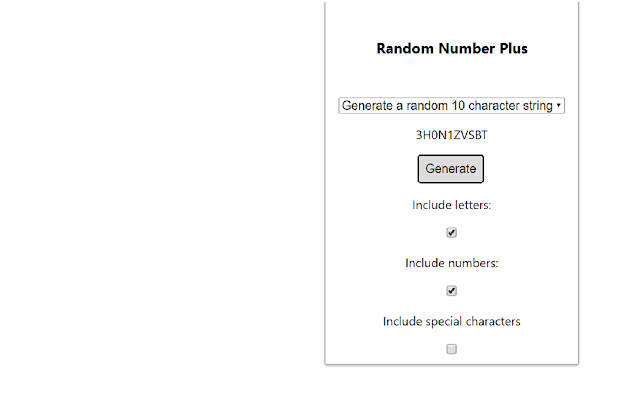
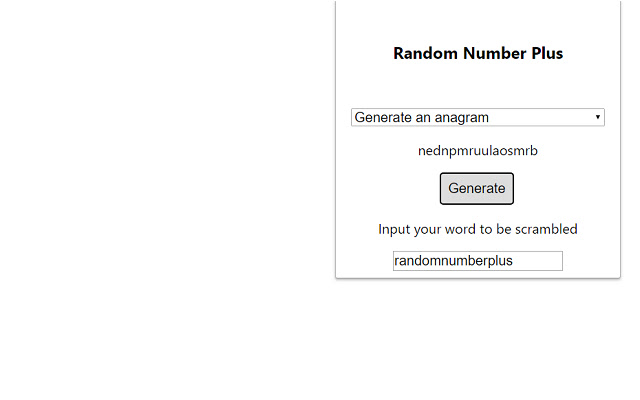
Download Random Number Plus Extension CRX File
Download Random Number Plus extension files in crx format, manually install Chrome extensions in the browser, or share the crx files with friends to easily install Chrome extensions.
Extension Usage Instructions
                        Random Number Plus is an extension with a variety of useful tools in order to provide a quick and accessible way for RNG related tasks.

Functions include coin flips, dice rolls, random card draws, number generators and more!
To use the extension, click the icon and select the function from the drop down menu.
Extension Basic Information
| Name |  Random Number Plus Random Number Plus |
| ID | ciaeedbhghjjfckbpedkgmfjmobpggog |
| Official URL | https://chrome.google.com/webstore/detail/random-number-plus/ciaeedbhghjjfckbpedkgmfjmobpggog |
| Description | Random Number Plus is an extension with a variety of useful tools in order to provide a quick and accessible way for RNG related… |
| File Size | 14.58 KB |
| Installation Count | 87 |
| Current Version | 0.1 |
| Last Updated | 2018-07-12 |
| Publish Date | 2018-07-12 |
| Rating | 4.80/5 Total 5 Ratings |
| Developer | matthew.teja |
| Payment Type | free |
| Supported Languages | en |
| manifest.json | |
{
"update_url": "https:\/\/clients2.google.com\/service\/update2\/crx",
"manifest_version": 2,
"name": "Random Number Plus",
"version": "0.1",
"author": "Matthew Teja",
"browser_action": {
"default_popup": "popup.html"
},
"short_name": "RNP Generator",
"icons": {
"16": "icon16.png",
"48": "icon48.png",
"128": "icon128.png"
},
"permissions": [
"storage",
"notifications"
],
"content_scripts": [
{
"matches": [
" | |