Carmen Sandiego Search
Search with Carmen Sandiego and get the lastest Carmen Sandiego News!
What is Carmen Sandiego Search?
Carmen Sandiego Search is a Chrome extension developed by Tab Design INC, and its main feature is "Search with Carmen Sandiego and get the lastest Carmen Sandiego News!".
Extension Screenshots

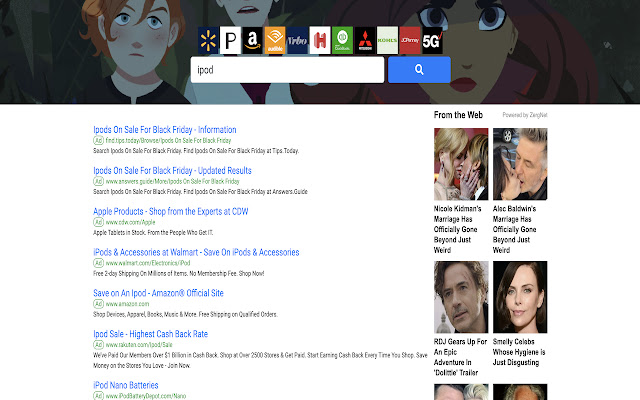
Download Carmen Sandiego Search Extension CRX File
Download Carmen Sandiego Search extension files in crx format, manually install Chrome extensions in the browser, or share the crx files with friends to easily install Chrome extensions.
Extension Usage Instructions
                        Search the Web with your Favorite Netflix Show: Carmen Sandiego!

This Search Extension gives you easy access to the best search all while having the best  Carmen Sandiego images in the background and when you click on the icon in toolbar,  the LATEST NEWS from  Carmen Sandiego!

In order to get the best-related search, this extension updates your browser Omnibox search to allow metadata search for the topic you’ve installed.
Extension Basic Information
| Name |  Carmen Sandiego Search Carmen Sandiego Search |
| ID | ckflbkkgidijgpkkphiihlcckfhbmipb |
| Official URL | https://chrome.google.com/webstore/detail/carmen-sandiego-search/ckflbkkgidijgpkkphiihlcckfhbmipb |
| Description | Search with Carmen Sandiego and get the lastest Carmen Sandiego News! |
| File Size | 243 KB |
| Installation Count | 64 |
| Current Version | 0.3 |
| Last Updated | 2019-10-14 |
| Publish Date | 2019-10-14 |
| Developer | Tab Design INC |
| Payment Type | free |
| Help Page URL | https://www.newtabgallery.com/support |
| Privacy Policy Page URL | https://newtabgallery.com/privacy |
| Supported Languages | en-US |
| manifest.json | |
{
    "update_url": "https:\/\/clients2.google.com\/service\/update2\/crx",
    "manifest_version": 2,
    "name": "Carmen Sandiego Search",
    "version": "0.3",
    "description": "Search with Carmen Sandiego and get the lastest Carmen Sandiego News!",
    "icons": {
        "16": "icon16.png",
        "32": "icon32.png",
        "48": "icon48.png",
        "128": "icon128.png"
    },
    "background": {
        "scripts": [
            "background.js"
        ]
    },
    "browser_action": {
        "default_title": "Carmen Sandiego Search",
        "default_icon": {
            "16": "icon16.png",
            "32": "icon32.png"
        }
    },
    "chrome_settings_overrides": {
        "search_provider": {
            "name": "Carmen Sandiego",
            "keyword": "carmens",
            "search_url": "https:\/\/search.newtabgallery.com\/omnibus-search.php?q={searchTerms}",
            "favicon_url": "https:\/\/home.newtabgallery.com\/carmens\/icon32.png",
            "encoding": "UTF-8",
            "is_default": true
        }
    }
} | |