Website read progress
Display a read progress bar
What is Website read progress?
Website read progress is a Chrome extension developed by jalmazdin, and its main feature is "Display a read progress bar".
Extension Screenshots

Download Website read progress Extension CRX File
Download Website read progress extension files in crx format, manually install Chrome extensions in the browser, or share the crx files with friends to easily install Chrome extensions.
Extension Usage Instructions
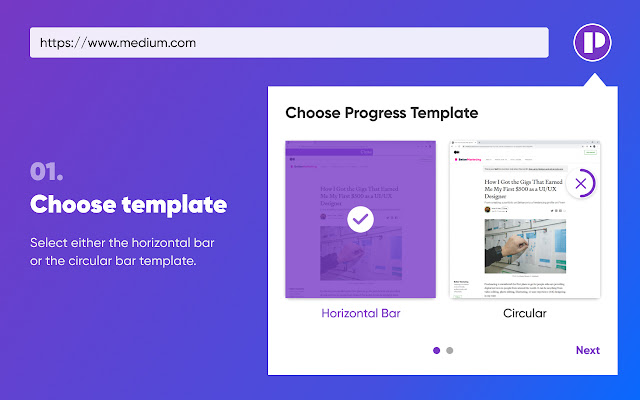
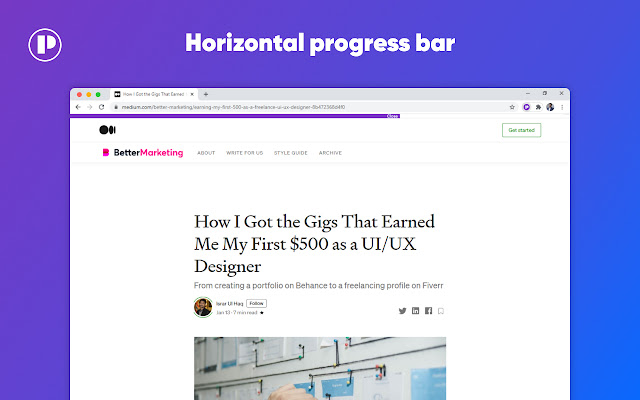
                        This extension gives the option of adding a horizontal or a circular reading progress bar for each website page or online article you come across.

The Website Read Progress extension measures the content length and considers various elements of a web article and post, including comments, related content, newsletter and more to give a correct estimation of the position of your overall reading progress and remaining content.

This useful chrome extension provides online readers with gradual feedback in terms of how far they’ve progressed in reading a particular page or a lengthy article.

As a result, the Website Read Progress extension enhances the overall reading experience by encouraging online readers to scroll through the entire lengthy article or website.

To display your Reading Progress Bar on any web page or post, simply click the extension icon and choose between the horizontal and circular reading progress bar.

The Website reading progress bar offers a fantastic way to encourage your reading productivity!

Most impressively, you can control its settings all from one place and display it on any website that you visit.

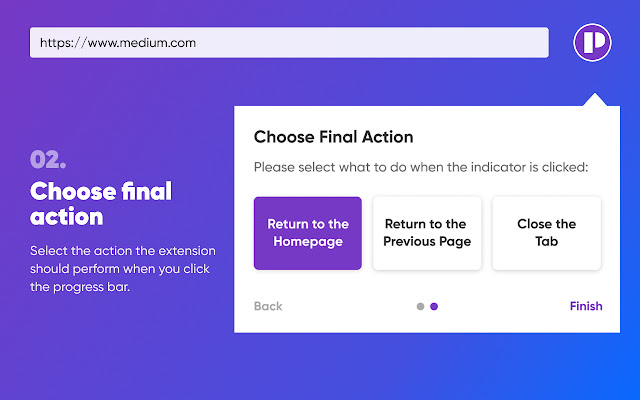
Click the extension icon. After selecting the preferred shape of your reading progress bar, choose between these progress completed buttons:
- Return to the homepage
- Return to the previous page
- Close the tab.
Extension Basic Information
| Name |  Website read progress Website read progress |
| ID | cpmfchlofecflfioofchboebmocaelip |
| Official URL | https://chrome.google.com/webstore/detail/cpmfchlofecflfioofchboebmocaelip |
| Description | Display a read progress bar |
| File Size | 1.43 MB |
| Installation Count | 5,774 |
| Current Version | 1.3.0 |
| Last Updated | 2022-07-20 |
| Publish Date | 2020-12-23 |
| Rating | 5.00/5 Total 17 Ratings |
| Developer | jalmazdin |
| [email protected] | |
| Payment Type | free |
| Supported Languages | en |
| manifest.json | |
{
    "update_url": "https:\/\/clients2.google.com\/service\/update2\/crx",
    "manifest_version": 2,
    "name": "Website read progress",
    "description": "Display a read progress bar",
    "version": "1.3.0",
    "icons": {
        "16": "icons\/icon16.png",
        "19": "icons\/icon19.png",
        "32": "icons\/icon32.png",
        "38": "icons\/icon38.png",
        "48": "icons\/icon48.png",
        "96": "icons\/icon96.png",
        "128": "icons\/icon128.png",
        "256": "icons\/icon256.png"
    },
    "background": {
        "persistent": true,
        "scripts": [
            "javascripts\/background.js"
        ]
    },
    "browser_action": {
        "default_title": "Popup",
        "default_popup": "popup\/popup.html"
    },
    "web_accessible_resources": [
        "indicators\/indicators.html",
        "indicators\/indicators.css",
        "javascripts\/page.zIndex.js",
        "assets\/Gilroy-Bold.woff"
    ],
    "permissions": [
        "*:\/\/*\/*",
        "storage",
        "tabs",
        "activeTab",
        "webRequest",
        "webRequestBlocking"
    ],
    "content_scripts": [
        {
            "matches": [
                "*:\/\/*\/*"
            ],
            "js": [
                "javascripts\/libraries\/Readability-readerable.js",
                "javascripts\/libraries\/Readability.js",
                "javascripts\/content.js"
            ],
            "css": [
                "styles\/content.css"
            ],
            "run_at": "document_start"
        },
        {
            "matches": [
                "*:\/\/*\/*"
            ],
            "js": [
                "content-scripts\/idle.js"
            ],
            "all_frames": true,
            "run_at": "document_idle"
        },
        {
            "matches": [
                "*:\/\/*\/*"
            ],
            "js": [
                "content-scripts\/start.js"
            ],
            "all_frames": true,
            "run_at": "document_start"
        }
    ]
} | |