Salesforce OmniLogin
Free and Open Source extension for store and manage Salesforce logins using OAuth2.
What is Salesforce OmniLogin?
Salesforce OmniLogin is a Chrome extension developed by Javier Martínez de Pissón Caruncho, and its main feature is "Free and Open Source extension for store and manage Salesforce logins using OAuth2.".
Extension Screenshots
Download Salesforce OmniLogin Extension CRX File
Download Salesforce OmniLogin extension files in crx format, manually install Chrome extensions in the browser, or share the crx files with friends to easily install Chrome extensions.
Extension Usage Instructions
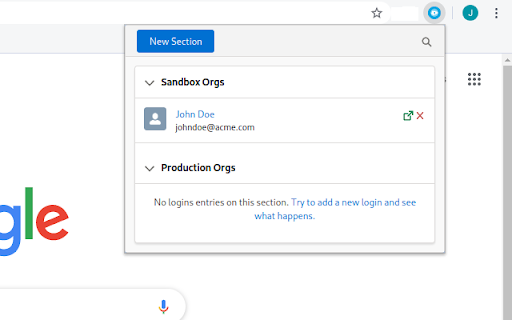
                        Salesforce OmniLogin provides Salesforce admins and developers a tool to manage accesses to their orgs using standard OAuth2, avoiding the use of passwords to login in Salesforce - you only have to enter its username/password once!

All your usernames are foldered in sections, keeping your orgs always organized and filterable; by using the Salesforce OAuth2 flow, you or your admin can revoke the access from the extension at any time, securing all your accesses.

Salesforce OmniLogin is written using Open Source Lightning Web Components, as a proof of concept to test LWC Framework outside Salesforce Platform or the more frequent "Web app" context - as this was the original idea, the extension is Free and Open Source. You can browse the code in GitHub.

Keep in mind that the extension is still experimental - don't use it in production environments!
Extension Basic Information
| Name |  Salesforce OmniLogin Salesforce OmniLogin |
| ID | daknjjebdbcihmlfifnaflconldlhhpl |
| Official URL | https://chromewebstore.google.com/detail/salesforce-omnilogin/daknjjebdbcihmlfifnaflconldlhhpl |
| Description | Free and Open Source extension for store and manage Salesforce logins using OAuth2. |
| File Size | 291 KB |
| Installation Count | 95 |
| Current Version | 0.7.4 |
| Last Updated | 2020-06-20 |
| Publish Date | 2020-06-19 |
| Rating | 5.00/5 Total 1 Ratings |
| Developer | Javier Martínez de Pissón Caruncho |
| [email protected] | |
| Payment Type | free |
| Supported Languages | en |
| manifest.json | |
{
    "update_url": "https:\/\/clients2.google.com\/service\/update2\/crx",
    "name": "Salesforce OmniLogin",
    "version": "0.7.4",
    "description": "Free and Open Source extension for store and manage Salesforce logins using OAuth2.",
    "permissions": [
        "storage",
        "identity",
        "https:\/\/login.salesforce.com\/services\/oauth2\/*",
        "https:\/\/test.salesforce.com\/services\/oauth2\/*",
        "https:\/\/*.my.salesforce.com\/services\/oauth2\/*",
        "https:\/\/*.force.com\/*\/services\/oauth2\/*",
        "https:\/\/*.salesforce.com\/services\/oauth2\/*"
    ],
    "icons": {
        "32": "icons\/32.png",
        "128": "icons\/128.png"
    },
    "background": {
        "scripts": [
            "background.js"
        ],
        "persistent": false
    },
    "browser_action": {
        "default_title": "Salesforce OmniLogin",
        "default_popup": "index.html"
    },
    "manifest_version": 2
} | |