Steam Activity Filter
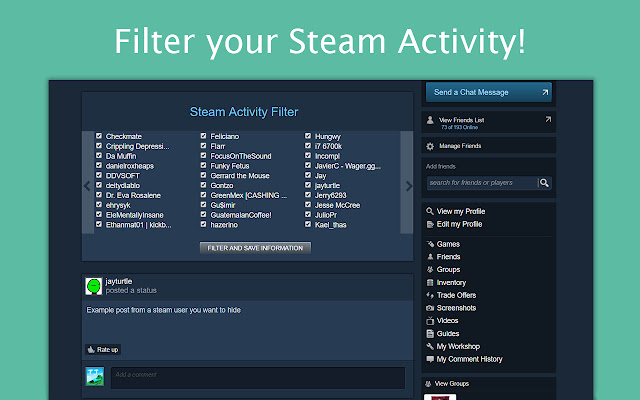
Steam Activity Filter lets you filter out unwanted screenshots and status updates from your Steam Friend Activity Feed.
What is Steam Activity Filter?
Steam Activity Filter is a Chrome extension developed by jayleenli, and its main feature is "Steam Activity Filter lets you filter out unwanted screenshots and status updates from your Steam Friend Activity Feed.".
Extension Screenshots

Download Steam Activity Filter Extension CRX File
Download Steam Activity Filter extension files in crx format, manually install Chrome extensions in the browser, or share the crx files with friends to easily install Chrome extensions.
Extension Usage Instructions
                        Steam Activity Filter(SAF) hides unwanted posts on your Steam Activity Feed. (e.g. https://steamcommunity.com/my/home)

SAF automatically places a filtering interface on at the top your Steam Friend Activity Home page. SAF retrieves your current Steam Friends list (https://steamcommunity.com/my/friends) and places the usernames in the interface.

This Chrome Extension can hide the following types of posts:
-Screenshots
-New Games
-Status Posts
-Favorites on Steam Community items

How to use Steam Activity Filter:
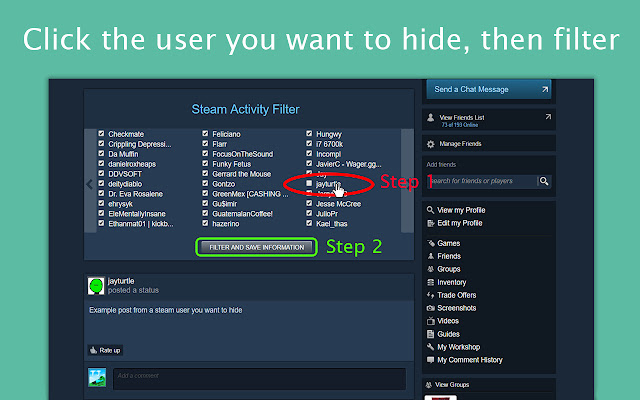
1. Uncheck the usernames of whom you do not want to see in your feed. Checked users will appear in your feed.
2. Click the filter button, and your Steam Activity Feed will change instantly.

Changelog:
https://github.com/jayleenli/Steam-Activity-Filter

Author:
Jayleen Li
Extension Basic Information
| Name |  Steam Activity Filter Steam Activity Filter |
| ID | dnhaemngbanccjamofoeokgpadfegjcf |
| Official URL | https://chrome.google.com/webstore/detail/steam-activity-filter/dnhaemngbanccjamofoeokgpadfegjcf |
| Description | Steam Activity Filter lets you filter out unwanted screenshots and status updates from your Steam Friend Activity Feed. |
| File Size | 40.39 KB |
| Installation Count | 71 |
| Current Version | 1.1 |
| Last Updated | 2017-04-03 |
| Publish Date | 2017-04-03 |
| Rating | 3.00/5 Total 6 Ratings |
| Developer | jayleenli |
| Payment Type | free |
| Privacy Policy Page URL | https://docs.google.com/document/d/1Qs86rceXys_oTsdKI79pKmd7tKlf6bVusTb4PYokVIo/edit?usp=sharing |
| Supported Languages | en |
| manifest.json | |
{
    "update_url": "https:\/\/clients2.google.com\/service\/update2\/crx",
    "manifest_version": 2,
    "name": "Steam Activity Filter",
    "description": "Steam Activity Filter lets you filter out unwanted screenshots and status updates from your Steam Friend Activity Feed.",
    "version": "1.1",
    "icons": {
        "16": "saflogo.png",
        "48": "saflogo.png",
        "128": "saflogo.png"
    },
    "browser_action": {
        "default_icon": "saflogo.png"
    },
    "permissions": [
        "http:\/\/steamcommunity.com\/*"
    ],
    "content_scripts": [
        {
            "matches": [
                "http:\/\/steamcommunity.com\/id\/*",
                "http:\/\/steamcommunity.com\/profiles\/*"
            ],
            "exclude_matches": [
                "*:\/\/store.steampowered.com\/dynamicstore\/*",
                "*:\/\/store.steampowered.com\/checkout\/*",
                "*:\/\/store.steampowered.com\/widget\/*",
                "*:\/\/store.steampowered.com\/login\/*",
                "*:\/\/store.steampowered.com\/join\/*",
                "*:\/\/store.steampowered.com\/api\/*",
                "*:\/\/steamcommunity.com\/login\/*"
            ],
            "js": [
                "jQuery.min.js",
                "steamfilter.js"
            ]
        }
    ]
} | |