Shrtr
Shrtn your URLs, using known shrtning services
What is Shrtr?
Shrtr is a Chrome extension developed by http://travelingtechguy.com, and its main feature is "Shrtn your URLs, using known shrtning services".
Extension Screenshots

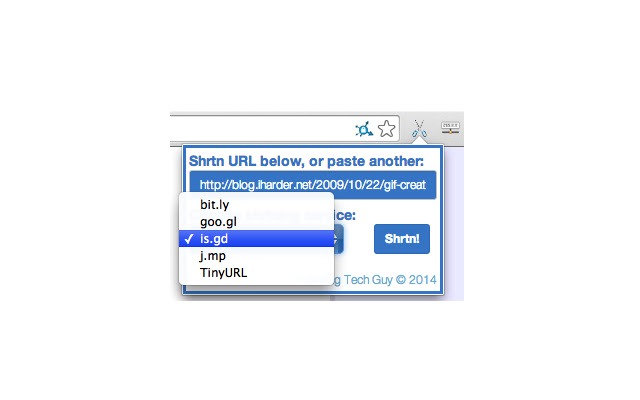

Download Shrtr Extension CRX File
Download Shrtr extension files in crx format, manually install Chrome extensions in the browser, or share the crx files with friends to easily install Chrome extensions.
Extension Usage Instructions
                        Do you need to share the site you're browsing right now, but can't be bothered to copy a long list of random characters? Is the 140 character limit preventing you from sharing important URLs with your tweeps?

Once you have Shrtr installed, simply go to the tab showing the URL you want to shrtn, click the scissors, choose your service, the the shrt URL will be copied to your clipboard.
You can now paste it in an email, or a social web site.

If you'd like me to add any more services, or any other features (like custom/vanity URLs), leave a comment.

Updates:
-------
V1.1.4
- Updated components

V1.1.3
- Updated components

V1.1.2
- Fixed email functionality, as it has changed in Chrome

V1.1.1
- Added feature: remove UTM parameters from shortened URL
- Fixed missing icon

V1.0.6
- Minor updates

V1.0.5
- Error when trying to shorten a file:// URL
- Bug fixes

V1.0.4
- Added 'Email` function - still not complete
- Removed border
- Design and performance enhancements

V1.0.3
- Improved design
- Improved performance

V1.0.2
- New service added

V1.0.1
- Allows you to paste/type a different URL, than the one you're on
- Allows you to decide whether to copy the shrt URL
- Saves the last shrtning service you used for next time
- Few cosmetic changes
Extension Basic Information
| Name |  Shrtr Shrtr |
| ID | eeconjecgepkohfkhnbcklboghanikko |
| Official URL | https://chrome.google.com/webstore/detail/shrtr/eeconjecgepkohfkhnbcklboghanikko |
| Description | Shrtn your URLs, using known shrtning services |
| File Size | 106 KB |
| Installation Count | 95 |
| Current Version | 1.1.4 |
| Last Updated | 2016-10-18 |
| Publish Date | 2016-10-18 |
| Rating | 5.00/5 Total 1 Ratings |
| Developer | http://travelingtechguy.com |
| Payment Type | free |
| Extension Website | http://www.shrtr.us |
| Help Page URL | http://www.travelingtechguy.com |
| Supported Languages | en |
| manifest.json | |
{
    "update_url": "https:\/\/clients2.google.com\/service\/update2\/crx",
    "manifest_version": 2,
    "name": "Shrtr",
    "short_name": "Shrtr",
    "version": "1.1.4",
    "default_locale": "en",
    "description": "Shrtn your URLs, using known shrtning services",
    "homepage_url": "http:\/\/www.shrtr.us",
    "icons": {
        "16": "icons\/icon-16.png",
        "128": "icons\/icon-128.png"
    },
    "browser_action": {
        "default_icon": {
            "19": "icons\/icon-19.png",
            "38": "icons\/icon-38.png"
        },
        "default_title": "Shrtn your URLs",
        "default_popup": "popup.html"
    },
    "background": {
        "page": "background.html"
    },
    "permissions": [
        "clipboardWrite",
        "storage",
        "tabs",
        "http:\/\/www.shrtr.us\/"
    ]
} | |