Flash Downloader
Flash Downloader - download flash game from websites.
What is Flash Downloader?
Flash Downloader is a Chrome extension developed by Tools for Browser, and its main feature is "Flash Downloader - download flash game from websites.".
Extension Screenshots
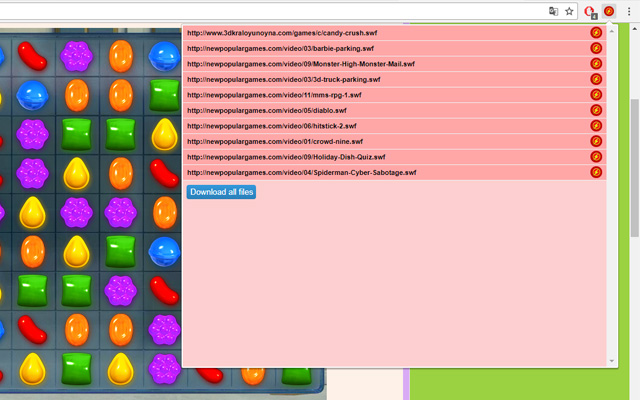


Download Flash Downloader Extension CRX File
Download Flash Downloader extension files in crx format, manually install Chrome extensions in the browser, or share the crx files with friends to easily install Chrome extensions.
Extension Usage Instructions
                        Flash Downloader is professional tool for downloading games in media files swf from webpages.

1) Click the icon on the web page.
2) Download one flash game.
3) Download all files for one click.

Please read this: Flash Downloader is not responsible for content which you download. We suggest to check first media copyright permissions before downloading media files.
Extension Basic Information
| Name |  Flash Downloader Flash Downloader |
| ID | eepdaplnjgknikdfmmiihcohocmpmimg |
| Official URL | https://chrome.google.com/webstore/detail/flash-downloader/eepdaplnjgknikdfmmiihcohocmpmimg |
| Description | Flash Downloader - download flash game from websites. |
| File Size | 99.02 KB |
| Installation Count | 14,125 |
| Current Version | 1.3.2 |
| Last Updated | 2022-11-26 |
| Publish Date | 2020-06-17 |
| Rating | 2.71/5 Total 52 Ratings |
| Developer | Tools for Browser |
| [email protected] | |
| Payment Type | free |
| Supported Languages | en |
| manifest.json | |
{
"update_url": "https:\/\/clients2.google.com\/service\/update2\/crx",
"version": "1.3.2",
"name": "Flash Downloader",
"description": "Flash Downloader - download flash game from websites.",
"background": {
"scripts": [
"jquery.js",
"background.js"
]
},
"browser_action": {
"default_icon": "img\/ico_19.png",
"default_popup": "popup.html"
},
"content_security_policy": "script-src 'self'; object-src 'self'",
"icons": {
"16": "img\/ico_16.png",
"48": "img\/ico_48.png",
"128": "img\/ico_128.png"
},
"manifest_version": 2,
"permissions": [
"activeTab",
" | |