WearWhat Fashion Shop
This extension will help you buy fashion items that you see while using the browser
What is WearWhat Fashion Shop?
WearWhat Fashion Shop is a Chrome extension developed by https://www.azivn.com, and its main feature is "This extension will help you buy fashion items that you see while using the browser".
Extension Screenshots
Download WearWhat Fashion Shop Extension CRX File
Download WearWhat Fashion Shop extension files in crx format, manually install Chrome extensions in the browser, or share the crx files with friends to easily install Chrome extensions.
Extension Usage Instructions
                        WearWhat, Your own personal stylist.
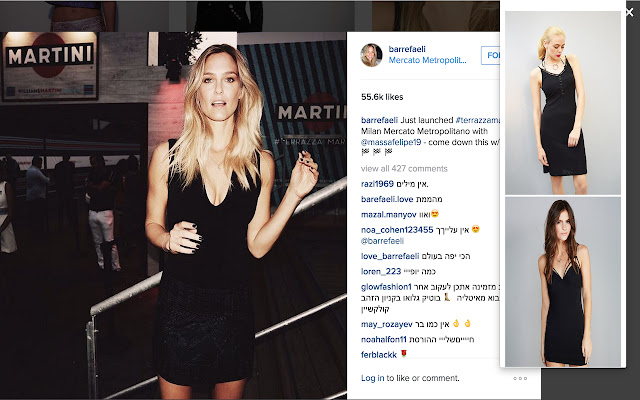
WearWhat stylist will capture every photo that you are viewing and will offer you similar fashion items to wear and buy.
Do you find yourself always wondering where you can buy this beautiful shirt or dress? Want to look just like this model?
WearWhat will help you do that.

1. Visit your favourite celebrity site (For example: Kim Kardashian's Instagram)
2. Click on WearWhat's Icon on the top-right
3. Choose your look

Enjoy!

Feedback -> [email protected]


**
Screenshot image taken from
instagram.com/barrefaeli/
Extension Basic Information
| Name |  WearWhat Fashion Shop WearWhat Fashion Shop |
| ID | ejddfebccpicbocciobobaaccblahjie |
| Official URL | https://chrome.google.com/webstore/detail/wearwhat-fashion-shop/ejddfebccpicbocciobobaaccblahjie |
| Description | This extension will help you buy fashion items that you see while using the browser |
| File Size | 284 KB |
| Installation Count | 74 |
| Current Version | 1.8 |
| Last Updated | 2015-09-24 |
| Publish Date | 2015-09-24 |
| Rating | 5.00/5 Total 1 Ratings |
| Developer | https://www.azivn.com |
| Payment Type | free |
| Supported Languages | en-US |
| manifest.json | |
{
    "update_url": "https:\/\/clients2.google.com\/service\/update2\/crx",
    "manifest_version": 2,
    "name": "WearWhat Fashion Shop",
    "description": "This extension will help you buy fashion items that you see while using the browser",
    "version": "1.8",
    "browser_action": {
        "default_icon": "clothes17.png",
        "default_popup": "popup.html"
    },
    "permissions": [
        "activeTab",
        "https:\/\/www.google-analytics.com\/",
        "storage"
    ]
} | |