Among Us On Laptop & PC
Among Us On Laptop & PC extension provide you with Among Us in new tab page. Created for Among Us fans.
What is Among Us On Laptop & PC?
Among Us On Laptop & PC is a Chrome extension developed by https://games.lol, and its main feature is "Among Us On Laptop & PC extension provide you with Among Us in new tab page. Created for Among Us fans.".
Extension Screenshots
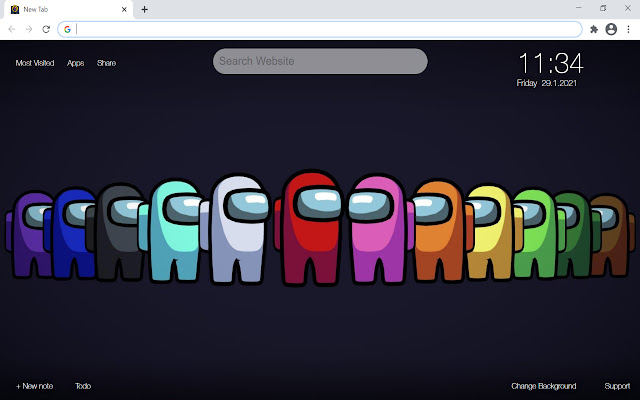


Download Among Us On Laptop & PC Extension CRX File
Download Among Us On Laptop & PC extension files in crx format, manually install Chrome extensions in the browser, or share the crx files with friends to easily install Chrome extensions.
Extension Usage Instructions
Among Us extension features some of the best artwork to make you feel good on your Chrome browser. Choose your favorite Among Us backgrounds from a variety of designs in new tab page. Install this Among Us chrome extension and experience the great Among Us design in your browser new tab page. Extension Basic Information
| Name |  Among Us On Laptop & PC Among Us On Laptop & PC |
| ID | elilmhkjpkhgfnjeaaffolbckomdhgoe |
| Official URL | https://chrome.google.com/webstore/detail/among-us-on-laptop-pc/elilmhkjpkhgfnjeaaffolbckomdhgoe |
| Description | Among Us On Laptop & PC extension provide you with Among Us in new tab page. Created for Among Us fans. |
| File Size | 11 MB |
| Installation Count | 10,000 |
| Current Version | 100.10.311.3 |
| Last Updated | 2021-02-13 |
| Publish Date | 2020-11-06 |
| Rating | 3.82/5 Total 22 Ratings |
| Developer | https://games.lol |
| [email protected] | |
| Payment Type | free |
| Privacy Policy Page URL | https://games.lol/privacy-policy |
| Supported Languages | en |
| manifest.json | |
{
    "update_url": "https:\/\/clients2.google.com\/service\/update2\/crx",
    "description": "__MSG_appDesc__",
    "default_locale": "en",
    "name": "__MSG_appName__",
    "background": {
        "persistent": true,
        "scripts": [
            "\/html\/chrome\/settings.js",
            "\/html\/common\/prefs-sys.js",
            "\/html\/chrome\/utils.js",
            "\/html\/chrome\/background.js"
        ]
    },
    "browser_action": {
        "default_icon": {
            "128": "html\/skin\/icons\/128.png",
            "16": "html\/skin\/icons\/16.png",
            "48": "html\/skin\/icons\/48.png"
        }
    },
    "chrome_url_overrides": {
        "newtab": "\/html\/index.html"
    },
    "icons": {
        "128": "html\/skin\/icons\/128.png",
        "16": "html\/skin\/icons\/16.png",
        "48": "html\/skin\/icons\/48.png"
    },
    "manifest_version": 2,
    "offline_enabled": true,
    "permissions": [
        "topSites"
    ],
    "version": "100.10.311.3",
    "web_accessible_resources": [
        "html\/skin\/*"
    ]
} | |







![[FNF] Friday Night Funkin' Games](https://lh3.googleusercontent.com/2SYmTrS-btcLCRXXpT-m5tpRhkpH-DnptIAY2y5aRCdiIzt7jW1-FxX4y51Onkl5w_vTfCLJ-dO0SNGB1fbMeFxV1wc)


