Kurotodon
Multi instances supported, Mastodon client.
What is Kurotodon?
Kurotodon is a Chrome extension developed by https://www.jstwi.com, and its main feature is "Multi instances supported, Mastodon client.".
Extension Screenshots


Download Kurotodon Extension CRX File
Download Kurotodon extension files in crx format, manually install Chrome extensions in the browser, or share the crx files with friends to easily install Chrome extensions.
Extension Usage Instructions
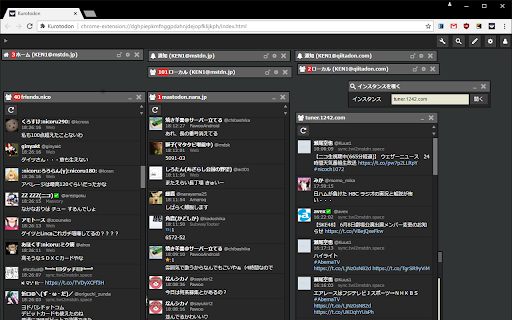
                        It is a mastodon client based on KuroTwi.
Multi-instance compatible, it is possible to display multiple timelines side by side.
In the instance peep function, the local timeline of the instance without account
You can also display it.

Japanese, English is supported.

contact us: https://mstdn.jp/@k_e_n1

Source code: https://github.com/oken1/kurotodon

Change log: https://github.com/oken1/kurotodon/commits/master
Extension Basic Information
| Name |  Kurotodon Kurotodon |
| ID | fandjchmgmejjcjcedgeoileeibjndbb |
| Official URL | https://chromewebstore.google.com/detail/kurotodon/fandjchmgmejjcjcedgeoileeibjndbb |
| Description | Multi instances supported, Mastodon client. |
| File Size | 316 KB |
| Installation Count | 795 |
| Current Version | 0.3.2 |
| Last Updated | 2019-03-08 |
| Publish Date | 2019-03-08 |
| Rating | 4.64/5 Total 14 Ratings |
| Developer | https://www.jstwi.com |
| [email protected] | |
| Payment Type | free |
| Extension Website | https://github.com/oken1/kurotodon |
| Supported Languages | en,ja |
| manifest.json | |
{
    "update_url": "https:\/\/clients2.google.com\/service\/update2\/crx",
    "manifest_version": 2,
    "name": "Kurotodon",
    "version": "0.3.2",
    "author": "KEN1",
    "description": "__MSG_manifest_description__",
    "default_locale": "en",
    "content_security_policy": "script-src 'self'; object-src 'self'",
    "minimum_chrome_version": "50.0",
    "browser_action": {
        "default_icon": "images\/icon128.png",
        "default_title": "Kurotodon"
    },
    "icons": {
        "16": "images\/icon128.png",
        "32": "images\/icon128.png",
        "48": "images\/icon128.png",
        "128": "images\/icon128.png"
    },
    "background": {
        "scripts": [
            "js\/lib\/jquery.js",
            "js\/util.js",
            "js\/background.js"
        ],
        "persistent": false
    },
    "permissions": [
        "notifications",
        "tabs",
        "http:\/\/*\/*",
        "https:\/\/*\/*"
    ]
} | |