Sharks HD new free tab theme
Get colorful sharks wallpapers, just opening a new tab.
What is Sharks HD new free tab theme?
Sharks HD new free tab theme is a Chrome extension developed by http://freetabtheme.ru, and its main feature is "Get colorful sharks wallpapers, just opening a new tab.".
Extension Screenshots



Download Sharks HD new free tab theme Extension CRX File
Download Sharks HD new free tab theme extension files in crx format, manually install Chrome extensions in the browser, or share the crx files with friends to easily install Chrome extensions.
Extension Usage Instructions
                        Sharks

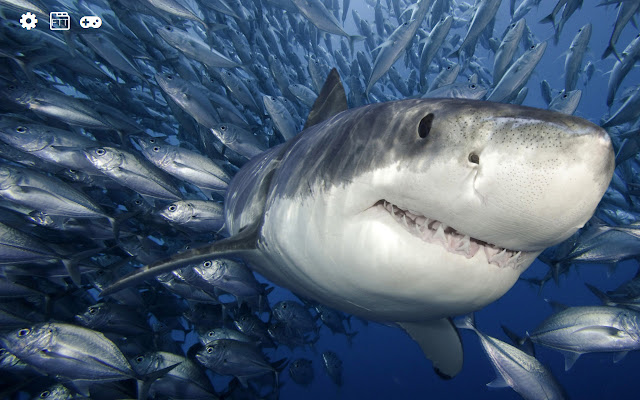
The theme of the new tab is for everyone who likes sharks.

Terrible predators of sea and ocean depths. By installing this extension, you can see these animals by simply opening a new browser tab.

The extension will replace the standard background of the new browser tab on the wallpapers with sharks.

Additional features:
- weather display setting
- time display setting
- displayed images settings
- search
Extension Basic Information
| Name |  Sharks HD new free tab theme Sharks HD new free tab theme |
| ID | fdbmpmcjjkfdjemkodmdllabdpefalpm |
| Official URL | https://chrome.google.com/webstore/detail/sharks-hd-new-free-tab-th/fdbmpmcjjkfdjemkodmdllabdpefalpm |
| Description | Get colorful sharks wallpapers, just opening a new tab. |
| File Size | 22.05 MB |
| Installation Count | 212 |
| Current Version | 0.3.0 |
| Last Updated | 2021-04-27 |
| Publish Date | 2018-10-12 |
| Rating | 4.67/5 Total 3 Ratings |
| Developer | http://freetabtheme.ru |
| [email protected] | |
| Payment Type | free |
| Extension Website | https://freetabtheme.ru |
| Help Page URL | https://freetabtheme.ru/form |
| Privacy Policy Page URL | https://freetabtheme.ru/eula |
| Supported Languages | en |
| manifest.json | |
{
    "update_url": "https:\/\/clients2.google.com\/service\/update2\/crx",
    "manifest_version": 2,
    "default_locale": "en",
    "name": "__MSG_chrome_extension_name__",
    "version": "0.3.0",
    "description": "__MSG_chrome_extension_description__",
    "background": {
        "scripts": [
            "vars.js",
            "js\/ls.js",
            "js\/lib\/lib.js",
            "js\/background\/api_b.js",
            "js\/background\/core_b.js"
        ],
        "persistent": true
    },
    "icons": {
        "16": "icons\/icon-16.png",
        "32": "icons\/icon-32.png",
        "48": "icons\/icon-48.png",
        "128": "icons\/icon-128.png"
    },
    "web_accessible_resources": [
        "icons\/*"
    ],
    "chrome_url_overrides": {
        "newtab": "page.html"
    },
    "content_security_policy": "script-src 'self' 'unsafe-eval'; object-src 'self'",
    "browser_action": {
        "default_title": "__MSG_chrome_extension_title__",
        "default_icon": {
            "16": "icons\/icon-16.png",
            "32": "icons\/icon-32.png",
            "48": "icons\/icon-48.png",
            "128": "icons\/icon-128.png"
        }
    }
} | |


![Batman Wallpaper New Tab Theme [Install]](https://lh3.googleusercontent.com/4r9qtiI0vJsfhG5fDnwI7ZNhpwaamgdKqQMr1-wjvIQV9nTPJixFpc6TY24MAxxAK6nILRzYDESLskMayhn-PhY5=w128-h128-e365-rj-sc0x00ffffff)