Florida State New Tab
The official Florida State University new tab high resolution images of the Seminoles and more to theme your browser.
What is Florida State New Tab?
Florida State New Tab is a Chrome extension developed by http://brandthunder.com, and its main feature is "The official Florida State University new tab high resolution images of the Seminoles and more to theme your browser.".
Extension Screenshots
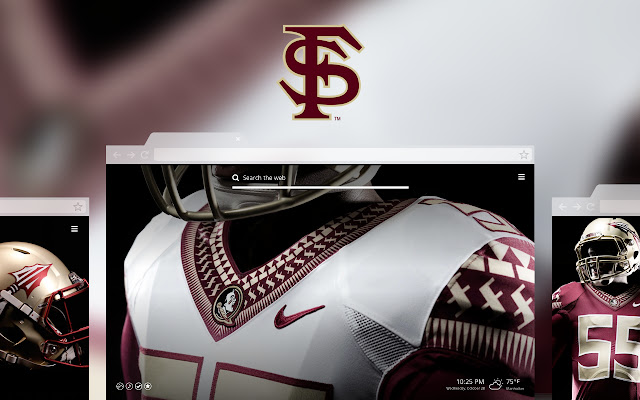


Download Florida State New Tab Extension CRX File
Download Florida State New Tab extension files in crx format, manually install Chrome extensions in the browser, or share the crx files with friends to easily install Chrome extensions.
Extension Usage Instructions
                        Please Rate Us!  If you feel we don’t deserve a 5-star rating, PLEASE email or call us FIRST! We want to hear from you!
[email protected] or 614.321.9316

*The latest news, features and video
*Direct links to social media
*Simple, clean layout, removing tiles from view

***More features to improve the user experience will be coming in the near future!

Note: this is NOT a Chrome theme, it’s a new tab page that includes a unique design. Search the THEMES section if you want the theme only version of this experience.

We have over 300 new tab experiences to choose from, see our MyWeb extension to get access to all of them.

This extension offers direct, convenient web search and features from a New Tab page.
Extension Basic Information
| Name |  Florida State New Tab Florida State New Tab |
| ID | fjlgmaialmpaboobhlmbnnddelbjdkjp |
| Official URL | https://chrome.google.com/webstore/detail/florida-state-new-tab/fjlgmaialmpaboobhlmbnnddelbjdkjp |
| Description | The official Florida State University new tab high resolution images of the Seminoles and more to theme your browser. |
| File Size | 44.3 KB |
| Installation Count | 230 |
| Current Version | 4.0.3.1 |
| Last Updated | 2017-06-07 |
| Publish Date | 2017-06-07 |
| Rating | 2.81/5 Total 27 Ratings |
| Developer | http://brandthunder.com |
| [email protected] | |
| Payment Type | free |
| Help Page URL | http://support.brandthunder.com |
| Privacy Policy Page URL | http://brandthunder.com/privacy |
| Supported Languages | en-US |
| manifest.json | |
{
    "update_url": "https:\/\/clients2.google.com\/service\/update2\/crx",
    "manifest_version": 2,
    "name": "Florida State New Tab",
    "version": "4.0.3.1",
    "description": "The official Florida State University new tab high resolution images of the Seminoles and more to theme your browser.",
    "icons": {
        "16": "icon16.png",
        "32": "icon32.png",
        "48": "icon48.png",
        "128": "icon128.png"
    },
    "background": {
        "page": "background.html"
    },
    "browser_action": {
        "default_title": "Florida State New Tab",
        "default_icon": {
            "16": "icon16.png",
            "32": "icon32.png"
        }
    },
    "options_ui": {
        "page": "options.html",
        "open_in_tab": true
    },
    "chrome_url_overrides": {
        "newtab": "newtab.html"
    },
    "permissions": [
        "http:\/\/*.brandthunder.com\/*",
        "storage"
    ],
    "content_security_policy": "script-src 'self' https:\/\/ssl.google-analytics.com; object-src 'self'"
} | |