Fokus
Emphasized text-highlighting
What is Fokus?
Fokus is a Chrome extension developed by hakim.elhattab, and its main feature is "Emphasized text-highlighting".
Extension Screenshots

Download Fokus Extension CRX File
Download Fokus extension files in crx format, manually install Chrome extensions in the browser, or share the crx files with friends to easily install Chrome extensions.
Extension Usage Instructions
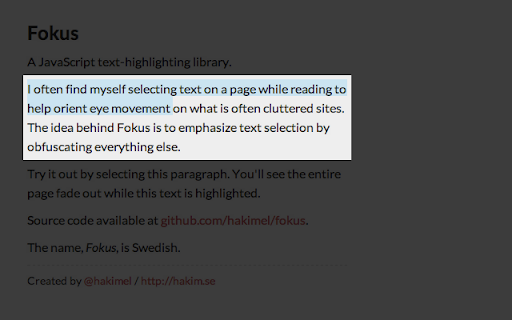
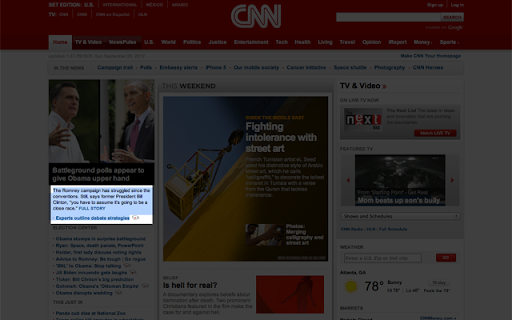
                        Fokus emphasizes anything you select by covering the rest of the page with a semi-transparent black overlay.

You can try it out here http://lab.hakim.se/fokus/ before installing.

The plugin comes with a few options that can be accessed from Chrome's extension listing page. This allows you to:
- Adjust overlay opacity
- Specify a modifier key shift/ctrl/alt/cmd which must be held down to active the overlay
- Adjust the padding around selection
Extension Basic Information
| Name |  Fokus Fokus |
| ID | flkkpmjbbpijiedjdgnhkcgopgnflehe |
| Official URL | https://chromewebstore.google.com/detail/fokus/flkkpmjbbpijiedjdgnhkcgopgnflehe |
| Description | Emphasized text-highlighting |
| File Size | 10.25 KB |
| Installation Count | 1,157 |
| Current Version | 1.7 |
| Last Updated | 2012-09-30 |
| Publish Date | 2012-09-30 |
| Rating | 4.37/5 Total 27 Ratings |
| Developer | hakim.elhattab |
| Payment Type | free |
| Extension Website | http://lab.hakim.se/fokus |
| Supported Languages | en-US |
| manifest.json | |
{
    "update_url": "http:\/\/clients2.google.com\/service\/update2\/crx",
    "name": "Fokus",
    "version": "1.7",
    "manifest_version": 2,
    "description": "Emphasized text-highlighting",
    "icons": {
        "16": "fokus16.png",
        "48": "fokus48.png",
        "128": "fokus128.png"
    },
    "content_scripts": [
        {
            "matches": [
                "http:\/\/*\/*",
                "https:\/\/*\/*"
            ],
            "js": [
                "fokus.min.js"
            ]
        }
    ],
    "options_page": "options.html",
    "permissions": [
        "storage"
    ]
} | |