Rollio
Enhance your browser with Rollio. Give back hours of time to sales & service, and start capturing missing & accurate CRM data.
What is Rollio?
Rollio is a Chrome extension developed by https://rollio.ai, and its main feature is "Enhance your browser with Rollio. Give back hours of time to sales & service, and start capturing missing & accurate CRM data.".
Extension Screenshots

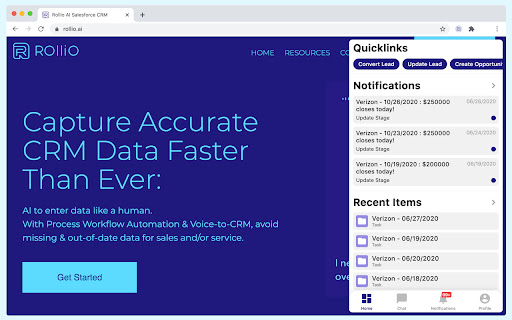

Download Rollio Extension CRX File
Download Rollio extension files in crx format, manually install Chrome extensions in the browser, or share the crx files with friends to easily install Chrome extensions.
Extension Usage Instructions
Say “Hello” to your new assistant. Rollio™ works with your CRM, including Salesforce™ and SAP Cloud for Customers™, allowing you to text your CRM, rather than waste time filling out clunky forms. Send a text, and Rollio will break up your message and put every piece of data into the appropriate fields. Extension Basic Information
| Name |  Rollio Rollio |
| ID | hdipjkndmhdjbnijboedfkjahcndeneb |
| Official URL | https://chromewebstore.google.com/detail/rollio/hdipjkndmhdjbnijboedfkjahcndeneb |
| Description | Enhance your browser with Rollio. Give back hours of time to sales & service, and start capturing missing & accurate CRM data. |
| File Size | 373 KB |
| Installation Count | 557 |
| Current Version | 2.2.4 |
| Last Updated | 2022-11-03 |
| Publish Date | 2020-06-29 |
| Developer | https://rollio.ai |
| [email protected] | |
| Payment Type | free |
| Extension Website | https://rollio.ai/ |
| Help Page URL | https://support-desk.rollio.ai/ |
| Privacy Policy Page URL | https://www.rollio.ai/privacy-policy |
| Supported Languages | en-US |
| manifest.json | |
{
"update_url": "https:\/\/clients2.google.com\/service\/update2\/crx",
"name": "Rollio",
"version": "2.2.4",
"manifest_version": 2,
"description": "Enhance your browser with Rollio. Give back hours of time to sales & service, and start capturing missing & accurate CRM data.",
"web_accessible_resources": [
"entry.js",
"assets\/notification-icon.png"
],
"background": {
"scripts": [
"background.js"
],
"persistent": true
},
"content_scripts": [
{
"matches": [
" | |