CsTimer Official results insertion
Compare your Times in CSTimer to your Official WCA profile!
What is CsTimer Official results insertion?
CsTimer Official results insertion is a Chrome extension developed by 43904.ando527, and its main feature is "Compare your Times in CSTimer to your Official WCA profile!".
Extension Screenshots
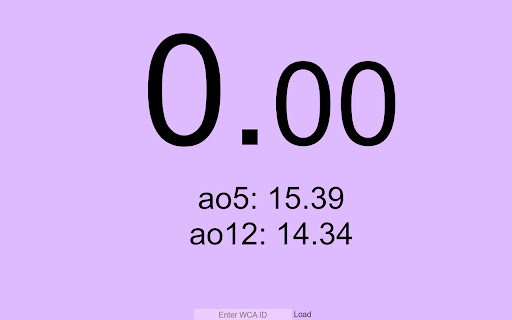


Download CsTimer Official results insertion Extension CRX File
Download CsTimer Official results insertion extension files in crx format, manually install Chrome extensions in the browser, or share the crx files with friends to easily install Chrome extensions.
Extension Usage Instructions
                        Integrate your Official WCA Profile times into your CSTimer sessions!

Just input your WCA ID e.g. 2022ANDE01 and press LOAD

Make sure your session scramble is set to "WCA" and then your event

Note: This is still continuously under development, please report any bugs you may find

Please also note that this is not an Official Extension, it is just referencing your "Official" WCA Times
Extension Basic Information
| Name |  CsTimer Official results insertion CsTimer Official results insertion |
| ID | hmbiafiooldmappmecndalifbpclamgg |
| Official URL | https://chromewebstore.google.com/detail/cstimer-official-results/hmbiafiooldmappmecndalifbpclamgg |
| Description | Compare your Times in CSTimer to your Official WCA profile! |
| File Size | 41.61 KB |
| Installation Count | 60 |
| Current Version | 0.0.2 |
| Last Updated | 2022-12-21 |
| Publish Date | 2022-11-21 |
| Rating | 5.00/5 Total 1 Ratings |
| Developer | 43904.ando527 |
| [email protected] | |
| Payment Type | free |
| Extension Website | https://github.com/ando527/CsTimer-Official-Times-Integration-Extension |
| Supported Languages | en |
| manifest.json | |
{
    "update_url": "https:\/\/clients2.google.com\/service\/update2\/crx",
    "name": "CsTimer Official results insertion",
    "version": "0.0.2",
    "manifest_version": 3,
    "description": "Compare your Times in CSTimer to your Official WCA profile!",
    "homepage_url": "https:\/\/github.com\/ando527\/CsTimer-Official-Times-Integration-Extension",
    "author": "Mitchell Anderson",
    "icons": {
        "16": "icons\/icon16.png",
        "48": "icons\/icon48.png",
        "128": "icons\/icon128.png"
    },
    "action": {
        "default_icon": {
            "16": "icons\/icon16.png",
            "48": "icons\/icon48.png",
            "128": "icons\/icon128.png"
        },
        "default_title": "CsTimer Official results insertion"
    },
    "default_locale": "en",
    "host_permissions": [
        "https:\/\/cstimer.net\/*"
    ],
    "content_scripts": [
        {
            "matches": [
                "https:\/\/cstimer.net\/*"
            ],
            "js": [
                "src\/inject\/inject.js"
            ]
        }
    ],
    "web_accessible_resources": [
        {
            "resources": [
                "src\/functions\/*"
            ],
            "matches": [
                "https:\/\/cstimer.net\/*"
            ]
        }
    ]
} | |